15
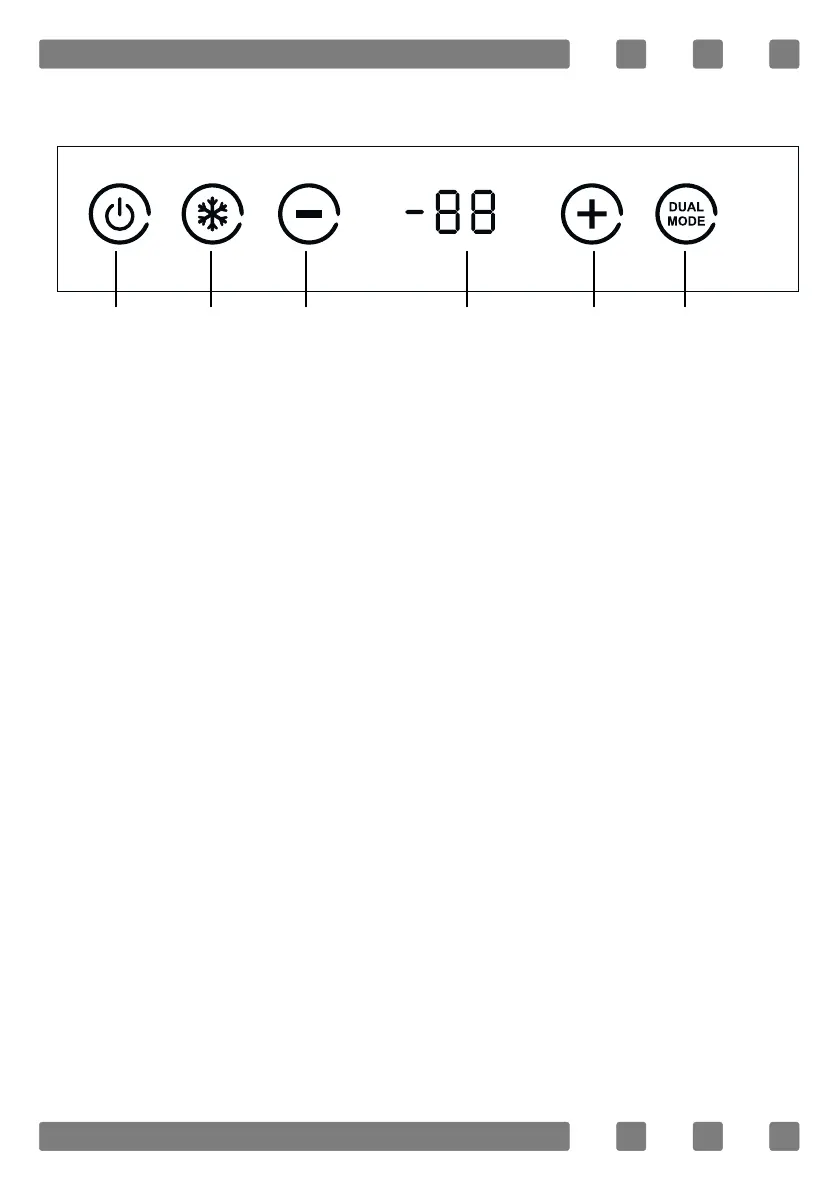
Control Panel (Electronic)
1 2 3 4 5 6
O
C
1. On/o (3 secs)
1
2. Rapid freezing (3 secs)
1
3. Temperature decrease
4. Temperature indicator
5. Temperature increase
6. Dual Mod Transition (cooler-freezer)(3sec)
1
1
Press for 3 seconds
Control Panel (Electronic Control at the Door)
* The display goes into energy saving mode when no button is
touched for 60 sec while the door is closed.
* When the mode is being switched (from cooler to freezer or freezer
to cooler), the icon of the corresponding mode (freezer icon or bottle
icon) will ash until the mode switch is completed.
When the mode switch is completed, the icon of the corresponding
mode is shown on the display for 1 minute, and if no key is pressed, it
will go into the energy saving mode. Do not place your products in the
cabinet until the mode switch is completed.



 To Next Page