2
Congratulations on the purchase of your Simmons
®
spotting
scope, a versatile high-performance spotting scope offering a
wide range of terrestrial viewing.
MOUNTING THE SCOPE ON THE TRIPOD
First, fold open the mini tripod's legs and place it on a sturdy, level
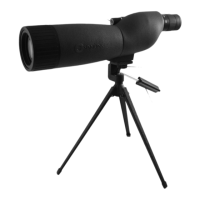
surface. Attach the spotting scope to the included mini tripod by
turning the mounting screw on the top of the tripod clockwise
into the socket on the base of the scope until it is securely
attached (but do not overtighten). The socket on the base is a
standard size (1/4"-20 thread), so any tripod of any size may also
be used with this scope.
USING THE TRIPOD PAN ARM
To tilt or pan the scope, first loosen the head of the tripod by
twisting the tripod's pan arm handle counter-clockwise, move the
scope into the desired position, then tighten the tripod head by
twisting the handle in a clockwise direction.
CHANGING MAGNIFICATION
Unscrew and set aside the eyepiece cover tube. Grasp and rotate
the zoom ring located at the base of the eyepiece to change the
scope's magnifying power. When rotating this ring, the image
appears to zoom in and out. It may be necessary to re-focus after
zooming from a low to a high magnification setting.
FOCUSING
Rotate the focus knob (located on the right side of the scope's
body) until the image appears in sharp focus.
USING THE EYECUP AND SUNSHADE
If you wear eyeglasses, fold down the rubber eyecup if you have
difficulty seeing the entire image. If the sun is at an angle to the
scope rather than behind you, glare may be a problem, causing
reduced image quality. If so, extend the sunshade out past the
end of the scope.
SETUP and OPERATION


 To Next Page