4
Click here to return to the Table of Contents
EYECUP ADJUSTMENT
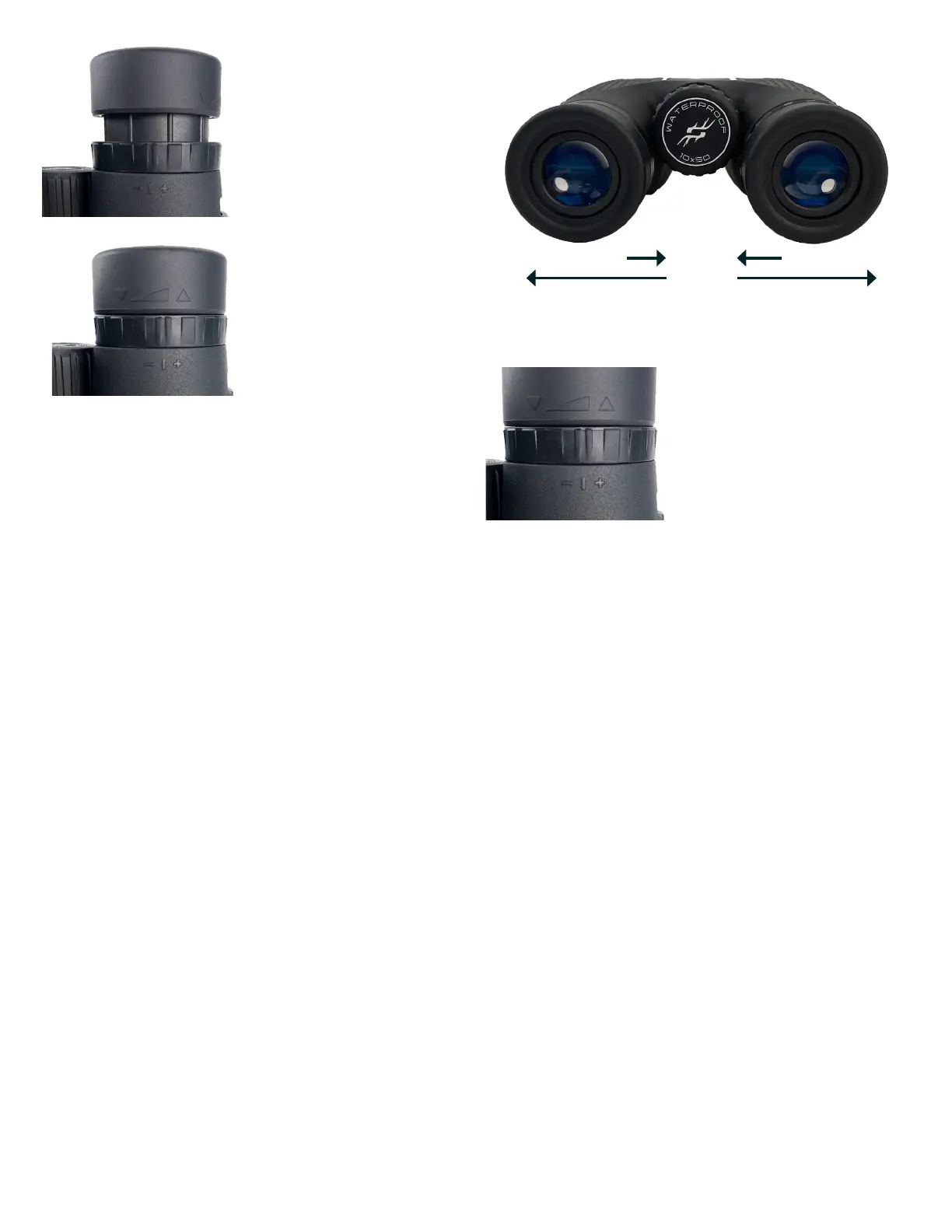
Your Simmons Pro Hunter binocular is fitted with eyecups (Fig. 1) that provide a comfortable view of the full image and help
to exclude extraneous light. For use with eyeglasses or sunglasses, roll down the eyecups (Fig. 2). This will bring your eyes
closer to the binocular’s ocular lenses, allowing you to see the full field of view.
IPD (INTERPUPILLARY DISTANCE) ADJUSTMENT
The spacing between the pupils of your eyes, called “interpupillary distance,” varies from person to person. To match your
binoculars to your IPD or “eye to eye” width:
1. Point them at a white wall or blank area of the sky. Hold the binoculars and view through them as you normally would.
Don’t worry about focus yet.
2. Grasp each side of the binocular firmly. Move the left and right sides closer or farther apart (Fig. 3) until you see a single
image with no shaded areas.
FOCUS AND DIOPTER ADJUSTMENT
1. First, adjust the eyecups and IPD as described in the previous sections.
2. Cover the objective lens on the right side of the binocular using the attached lens cap or your hand.
3. Using the center focus knob, focus on a distant object with fine detail (e.g., brick wall, tree branches, etc) until it appears
as sharp as possible when viewed through the left side of the binocular.
4. Uncover the objective lens on the right side, and cover the left objective lens while continuing to view the same object.
5. Rotate the diopter adjustment ring located directly below the right eyecup (Fig. 4), NOT the center focus knob, to
bring the object into focus on the right side of the binocular (rotate the entire right eyecup on compact models). Avoid
over-turning or forcing the diopter mechanism. If you cannot bring the object into focus for your right eye by adjusting
the diopter ring, ensure the left side is still in focus (repeat steps #2-4 if necessary). The diopter adjustment essentially
provides “fine focus” on one side of the binocular (right only) to allow for slight differences in the vision of your left and
right eyes.
6. Your binocular should now be adjusted for your eyes. Focusing for any distance can now be done simply by turning the
center focus knob. Note your diopter setting (position of index mark on diopter ring relative to plus and minus marks on
binocular below the ring) for future reference if the ring is moved accidentally or by another person using your binocular.
Fig. 2 Eyecup in “Down” Position
(for use with eyeglasses)
Fig. 1 Eyecup in “Up” Position
(for use without eyeglasses)
Fig. 3 Interpupillary Distance Adjustment
Fig. 4 Diopter Adjustment Ring
Wide IPD
Narrow IPD



 To Next Page