MRMap Development Team 10/01/2009
Programming the Radios.
The Portable Handset:
Although it’s assumed that a Simoco SRP9100 is going to be used along with a GPS micro-
phone, the principles described here will work with any make of radio capable of using CTCSS.
This would add the benefit of no FFSK noise from Simoco-based GPS to users of other makes.
Just program the necessary channels in your radio with the tone 218.1Hz on both Tx and Rx. In
the case of Simoco radios it’s also a good idea to program one of the function buttons for CTCSS
disable in case you need to knock off the tone mute.
Note:- It’s important to realise that when using a fixed remote or vehicle mounted rebroadcast device set up
as described here that full Rx & Tx CTCSS then becomes an unalterable part of the system as it’s not
easily possible to switch the CTCSS on and off remotely. If the ‘CTCSS/DCS’ button is pressed on a
portable or base radio to prevent a CTCSS tone being used on either Rx or Tx then you won’t now be able
to access the rebroadcast device hence this is a committed method of operation. If used, then it’s really the
only method of operation you can use with your own area’s radio hardware.
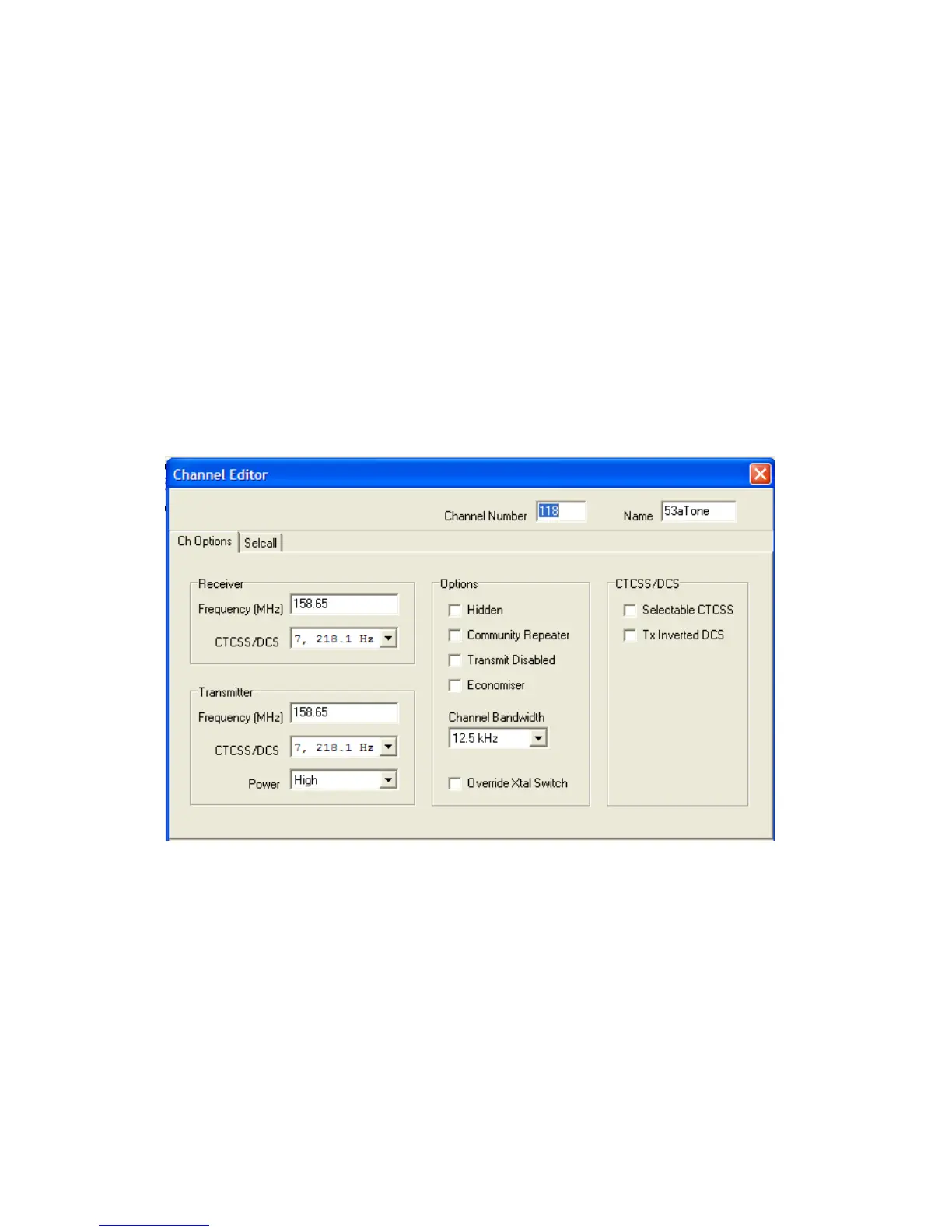
Here the radio is programmed with a single instance of channel 53a. Note that CTCSS is programmed into
both the receive and transmit frequencies and that in my case, I’ve already changed to 12.5KHz channel
spacing. It makes no difference to operation if you’re still using 25KHz.
Next you need to make a slight change to the way in which the GPS functions are programmed. Most of
you will already have this section programmed correctly. Users of other makes of radio can ignore the fol-
lowing programming section.


 To Next Page