SRP9170/80 P25 Portable Radio – User Manual
© ComGroup Australia 2010 Page 9 TNM-U-E-0091 1.4a
2 CONTROLS
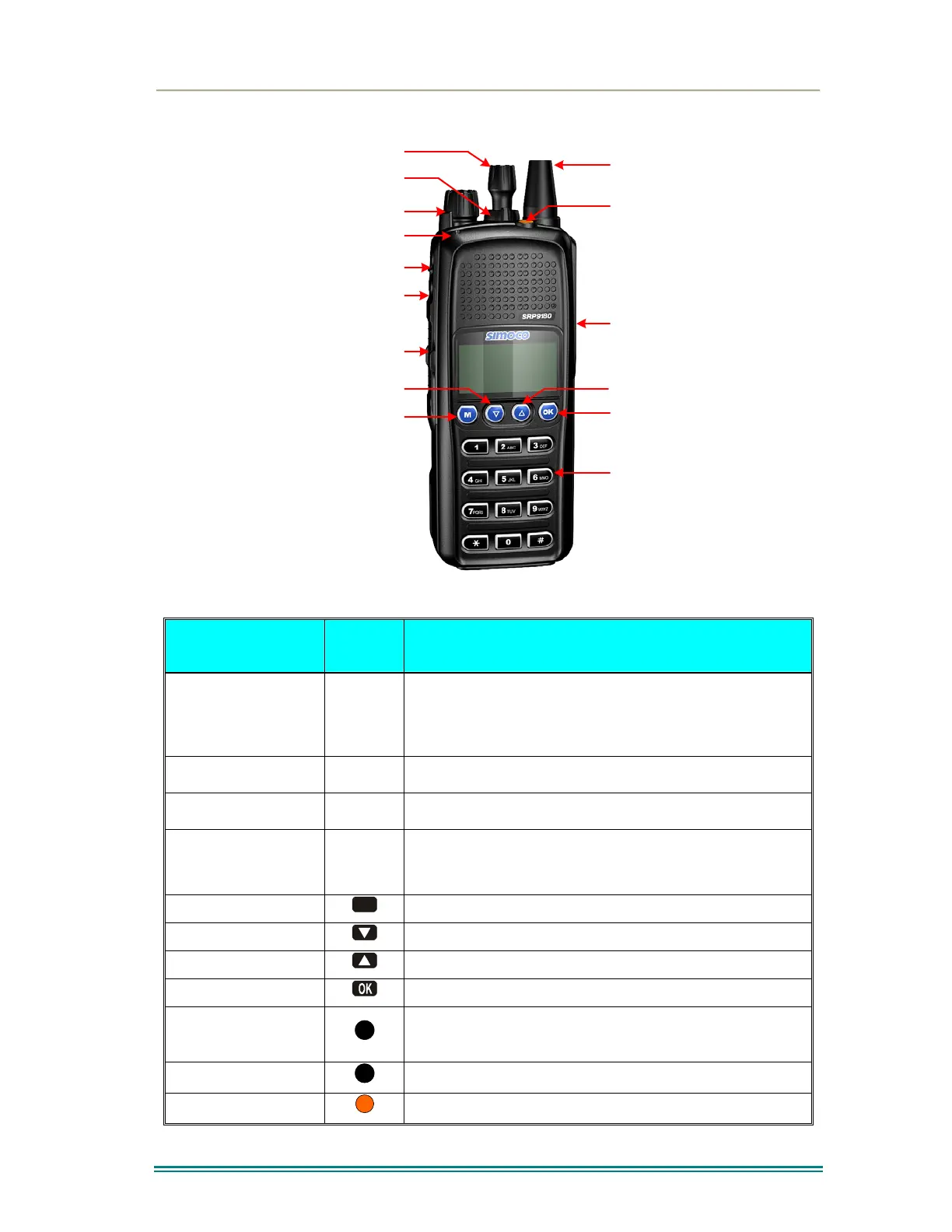
Accessory
Connector
Function #7
Selector Switch
ABC Switch
On/Off Volume
PTT
Function #5
Function #6
Function #2
Function #1
Function #3
Function #4
Antenna
Keypad
Indicator LED
Figure 1 – SRP9180 Portable Key Layout
SRP9180
Key/Control
Label Function
On/Off / Volume
The radio is turned on by rotating the volume knob
clockwise, and turned off by rotating it anti-clockwise.
Turning the knob clockwise increases volume.
Selector Switch
Rotate the switch to select the desired channel.
ABC Switch
Programmer configurable function switch.
PTT
Push-to-Talk. Hold the radio 10cm from the mouth.
Press and hold the PTT switch and speak. Release to
listen.
Function Key F1
M
Programmable Function key. Default – Menu Select.
Function Key F2
Programmable Function key. Default – Channel Down.
Function Key F3
Programmable Function key. Default – Channel Up.
Function Key F4
Programmable Function key. Default – OK.
Function Key F5
Programmable Function key.
Function Key F6
Programmable Function key. Default – Reset / Cancel.
Function key F7
Programmable Function key. Default – Alarm.



 To Next Page