EasyManua.ls Logo

simpl touch player - User Manual

simpl touch player
2 pages
Print Icon
To Next Page IconTo Next Page
Loading...
Remove the Port Compartment door (back, left side). Remove both the
USB stick followed by the AC Adapter. Insert them into the ports as
indicated.
Insert AC plug into an outlet.
Turn on by pressing down the On/O silver button.
1
. Switch to MUSIC. Hear songs in MP3 format included on the USB stick.
2
. Adjust v
olume to the users desired level. There are 10 volume levels. The Music volume level may be different than the
Radio volume.
3. The USB stick is pre-loaded with 75 American Classics from the 20th Century. For better user enjoyment, add or delete songs
most familiar to the user. 20-40 songs may be sufficient, however, download as many as 1,000 songs /audio books if desired.
4. Press NEXT button to skip to the next song, or BACK for the previous song. Songs always play in the same order, which is
preferred by care recipients.
5. Only MP3 file format is supported. Convert other file formats, such as M4A, to MP3. For directions to convert file formats, go
to the download section at: www.smpltec.com/radio-music-player-details
6. Only supports file system format FAT and FAT32. Does not support MacOS file system APFS/HFS+.
7. Only supports USB sticks with maximum capacity of 32GB.
Behind the removable front panel
you can set the volume and store AM
or FM radio stations. Purposely the
controls are hidden from the user.
User Guide
Quick Start
Music Mode
SiMPL Technology LLC | smpltec.com
Insert
Ports
Plug In
Turn On
Radio or
Music
(MP3)
Easy
to
Remove
Easy
User
Controls
Hidden Controls
BACK NEXT
Switch between RADIO and MUSIC.
Radio & Music Player
Question and Answer IconNeed help?

Do you have a question about the simpl touch player and is the answer not in the manual?

Summary

Quick Start Guide

Connecting Ports

Instructions for inserting the USB stick and AC adapter into the device.

Powering the Device

Guide on plugging in the AC adapter and turning the unit on.

Mode Switching

How to switch between Radio and Music playback modes.

Hidden Controls and User Interface

Accessing Hidden Controls

Information on removing the front panel to access hidden controls.

User Controls Overview

Description of user-accessible controls like volume and tuning.

Music Mode Operation

Playing Music Files

Details on playing MP3 files from a USB stick and managing songs.

USB Stick Compatibility

Requirements for USB file format, file system, and capacity.

Radio Mode Operation

Tuning and Reception

How to switch to Radio Mode and improve AM/FM reception.

Storing Radio Stations

Step-by-step guide to storing up to 10 AM/FM radio stations.

Technical Specifications and Support

Product Specifications

Details on power, controls, storage, dimensions, and amplifier.

Warranty Information

Details about the 12-month warranty and conditions.

Technical Support Contact

How to contact for technical support or warranty service.

Safety and Compliance

Safety Instructions

Precautions to avoid electric shock and damage.

Compliance Statements

Information regarding interference and California Proposition 65 warning.

Overview

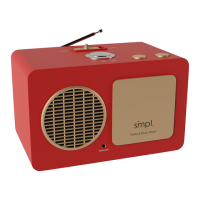
The SiMPL Radio & Music Player is a user-friendly device designed for easy operation, particularly suitable for individuals who may benefit from simplified controls. It functions as both an AM/FM radio and an MP3 music player, offering a blend of classic and modern audio entertainment.

Function Description:

The device allows users to listen to radio broadcasts (AM/FM) or play music files in MP3 format from a USB stick. Its design emphasizes ease of use, with hidden controls for advanced settings (like volume and station presets) to prevent accidental changes by the primary user. The player is portable, capable of operating on AC power or C-size batteries.

Important Technical Specifications:

  • Power Adapter: 9VAC 1000 mA, exclusively for this product.
  • Power Source: AC 120 volts AC/AC adaptor. For portability, it requires 6 x C-size batteries.
  • User Controls: ON/OFF, RADIO/MUSIC, BACK/NEXT buttons are easily accessible.
  • Hidden Controls: AM/FM, TUNE (-/+), and VOLUME (-/+) are located behind a removable front panel.
  • Radio Station Storage: Up to 10 stations can be stored.
  • Headphone Jack: Insert jack into port in front of unit.
  • Power Consumption: 300 mA – 1A at 9V.
  • Amplifier: 6W Class D mono audio player with AM/FM radio and antenna.
  • Dimensions: 10"w x 6 1/8″h x 5 3/4″d (26 x 16 x 15 cm), weighing 4 lb (1.8 KG).
  • Music File Format: Supports only MP3 files. Other formats like M4A need to be converted to MP3.
  • File System Format: Supports FAT and FAT32. Does not support MacOS file systems (APFS/HFS+).
  • USB Stick Capacity: Supports USB sticks with a maximum capacity of 32GB.

Usage Features:

Quick Start:

To begin, remove the port compartment door (back, left side), then insert the USB stick and AC Adapter into their respective ports. Plug the AC adapter into an outlet. Turn the device on by pressing the silver On/Off button.

Radio Mode:

Switch to RADIO mode. The last played preset station will automatically start. An external antenna can improve FM reception, while the internal AM antenna benefits from repositioning the unit (e.g., closer to a window, rotating the unit) to improve AM reception.

Storing Radio Stations (Hidden Controls):

  1. Obtain a list of up to 10 preferred AM/FM stations from the user.
  2. Remove the front panel to access the hidden controls.
  3. Select AM or FM and use the TUNE -/+ buttons to find the desired station.
  4. To store a station, press and hold the NEXT button (located on top of the unit) for approximately 3 seconds. The display will show "S 1" (Station 1) for the first stored station. Repeat this process for up to 10 stations (S 10).
  5. Adjust the radio volume using the hidden VOLUME -/+ buttons to the desired level.
  6. Once stations are stored, the BACK and NEXT buttons will cycle through only the preset channels.

Music Mode (MP3):

  1. Switch to MUSIC mode. The device will play MP3 songs from the pre-loaded USB stick.
  2. Adjust the volume to the desired level using the hidden VOLUME -/+ buttons. There are 10 volume levels, and the music volume may differ from the radio volume.
  3. The USB stick comes pre-loaded with 75 American Classics. Users can add or delete songs to personalize the playlist, with 20-40 songs being a sufficient number, though up to 1,000 songs/audiobooks are supported.
  4. Press the NEXT button to skip to the next song, or BACK for the previous song. Songs play in a consistent order, which is beneficial for care recipients.
  5. Only MP3 file format is supported. For other formats (e.g., M4A), conversion to MP3 is required. Directions for conversion can be found at www.smpltec.com/radio-music-player-details.
  6. The device supports FAT and FAT32 file systems only and does not support MacOS file systems (APFS/HFS+).
  7. Only USB sticks with a maximum capacity of 32GB are supported.

Maintenance Features:

Warranty:

SiMPL Technology LLC provides a twelve (12) month warranty from the date of purchase, covering defects in material and workmanship. The warranty is limited to the repair or replacement of defective parts at the manufacturer's discretion.

Warranty Voidance:

The warranty may be voided by willful abuse or neglect, modification of the unit, use of alternative power supplies, or exposure to organic solvents, strong acids, or petroleum-based solvents/ammonia.

Safety Instructions:

  • The device should not be exposed to dripping or splashing liquids or placed near a bathtub.
  • Keep the device away from heat sources like radiators, heat registers, stoves, or other heat-producing appliances.
  • Ensure power supply cords are not walked on, pinched, or chewed by pets.
  • To avoid electric shock, do not remove the cover of the apparatus; there are no user-serviceable parts inside.
  • Do not operate the product if the main lead is damaged.

Compliance:

Operation is subject to three conditions: 1) No harmful interference, 2) Acceptance of any interference received, and 3) No undesired operation. Unauthorized modifications to the electronics will void the warranty.

Technical Support:

For technical support or warranty service, do not return the unit to the reseller. Contact the manufacturer first by calling 1-833-237-4675 Ext.1 or emailing support@smpltec.com. Further information and Q&A can be found at www.smpltec.com/radio-music-player.

simpl touch player Specifications

General IconGeneral
Brandsimpl
Modeltouch player
CategoryMP3 Player
LanguageEnglish