The iSimple BTHFS380 is a Bluetooth Cassette Adapter with Handsfree functionality, designed to bring modern audio streaming and call management to vehicles equipped with a cassette player. This device allows users to stream music and make hands-free calls through their car's existing audio system, effectively transforming an older car stereo into a Bluetooth-enabled entertainment hub.
Function Description:
The primary function of the BTHFS380 is to enable wireless audio streaming from a smartphone or other Bluetooth-enabled device to a car's cassette player. This means users can enjoy music from popular streaming services like Spotify, Pandora, Google Play, YouTube Red, and iTunes, or any other audio source on their device, through their car's speakers. Beyond music, it facilitates hands-free calling, allowing users to answer, end, or reject calls without needing to interact directly with their phone. The device also supports voice recognition activation, providing a safer way to interact with a smartphone while driving.
Important Technical Specifications:
- Bluetooth Connectivity: The device is Bluetooth equipped, enabling wireless pairing with smartphones and other compatible devices.
- Power Source: It features a built-in rechargeable battery, offering approximately 5 hours of playback on a single charge. Charging is done via a micro-USB port.
- FCC ID: 2ATYS-BTHFS380, indicating compliance with FCC regulations.
- Cable Design: Features a flat cable design, which helps prevent tangling.
Usage Features:
- Compatibility: Compatible with any car's cassette player, making it a versatile solution for older vehicles.
- Dash-Mounted Control Button: A key feature is the external control button with an integrated microphone. This button can be mounted on the car's dash for easy access.
- Answer/End Call: Press once.
- Play/Pause Music: Press once.
- Track Forward: Press twice.
- Reverse (Track Back): Press three times.
- Enable Voice Recognition: Press and hold.
- Easy Installation: The cassette adapter simply inserts into the car's cassette player. The control button adheres to the dash with an adhesive backing.
- Pairing Process:
- Turn on the BTHFS380 by pressing the power button on the CallCassette (A). An LED light will flash red/blue, indicating it's ready for pairing.
- On your smartphone, open the Bluetooth menu, scan for devices, find "CallCassette," and select "Connect."
- A steady red LED light (which then turns off) confirms a successful connection.
- Audio Playback:
- Select the "TAPE" source on your car radio.
- Access your music/media player on your device.
- Use the control button for play, pause, and track forward functions.
- Calling Instructions:
- Ensure the phone is paired and the "TAPE" source is selected on the radio.
- Dial a phone number using the phone's keypad or activate Voice Recognition by pressing and holding the control button.
- Press the control button once to accept/end calls.
- Auto-Connect: When powered on, the CallCassette will automatically connect to the last paired device if it is available.
- Volume Adjustment: Volume should be adjusted using both the smartphone and the car radio's volume controls for optimal sound quality.
Maintenance Features:
- Charging: The device is charged by plugging the micro-USB end of the included charging cable into the CallCassette (A) and the USB end into a USB power source. A red LED light indicates charging, and it turns off when charging is complete.
- Power Off: To power off, press the power button on the CallCassette (A) for 5 seconds. The LED light will flash red and then turn off.
- Power Save Mode: If left on and out of range of a smartphone for 3 minutes, the CallCassette will automatically shut down to conserve battery life.
- Low Battery Warning: When the built-in battery is low, the CallCassette LED light will flash red approximately every 8 seconds, indicating it's time to recharge.
- Environmental Considerations: The device should not be exposed to direct sunlight or extreme heat, as this may cause damage or malfunction. It is also recommended to be parked in a safe spot during installation or device pairing, and never while driving.

 Need help?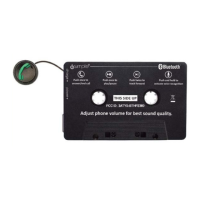

 To Next Page
 General