8
This thermostat is intended to be connected to your Wi-Fi network. However,
it is fully functional as a conventional thermostat when disconnected.
If you wish to use the thermostat as a disconnected device, the system
heating and cooling conguration must be congured using the Advanced
Menu before use.
If the thermostat was previously congured to use Wi-Fi, this connected
conguration must rst be cleared with a Factory Reset.
The default conguration for your thermostat is for conventional heating
and cooling. If you have a heat pump or other conguration, do not use the
MODE button until the thermostat has been congured.
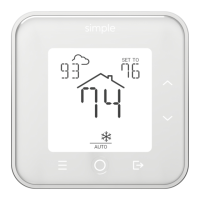
Press and hold both the MENU tand MODE buttons for 5 seconds to enter the
Advanced Menu.
Press DOWN until RESET is shown.
Press MODE and CONFIRM will start ashing.
Hold MODE for 5 seconds to clear all settings.
Step 1: Factory Reset (if needed)
Disconnected Conguration


 To Next Page