Fly with GPS Watch
Fly with GPS Watch
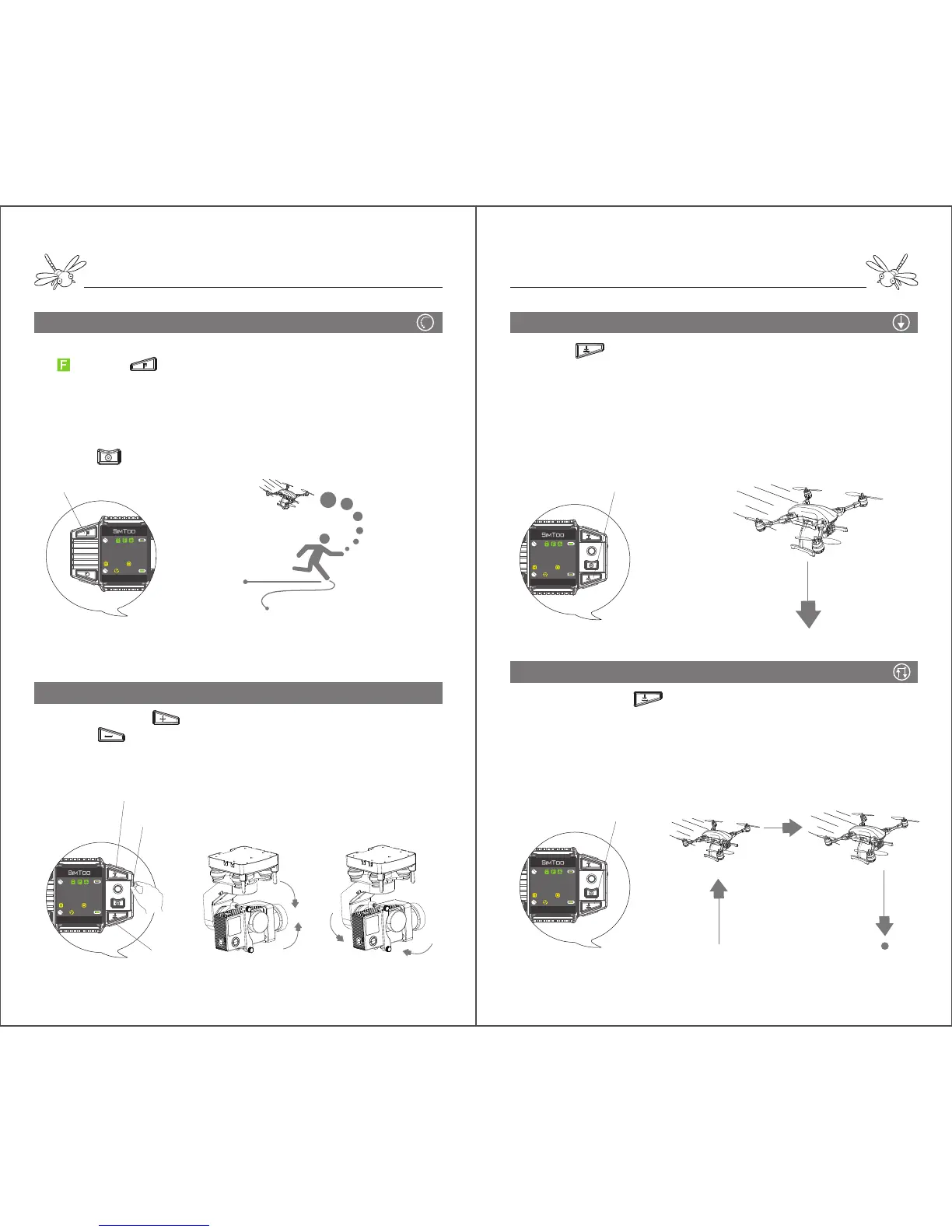
Follow Me
Gimbal Control
Pressing and hold can turn the gimbal to the left. Pressing
and hold can turn the gimbal to the right.
Turning the dial up can tilt up the gimbal. Turning the dial down
can tilt down the gimbal.
Notes: keep an eye on the following path and ensure there are no obstacles in the way. Do
not move too fast when dragonfly is following you in case that the aircraft may lose
connection with the watch.
After the watch gets 8 follow-me GPS satellites and show an
“ ”, press once and start to move. Dragonfly will
autonomously follow behind the watch when they are 5 meters
away from one another. The aircraft’s head will point to the
watch at all times.
When the watch stops moving, the aircraft will hover near the
watch.
Pressing can stop the follow-me mode.
Follow-me (press once)
Gimbal Pitch
Land
Return Home
15 meters
Pressing once will make dragonfly slowly land at its
current spot. When dragonfly gets close to the ground, it will
jump a few times to find flat base.
The motors will stop rotating in 5 seconds after landing on the
ground.
In process of landing, it is still available to make it hover and
change its position if the landing area is not flat or safe.
Pressing and hold will make dragonfly autonomously
ascend to 15 meters, slowly fly back to the take-off point and
land. If there is obstacle in the way of return-home, make it
hover and come back in other paths.
Return-home only works when the aircraft is 5 meters away from
the take-off point.
Land(press once)
Return Home(press and hold)


 To Next Page
 Loading...