Fly with GPS Watch
Fly with GPS Watch
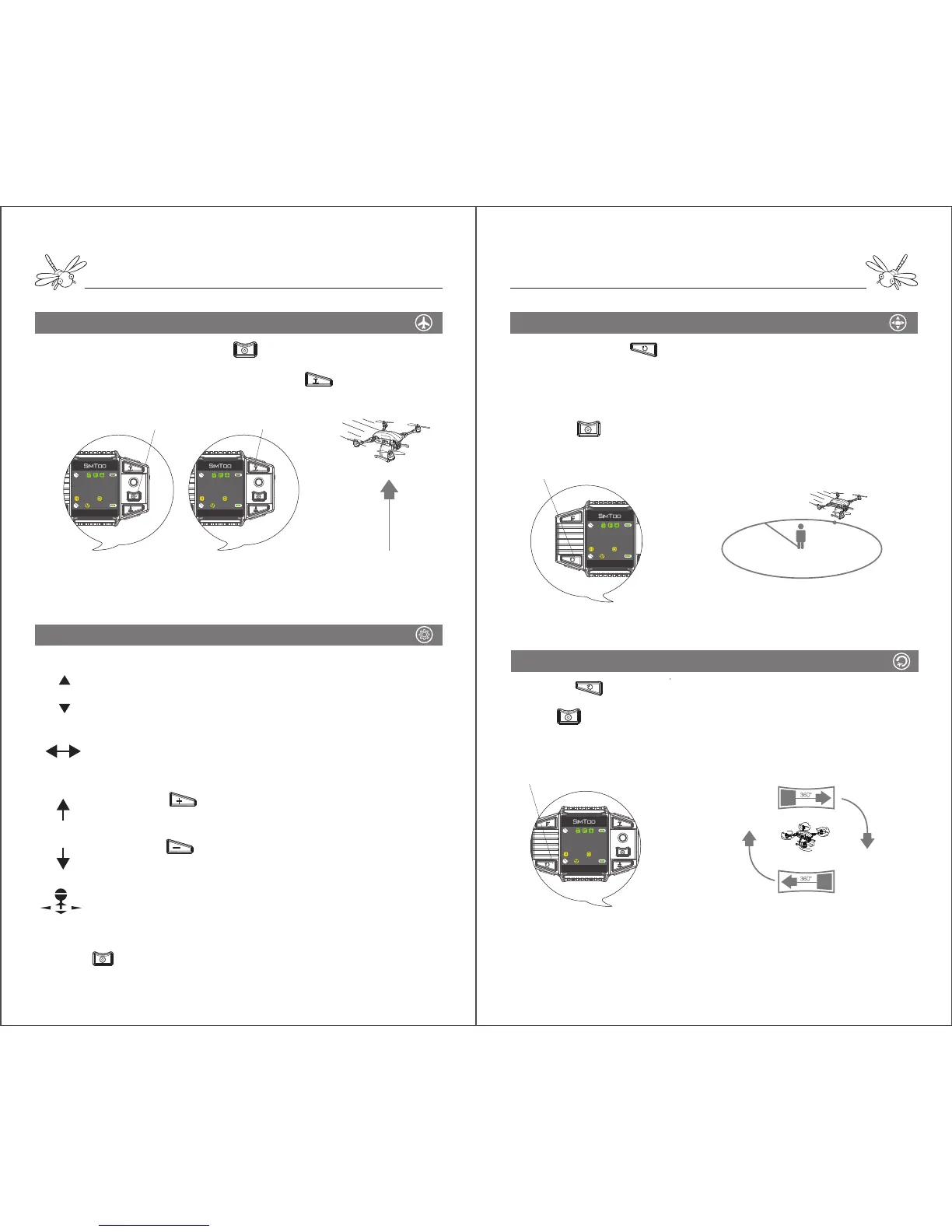
One Key to Take off Orbit Fly ( Point of Interest )
Rotating (Pan Shot)
Pressing and hold will keep dragonfly moving in a 5m
radius orbit around a center at is front. The aircraft’s head will
point to the center at all times.
During orbit fly, pulling the joystick left or right can make the
orbit larger or smaller.
Pressing can stop the orbit fly mode.
Pressing once will keep dragonfly rotating clockwise in place
autonomously.
Press will stop the rotating. Rotating mode is not only used
for pan-shot but also to turn the orientation of the aircraft.
Notes: The motors will stop rotating and stay locked if the aircraft doesn’t take off within 6
seconds after activated.
Basic Fly Control
Before take-off, press and hold to check if the four motors are
rotating properly.
When the motors are still rotating, pressing will make dragonfly
ascend to 5 meters high and hover in place autonomously.
1. Pushing the joystick up will make dragonfly fly
forward. Pushing the joystick down will make dragonfly
fly backward.
2. Pushing the stick to the left will make dragonfly fly
leftward. Pushing the stick to the right will make
dragonfly fly rightward.
3. Pressing once will keep dragonfly ascending
autonomously until 30 meters high.
4. Pressing once will keep dragonfly descending
autonomously until 5 meters high.
5. Pressing the joystick can turn off the red LEDs.
When the stick is released, dragonfly will autonomously hover in place.
Pressing can make dragonfly hover at the desired height during
ascend and descend.
5m


 To Next Page
 Loading...