Stabilize
9
00.0m 00.0m
00:00:00
16
Fly with GPS Watch
Fly with GPS Watch
Instruction of RC Watch Preparations Pre-fly
Notes: Do not press two buttons at the same time which may interfere with each other.
Press the hover button first before switching one flight mode to another.
1 2
Binding.. Process=xx%
Connecting...
ID=XXX
...............
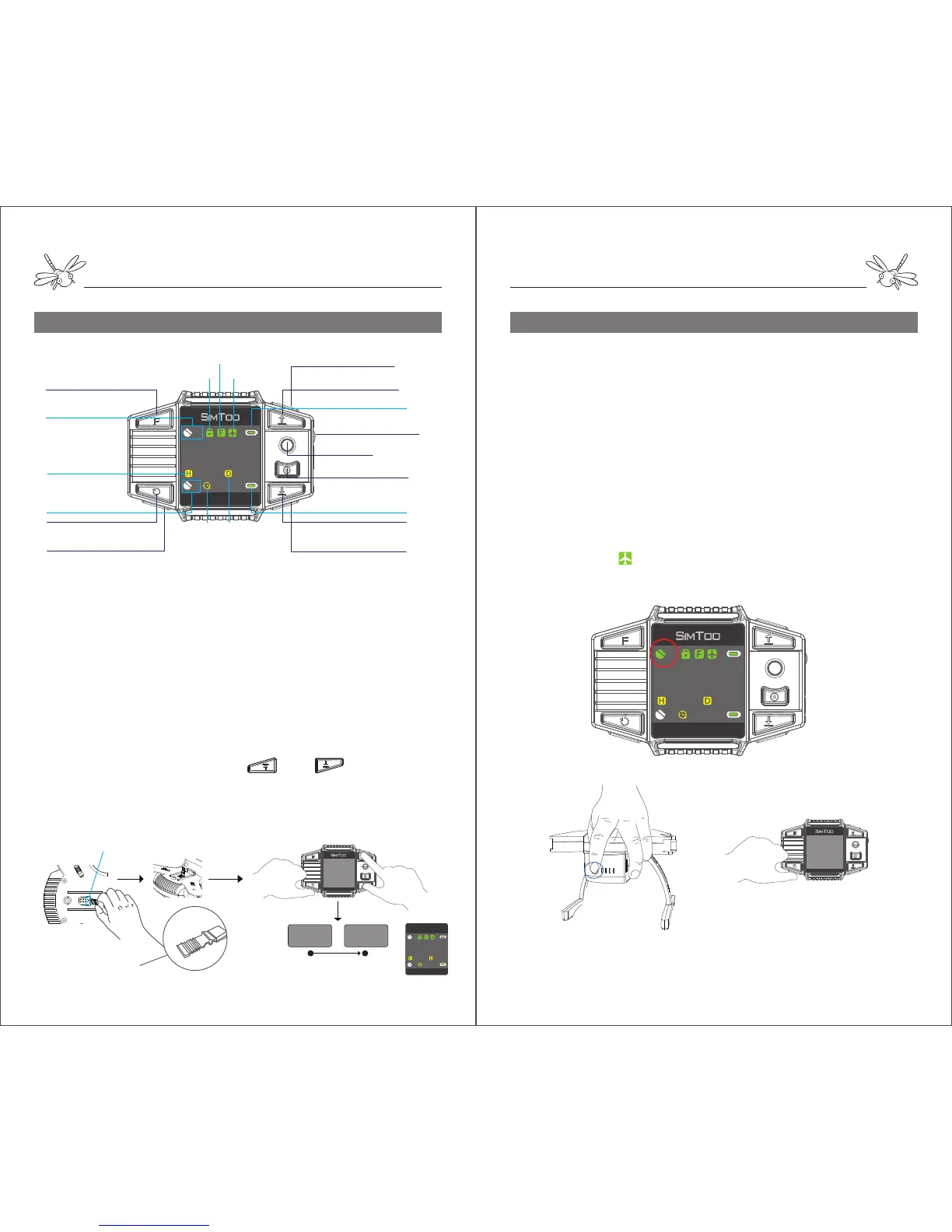
Codes Binding: Dragonfly to watch
The aircraft is linked with remote controller by default. It is
necessary to bind the codes if the dragonfly is going to be
controlled with watch.
1. Find a short circuit contactor in the plastic bag. Plug the
contactor into the jumper header on the gimbal mount to make
the aircraft a short circuit.
2. Turn on the aircraft and then remove the contactor.
3. Turn on the watch and hold the and at the same
time until the watch says “Binding ID=XXXX”.
4. The watch will get connected with the aircraft when the screen
enters the control interface.
1. Place Dragonfly on a flat platform and turn on the battery by
pressing & hold the power button on the tail. Dragonfly will
immediately start system self-checking when the front red LEDs
light once and rear blue LEDs quickly flash.
2. When the blue LEDs slowly flash and the aircraft gives out a
beep sound, it indicates that the fly control system is functioning
all right.
3. When the gimbal is level and the aircraft gives out a second
beep sound, it indicates that the gimbal is functioning all right.
4. Turn on the watch by pressing and hold the power button. In a
few seconds the watch will get connected to the aircraft when the
screen enters the control interface.
5. Wait until the aircraft gets at least 10 GPS satellites and the
screen display a icon before take-off. If the satellite signals are
not stable, try it at another place.
Initialized
9
00.0m 00.0m
00:00:00
16
Flight Height
①Power on/off(press&hold)
⑤Auto-take Off (press once)
⑥Auto land(press once)
Return-home(press&hold)
⑧Descend(press&hold)
Gimbal Right(press&hold)
②Gimbal Up/Down(Rotate
Up/Down)
⑩Auto-rotate(press once)
Orbit fly(press&hold)
④Hover(press once)
Activate Motors(press&hold)
⑨Follow-me(press once)
⑦Ascend(press once)
Gimbal Left (Press&hold)
③Joystick
Aircraft GPS Signals
Watch GPS Signals
Aircraft Battery Level
Ready to fly
Watch Battery Level
Follow Me Mode
Motors Locked
Time Distance
Jumper Headers
Short Circuit Contactor
Stabilize
9
00.0m 00.0m
00:00:00
16


 To Next Page
 Loading...