Fly with Remote Controller
Fly with Remote Controller
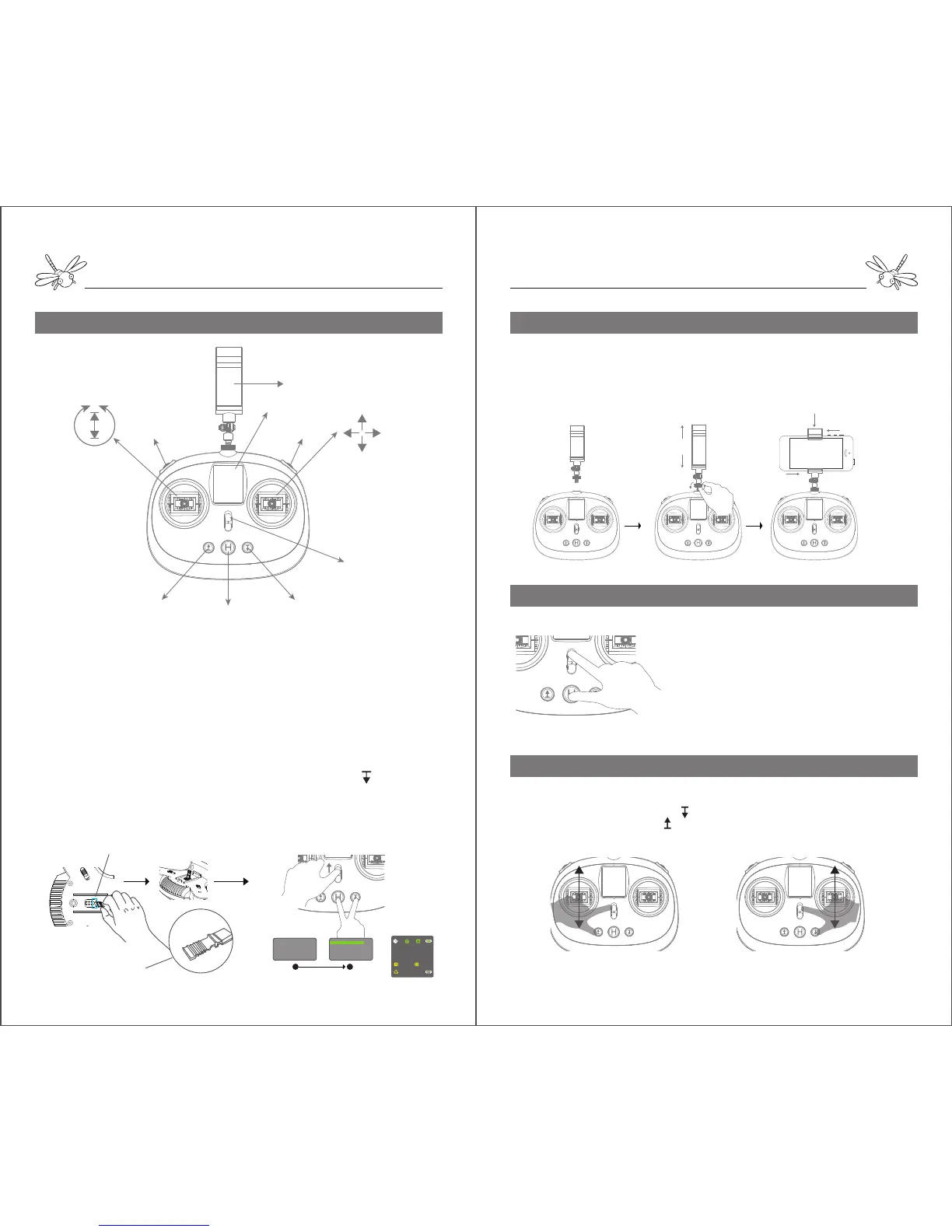
Instruction of Remote Controller
Codes Binding Aircraft to Remote Controller
The aircraft is connected to the remote controller by default. It is
necessary to bind the codes again just in case that dragonfly is
linked with the watch before.
1. Find a short circuit contactor in the plastic bag. Plug the
contactor into the jumper header on the gimbal mount to make
the aircraft a short circuit.
2. Turn on the aircraft and then remove the contactor.
3. Turn on the remote controller and hold the
H and at the
same time until the screen says “Binding ID=XXXX”.
4. The remote controller will get connected with the aircraft when
the screen enters the control interface.
TAKE OFF
CIRCLE
HOVER LANDING
RETURN HOME
ON/OFF
LCD Screen
Mobile Holder
Gimbal Pitch
Gimbal Yaw
ON
OFF
ON
OFF
Prepare the remote controller
1. Drive the mobile holder into the remote, fix the nut on the
screw bar to make the holder face to you.
2. Adjust the holder to your desired postion, stretch the holder
clamp and attach your mobile device into the clamp.
ON
OFF
ON
OFF
ON
OFF
ON
OFF
Normal Mode & Advance Mode
Left Mode & Right Mode
The default control mode is beginner mode (NOR
MODE) which requires 6 GPS satellites to launch
dragonfly. In professional mode (ADV MODE), dragonfly
can take off without GPS signals limit and fly at a higher
speed and longer range. To switch the control modes,
hold H and turn on the remote at the same time.
However, it is not recommended to choose professional
mode for beginners.
The left stick is set to control the power of motors by default. The power control can be
switched to the right stick by holding and turning on the remote. To switch back to the
left, turn on the remote and hold .
ON
OFF
ON
OFF
Power
Left Mode(American Hand) Right Mode(Japanese Hand)
Power
Jumper Headers
Short Circuit Contactor
1 2
Binding..
Connecting...
ID=XXX
...............
Initialized
00.0m 00.0m
00:00:00
16


 To Next Page
 Loading...