8
Setup and operating options
8
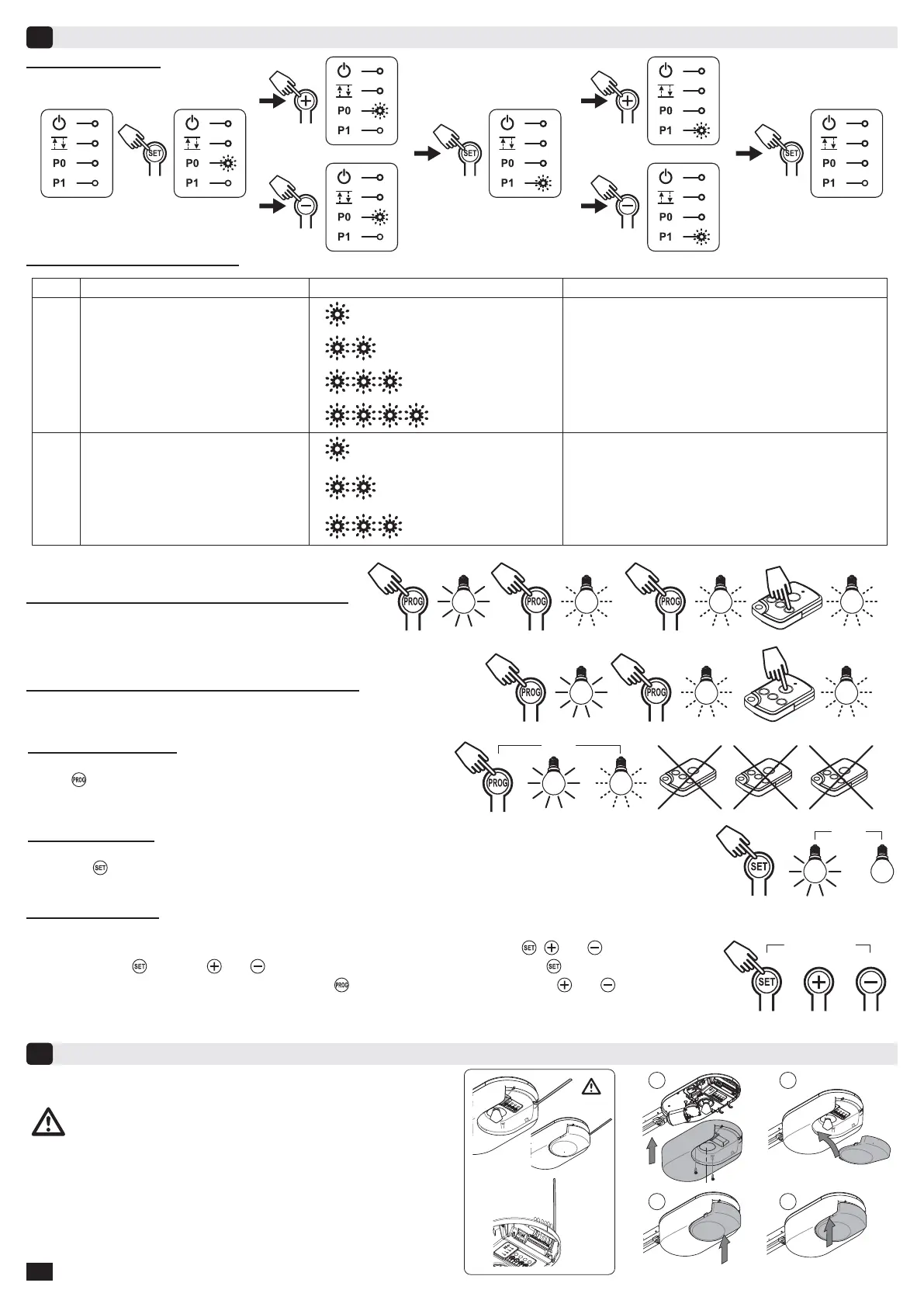
General setup diagram
Meanings of the various parameters
X
X
X+1
X-1
X+1
X-1
CODE
DESCRIPTION
VALUES
COMMENTS
P0
Obstacle detection sensitivity
1
very low sensitivity
2
low sensitivity
3
Standard (default setting)
4
high sensitivity
If this parameter is modified, the installer must check that
the limitation of forces complies with appendix A of
the standard EN 12 453.
If this parameter is modified, the installer must check that the limitation
of forces complies with appendix A of the standard EN 12 453.
P1
Closure approach speed
1
no slowdown
2
short soft stop
(default setting)
3
P1=1
no slowdown before closure
P1=2
speed is reduced during the last 20 centimetres.
P1=3
speed is reduced during the last 50 centimetres.
long soft stop
Resetting all settings
- Press the
button until the light goes out (7 s). This clears all previously stored settings and returns them to their
default values.
7 s.
2 s. max.
++
1
4
2
3
P
0
P1
+
S
E
T
-
*
Re-fi tting covers - Antenna orientation
9
- Position the aerial and fi t the covers.
Locking programming
- The keypad must be locked to ensure the safety of the users. Simultaneously press the
, and .
- Start by pressing
. Pressing and must take place within two seconds. Pressing the button then no longer has
any effect. The remote control memorising functions (
button) and forced mode operation ( and buttons) remain
possible. To access programming mode once again, repeat the same procedure.
* To ensure proper remote control range, the aerial must
be fi tted in one of the two positions shown deside.
Memorising the remote control for controlling lighting
Memorising the remote control for partial opening cycle
Clearing remote controls
- Press
the button until the light blinks (7 s). This clears all of the
remote controls memorised.
2 s. 1 s. x1 5 s.
2 s. 1 s. x1 1 s. x2 5 s.
7 s.
…


 To Next Page