SINAMICS G120
Standard inverters 0.37 kW to 250 kW (0.5 hp to 400 hp)
Supplementary system components
Intelligent Operator Panel IOP
4/102
Siemens D 11.1 · 2009
4
■
Overview
Intelligent Operator Panel IOP
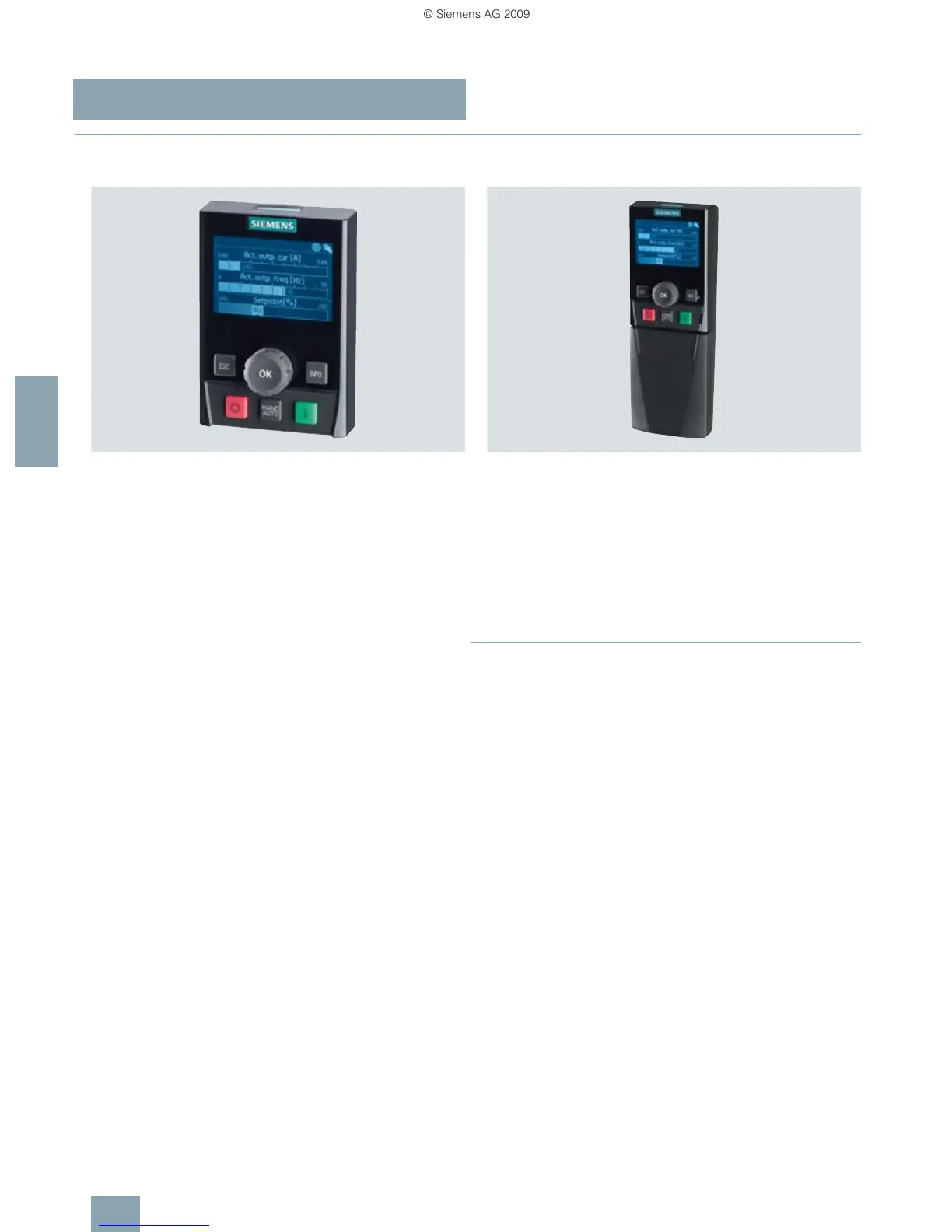
The Intelligent Operator Panel IOP is an extremely user-friendly
and powerful Operator Panel for the SINAMICS G120,
SINAMICS G120D standard drives and SIMATIC ET 200
frequency converters.
The IOP supports both entry-level personnel and drive experts.
Thanks to the large plain text display, the menu prompting and
the Application Wizards, it is easy to commission standard
drives. A drive can be essentially commissioned without having
to use a printed parameter list as the parameters are displayed
in plain text and due to the explanatory help texts and the param-
eter filtering function.
Application Wizards interactively guide you when commissio-
ning important applications such as conveyor technology,
pumps, fans and compressors. There are quick commissioning
wizards for general commissioning.
The drives are manually and simply controlled using directly as-
signed buttons and the navigation wheel. The IOP has a dedi-
cated switchover button to switch over from the automatic to the
manual mode.
The frequency inverter can be diagnosed in a user-friendly
fashion using the plain text display of faults and alarms. Help
texts can be obtained by pressing the INFO button.
Up to two process values can either be graphically or numeri-
cally visualized on the status screen/status display. Process val-
ues can also be displayed in technological units.
IOP supports series commissioning of identical drives. For this
purpose, a parameter list can be copied from a frequency in-
verter into the IOP and when required, downloaded into other
drive units of the same type.
The IOP includes the following language packages: English,
French, German, Italian and Spanish.
The IOP can be installed in control cabinet doors using the op-
tionally available door mounting kit.
Updating the IOP
The IOP can be updated and expanded using the integrated
USB interface. Data to support future drive systems can be
transferred from the PC to the IOP via drag & drop. Further, the
USB interface allows user languages and wizards that become
available in the future to be subsequently downloaded and the
firmware to be updated for the IOP. The IOP is supplied with
power via the USB interface during an update.
IOP Handheld
A handheld version of the IOP can be ordered for mobile use. In
addition to the IOP, this includes a housing with rechargeable
batteries, charging unit and RS232 interface cable. The charg-
ing unit is supplied with connector adapters for Europe, the US
and UK. When the batteries are fully charged, the operating time
is up to 8 hours.
A PC Inverter Connection Kit 6SL3255-0AA00-2AA1 is required
to connect the IOP to the CU240S and CU240E Control Units.
To connect the IOP Handheld to SINAMICS G110D and
SINAMICS G120D, the RS232 interface cable with optical inter-
face is additionally required.
■
Benefits
7 Simple commissioning of standard applications using
wizards, it is not necessary to know the parameter structure
7 Diagnostics using plain text display; can be used locally on-
site without documentation
7 Direct manual operation of the drive – you can toggle between
the automatic and manual modes
7 Status display with freely selectable units; display of real phys-
ical values
7 Intuitive, navigation using a wheel – just like in everyday appli-
cations
7 Graphic display for e.g. status values in bar-type diagrams
such as e.g. pressure, flow
7 Quickly and simply mounted in the door – mechanically and
electrically
7 Simple local commissioning on-site using the handheld ver-
sion
7 Commissioning without documentation using the integrated
help function
7 Series commissioning using the clone function (parameter set
data is saved for fast replacement)
7 User-defined parameter list with a reduced number of self-se-
lected parameters (to generate your own commissioning
screens)
7 5 integrated languages
7 Simple update of languages, wizards and firmware updates
via USB


 To Next Page
 Loading...