DC INVERTER U-MATCH AIR CONDITIONERS CONTROL
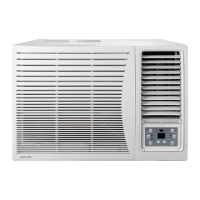
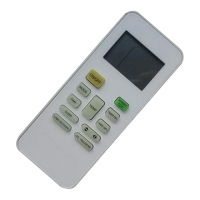
NO. Name Function description
1 MODE button
Press the button to select the mode,
cooling , heating , fan or auto mode.
2 Increasing button Press this button to increase the setup temp.
3 Decreasing button Press this button to decrase the setup temp.
4 Fan speed button Press this button to set fan speed
5 Sleep/SWING button Press the button to set sleep/swing function
6 Timer button Press the button to set timer function
7 On/off button Press the button to turn on or off the unit
8 Remote window Get remote information
9 LCD display Display unit information
Note:
1) SAVE set up: At unit turned off, to press the “FAN” +“▼” buttons continuously 5 seconds, it can
come enter save set up interface; the unit will run at save mode.
2) FRESH valve setup: At unit is turned off, press the “ FAN” button for 5seconds,And set up the fresh
air setup.
3) Outer ambient temperature display: Under normal condition, “ENV” will display the room ambient
temperature, at unit turned on, or unit turned off status, press “SLEEP/SWING” button last for 5
seconds, the LCD will display “OUT ENV”.
4) MEMORY function setup: At unit turned off, press “MODE” button for 10 seconds, could switch
whether turn on or off the unit state after powered off.
5) Debugging function: At unit off, continuously press “FAN” + “SLEEP” buttons lasting for 10seconds,
call out debugging menu, and displays “Debugging” icons, use “MODE” button adjust setting item, by
pressing “▲”,“▼” button to set up the detailed value.
(A) Ambient sensor set up: it can set three kinds styles.
6) Lock function: Press “▲”and“▼” at the same time for 5 seconds, the set temp. will display “EE” and
shield, all buttons will sound; and repress the“▲”and “▼”at the same time for 5 seconds, the lock
function will be released.(for details, please read corresponding parts of manual).



 To Next Page