ENGLISH
8
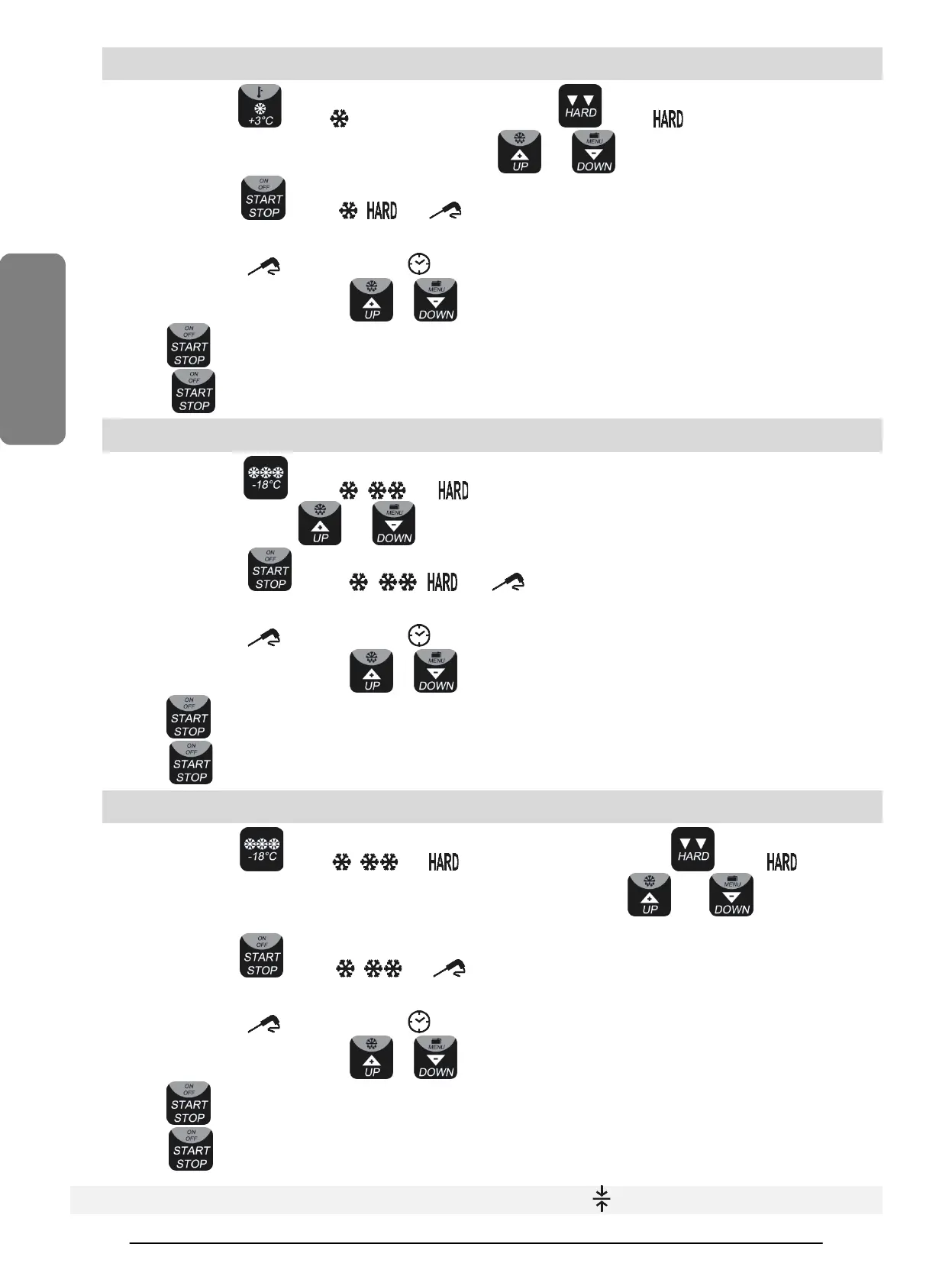
4.2.2.3. TEMPERATURE BLAST CHILLING HARD WITH CORE PROBE (2) + CONSERVATION
4.2.2.4. TIME BLAST CHILLING HARD (6) + CONSERVATION
Press and release the button
the led will start flashing, press the button , the led will start flashing
, the display will
show the temperature of end cycle, which can be modified with the buttons and (the value +3.0 is recommended).
Press and release the button
, the led , and
will be steadily lighted and the working cycle including the conservation
phase will start. The check for the correct introduction of the core probe will be activated.
sfully executed, the cycle will go on in temperature mode (2)
; if the test is not successfully executed, the cycle will go on as
time cycle in mode (6), the led will go off and the led will switch on.
At this point, within 5 minutes, press the button or to change the duration of the cycle in execution.
Keep the button pressed to interrupt the cycle.
Press the button to stop the conservation phase.
4.2.2.5. TEMPERATURE DEEP FREEZING HARD WITH CORE PROBE (3) + CONSERVATION
4.2.2.6. TIME DEEP FREEZING HARD (7) + CONSERVATION
Press and release the button
the led , and will start flashing,
the display will show the temperature of end cycle,
which can be modified with the buttons and (the value −18.0 is recommended).
Press and release the button
, the led , , and
will be steadily lighted and the working cycle including the
conservation phase will start. The check for the correct introduction of th
e core probe will be activated.
If this test is successfully executed, the cycle will go on in temperature mode
(3)
; if the test is not successfully executed, the cycle will go on as
time cycle in mode (7), the led will go off and the led will switch on.
At this point, within 5 minutes, press the button or to change the duration of the cycle in execution.
Keep the button pressed to interrupt the cycle.
Press the button to stop the conservation phase.
4.2.2.7. TEMPERATURE DEEP FREEZING SOFT WITH CORE PROBE (4) + CONSERVATION
4.2.2.8. TIME DEEP FREEZING SOFT (8) + CONSERVATION
Press and release the button
the led , and will start flashing, press the button , the led will go off,
the
display will show the temperature of end cycle, which can be modified with the buttons
and (the value −18.0
Press and release the button
, the led , and
will be steadily lighted and the working cycle including the conservation
phase will start. The check for the correct introduction of th
e core probe will be activated.
If this test is successfully executed, the cycle will go on in temperature mode
(4)
; if the test is not successfully executed, the cycle will go on as
time cycle in mode (8), the led will go off and the led will switch on.
At this point, within 5 minutes, press the button or to change the duration of the cycle in execution.
Keep the button pressed to interrupt the cycle.
Press the button to stop the conservation phase.
At the end of any cycle the unit turns automatically into conservation and the led will light up.


 To Next Page
 Loading...