19. HOW TO ADJUST THE OVEREDGE
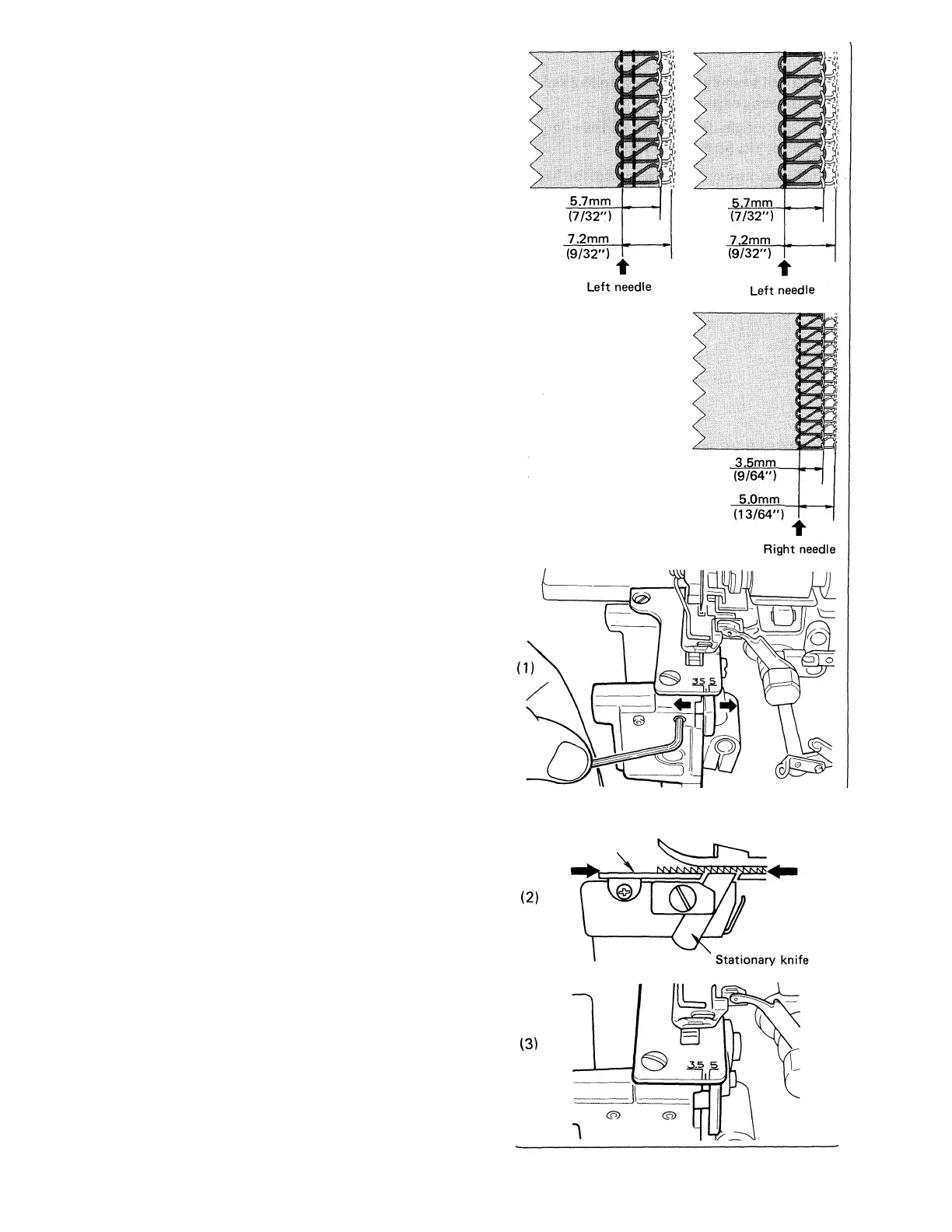
SEAM WIDTH
* The machine is set to sew the 4 thread stitch and
three thread left needle position stitch at a width
of 5.7mm (7/32 inch).
The machine is set to sew the three thread right
needle position stitch at a width of 3.5mm (9/64
inch).
* The 5.7mm (7/32 inch) setting can be increased to
7.2mm (9/32 inch) and the 3.5mm (9/64 inch)
setting can be increased to 5mm (13/64 inch) by
adjusting the stationary knife.
* ■ Be sure the machine is disconnected from the
power source.
* Open the looper cover (page 6).
* Disengage the movable upper knife (page 23).
* Remove the cylinder cover (page 9).
* Loosen the 2 stationary knife holder set screws
with the hex-head wrench provided in the accesso-
ries. (1)
* Move the stationary knife holder to the right to
increase the stitch width, or to the left to decrease
the stitch width.
* Be sure to align the cutting edge of the stationary
knife level with the top surface of the throat plate.
(2)
* Tighten set screws. (3)
* Replace the cylinder cover (page 9).
* Return the movable knife to its original position
(page 24).
* Test sew and adjust tensions as necessary to com
pensate for the increase or decrease in stitch
width.
Note: Do not set the overedge seam width below
3.5mm (9/64 inch).
Throat plate
25



 To Next Page