1
2
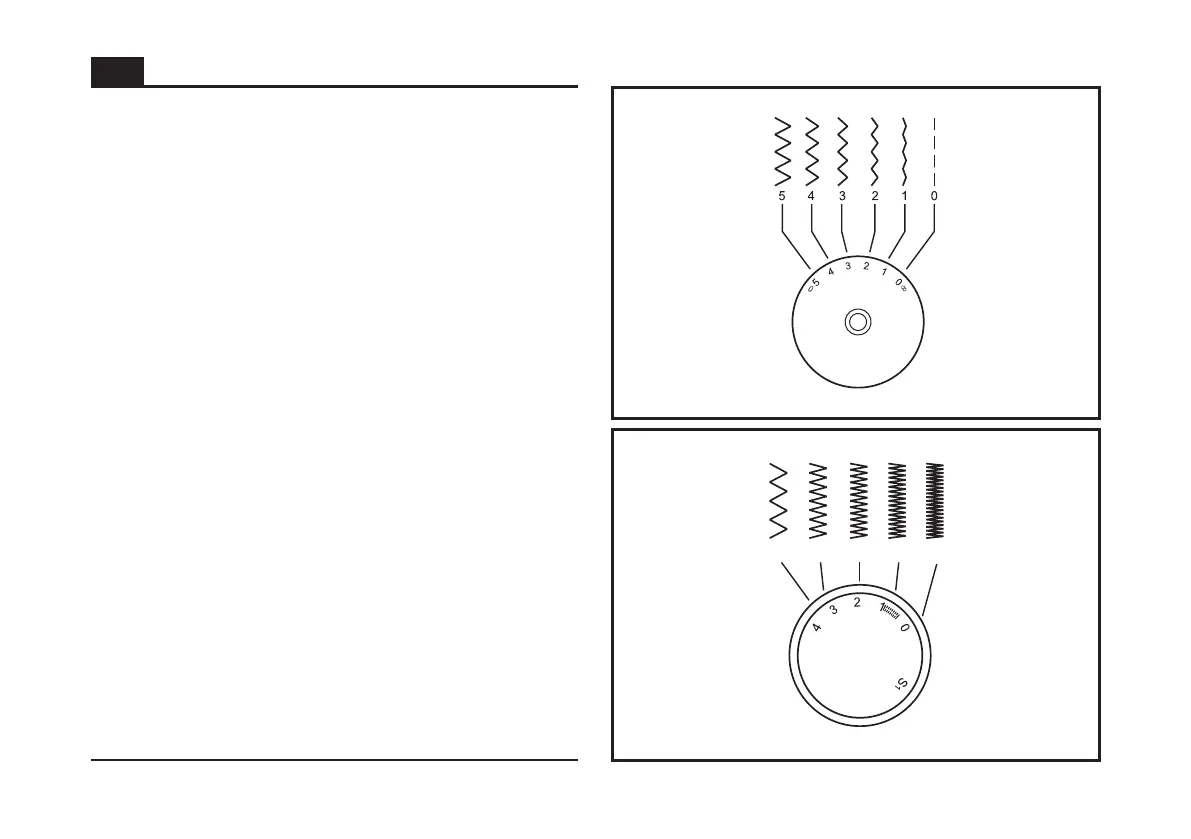
Function of stitch width dial
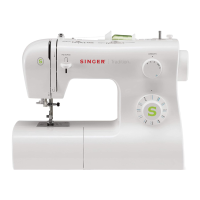
Function of stitch length dial while zig-zag stitching
Function of stitch length dial for when straight stitching
The maximum zigzag stitch width for zigzag stitching is 5mm;
however, the width can be reduced on any patterns. The
width increases as you move zigzag dial from "0" - "5". (1)
The Stitch Width Dial is also the control for the straight stitch
infinite needle position. "0" position is full left, "5" is full right
and between "2" and "3" is center needle position.
Set the Pattern Selector Dial to zig-zag.
The density of zig-zag stitches increase as the setting of stitch
length dial approaches "0".
Neat zig-zag stitches are usually achieved at "2.5" or below. (2)
Dense zig-zag stitches are called satin stitches. (2)
For straight stitch sewing, turn the Pattern Selector Dial to
the straight stitch setting. Turn the Stitch Length Dial, and the
length of the individual stitches will decrease as the dial
approached "0". The length of the individual stitches will
increase as the dial approaches "4". Generally speaking, use
a longer stitch length when sewing heavier weight fabrics or
when using a thicker needle or thread. Use a shorter stitch
length when sewing lighter weight fabrics or when using a
finer needle or thread.
4
3
2
1
0.5
Stitch Width Dial & Stitch Length Dial
GB
25


 To Next Page