EasyManua.ls Logo

Singer 5122 - Machine Care and Maintenance; Machine Cleaning and Oiling

Singer 5122
33 pages
Print Icon
To Next Page IconTo Next Page
To Previous Page IconTo Previous Page
Loading...
Chapter
7.
Caring
for
Your
Machine
CLEANING
AND
OILING
YOUR
MACNINE
5
B
~
CAUTION:
Before
cleaning
your
machine,
dis-
o-A
cP®connect
power
line
plug
from
your
socket
outlet.
Periodically,
depending
on
usage,
clean
and
oil
your
machine
as
follows,
using
one
drop
of
oil
6
4
on
areas
indicated:
_______
-
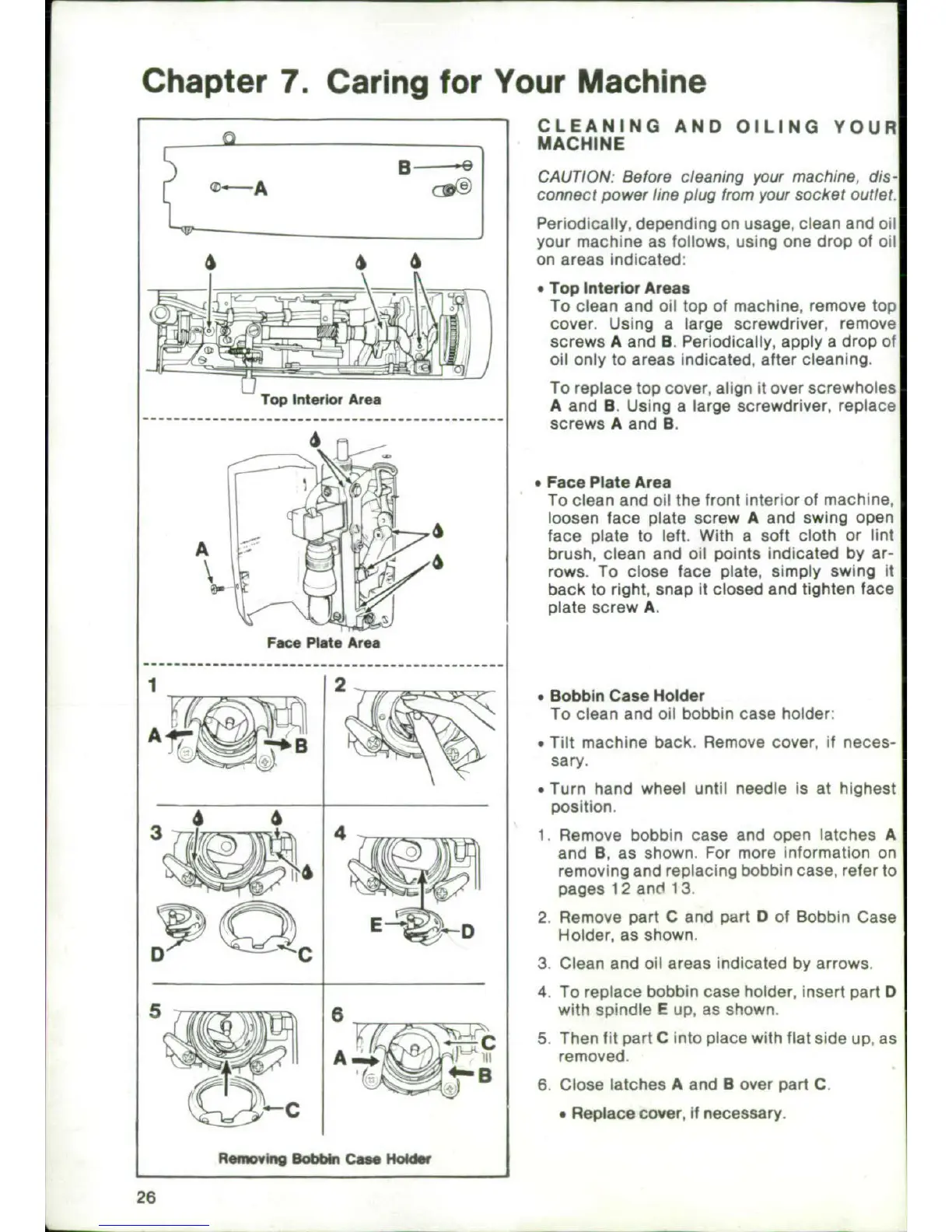
*Top
Interior
Areas
To
clean
and
oil
top
of
machine,
remove
top
cover.
Using
a
large
screwdriver,
remove
Iscrews
A
and
B.
Periodically,
apply
a
drop
of
- /
oil
only
to
areas
indicated,
after
cleaning.
To
replace
top
cover, align
it
over
screwholes
Top
Interimr
Area
A
and
9.
Using
a
large
screwdriver,
replace
---
---
---
---
---
---
---
---
---
---
---
---
screw
s
A
and
9
.
-
.
Pace
Plate
Area
To
clean
and
oil
the
front
interior
of
machine,
loosen face
plate
screw
A
and
swing
open
A .
4
face
plate
to
left.
With
a
soft
cloth
or
lint
A.
brush,
clean
and
oil
points
indicated
by
ar-
rows.
To
close
face
plate,
simply
swing
it
A
back
to
right, snap
it
closed
and
tighten face
plate
screw
A.
Face
Mlate
Area
2
Bobbin
Case
Holder
To
clean
and
oil
bobbin
case
holder.
ý*EllTilt
machine
back.
Remove
cover,
if
neces-
sary.
*
Turn
hand
wheel
until
needle
is
at
highest
position.
4
1.
Remove
bobbin
case
and
open
latches
A
and
B,
as
shown.
For
more
information
on
removing
and
replacing
bobbin
case,
refer
to
pages
12
and
13.
4
D2.
Remove
part
C
and part
D
of
Bobbin
Case
E~t
DHolder,
as
shown.
D
Q
c
3.
Clean
and
oil
areas
indicated
by
arrows.
4,
To
replace
bobbin
case
holder,
insert
padt
D
8
with
spindle
E
up, as
shown.
4
C
5.
Then
fit
padt
C
into
place
with
flat
side
up,
as
AýO
1c1
removed.
6,Close
latches
A
and
B
over
padt
C.
9Replace
cover,
if
necessary.
Remowhig
Bobbn
Cam
Holder
26

Related product manuals