EasyManua.ls Logo

Singer 628 - Setting the Index Pins

Singer 628
26 pages
Print Icon
To Next Page IconTo Next Page
To Previous Page IconTo Previous Page
Loading...
THE
CAM
STACK
(Cont’d)
Removal
and
Replacement
Remove
arm
top
cover
and
control
panel.
Remove
cam
stack
as
previously
instructed
on
page
14.
Loosen
the
clamping
screw
in
lower
selector
arm
by
inserting
screwdriver
through
hole
in
upper
arm.
Remove
locating
screw
from
plastic
cam.
Remove
the
screw
in
rear
follower
arm.
Loosen
the
rear-stop-bushing
set-screw.
Withdraw
selector-arm
shaft
from
rear
of
machine
arm,
releasing
front
selector-arm
and
return-spring,
plastic
cam,
spring,
rear
selector-arm,
and
rear
se¬
lector-arm
return-spring.
Remove
selector
arms
from
machine.
Remove
two
followers
from
index
pins.
Replace
two
followers,
and
replace
selector
arms
with
cam
and
return-springs
in
position,
making
cer¬
tain
that
hinged
brackets
fit
into
slots
in
followers.
Replace
selector-arm
shaft
through
follower
arms.
Replace
rear
follower-arm
screw
making
certain
that
it
clamps
down
on
flat
part
of
shaft.
Tighten
rear-stop-bushing
set-screw
securely.
Tighten
the
damning
screw
in
lower
selector-arm.
Rsdiccs
ram
stack.
Cneck
one
aajust
the
release
mechcmsm
as
;
n
-
Aa
i
u
stmen
r
s
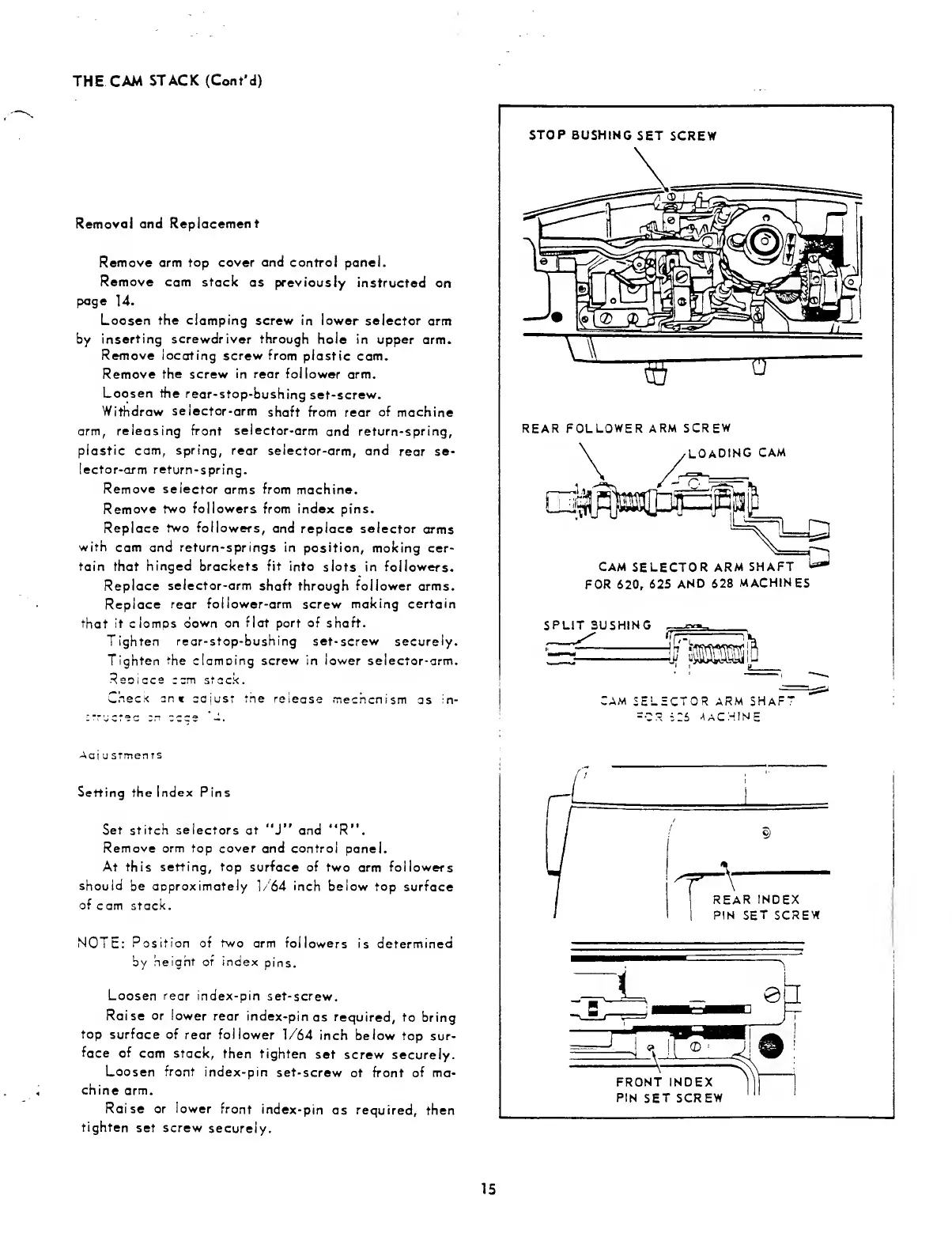
Setting
the
Index
Pins
Set
stitch
selectors
at
“J”
and
"R”.
Remove
arm
top
cover
and
control
panel.
At
this
setting,
top
surface
of
two
arm
followers
should
be
approximately
1/64
inch
below
top
surface
of
c
am
stack.
NOTE:
Position
of
two
arm
followers
is
determined
by
height
or
index
pins.
Loosen
rear
index-pin
set-screw.
Raise
or
lower
rear
index-pin
as
required,
to
bring
top
surface
of
rear
follower
1/64
inch
below
top
sur¬
face
of
cam
stack,
then
tighten
set
screw
securely.
Loosen
front
index-pin
set-screw
at
front
of
ma¬
chine
arm.
Raise
or
lower
front
index-pin
as
required,
then
tighten
set
screw
securely.
15

Related product manuals