EasyManua.ls Logo

Singer Centurion 121C - BOBBIN WINDER ADJUSTMENTS; DRIVE WHEEL ADJUSTMENT

Singer Centurion 121C
48 pages
Print Icon
To Next Page IconTo Next Page
To Previous Page IconTo Previous Page
Loading...
From the library of Superior Sewing Machine & Supply LLC - www.supsew.com
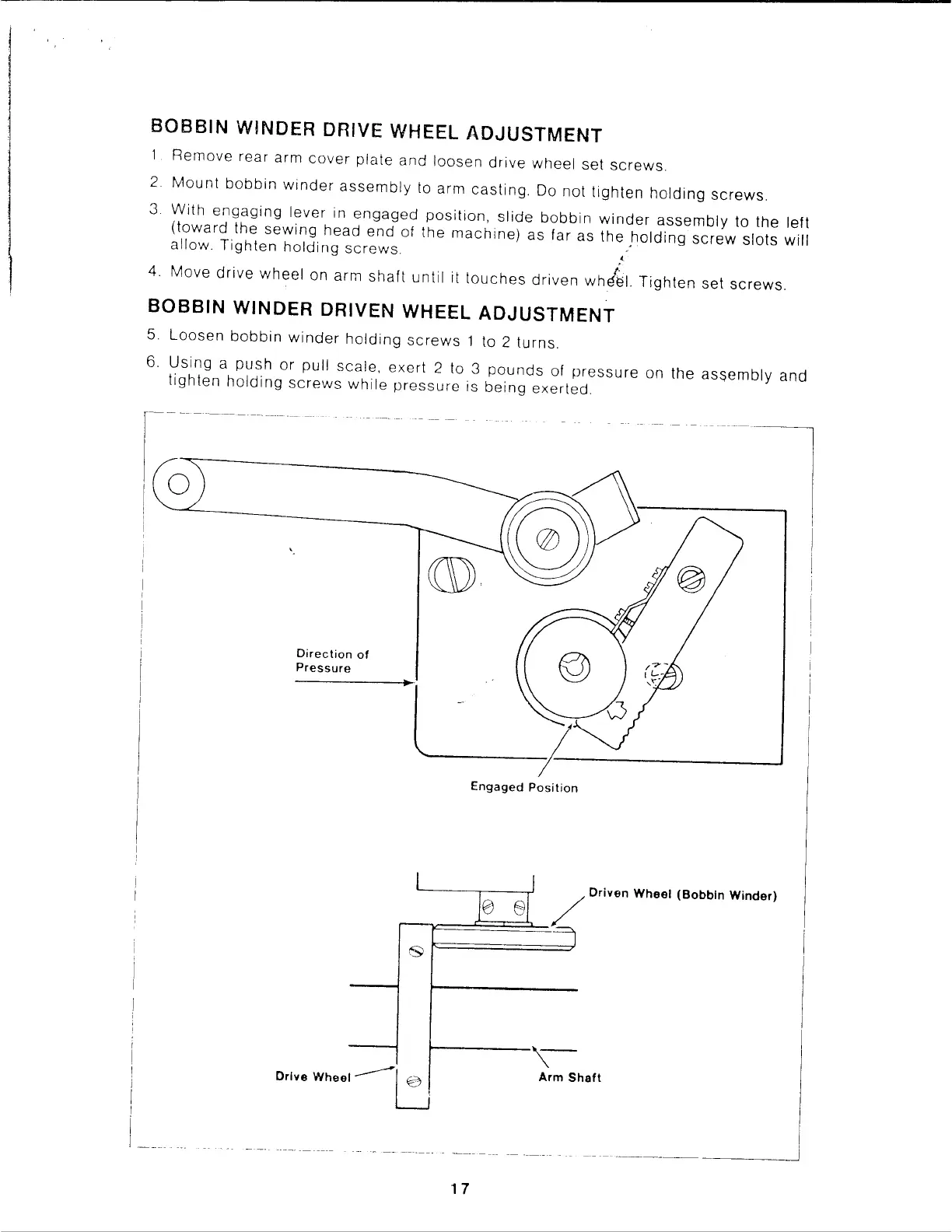
BOBBIN
WINDER DRIVE WHEEL
ADJUSTMENT
Remove
rear arm
cover
plate
and
loosen
drive
wheel
set
screws.
2
Mount
bobbin
winder
assembly
to arm
casting.
Do
not
tighten
holding
screws.
3
With
engaging
lever
in
engaged
position,
slide
bobbin
winder
assembly
to the left
(toward
the
sewing
head
end
of
the
machine)
as
far as
the
holding
screw
slots
will
allow.
Tighten
holding
screws.
,',
4.
Move
drive
wheel
on arm
shaft
until
it
touches
driven
whdel.
Tighten
set
screws.
BOBBIN
WINDER
DRIVEN WHEEL
ADJUSTMENT
5.
Loosen
bobbin
winder
holding
screws
1 to 2
turns.
6.
Using
a
push
or
pull
sca!e,
exert
2 to 3
pounds
of
pressure
on
the
asqembly
and
lighten
holding
screws
while
pressure
is
being
exerted.
Direction
of
Pressure
I
Drive Wheel
...-------l:J
Engaged
Position
1 7
10
ei
~
0,1,'"
Wheel (Bobbin Winde,)
I
~
Arm
Shaft

Related product manuals