74
SHIFTING THE CURSOR
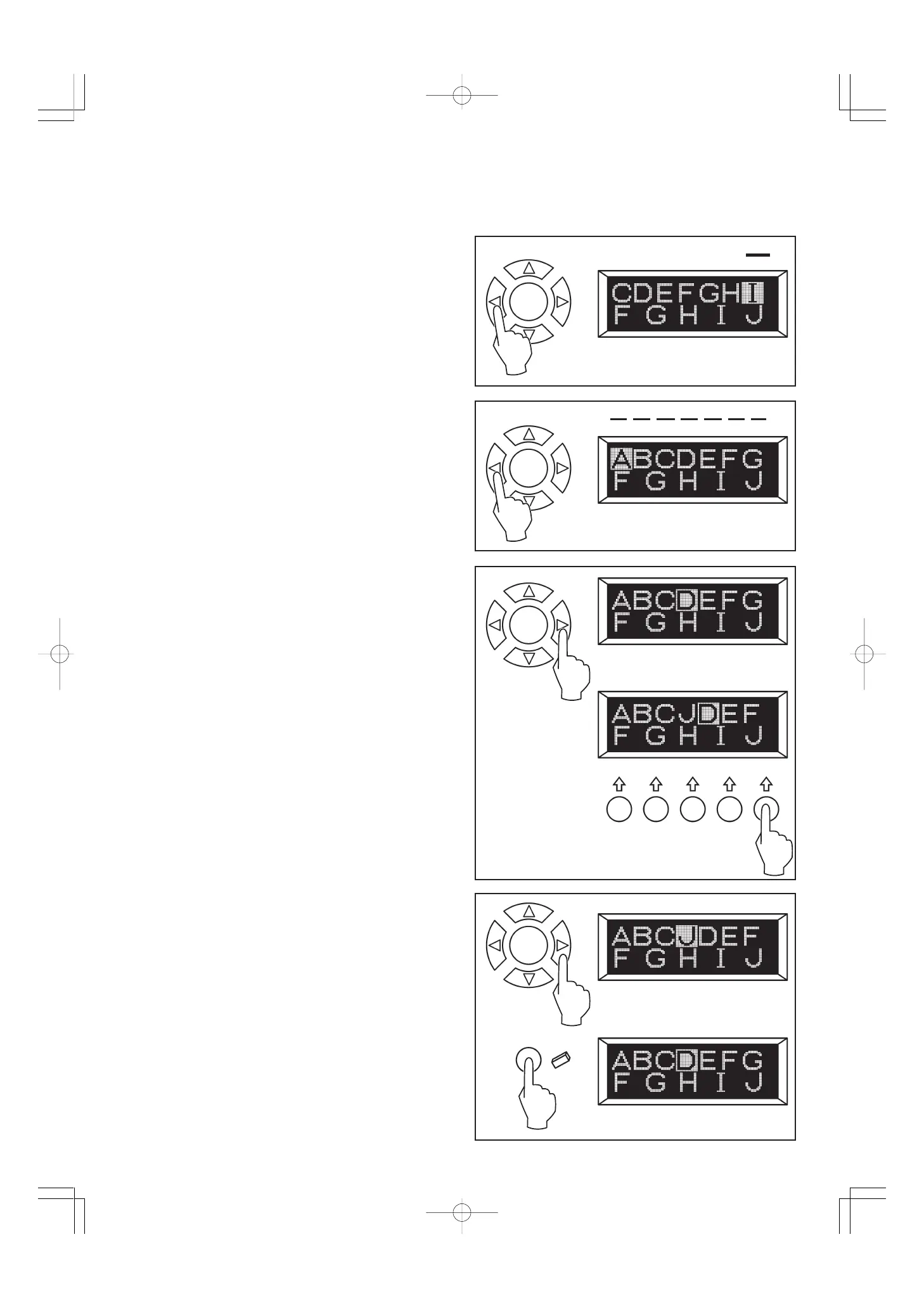
When patterns are selected, the cursor shifts to the right side
of selected patterns. Press the cursor left button and cursor
will shift to the left and cursor position will be highlighted.
The cursor is used to check selected patterns, clear patterns,
insert patterns or change settings of each pattern as described
below.
CHECKING SELECTED PATTERNS
As selected patterns increases, formerly selected patterns will
disappear from the display. You may check them by shifting the
cursor to the left.
INSERTING PATTERNS
(1) Shift the cursor to the right next pattern of the position where
you want to insert a pattern.
(2) Select the pattern and it will be inserted just before the
highlighted pattern.
CLEARING MEMORIZED PATTERN
(1) Shift the cursor to the pattern you want to clear.
(2) Press the memory clear button and the pattern will be
cleared and the cursor will shift to next pattern.
(1)
(2)
(1)
(2)








 To Next Page