Need help?
Do you have a question about the SingTel RT5703W and is the answer not in the manual?
Lists the Singtel Wi-Fi 6 Router and Quick Installation Guide included in the package.
Lists the Power Cable and Ethernet Cable provided with the router.
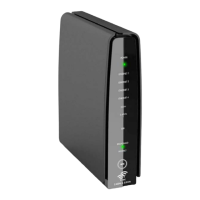
Visual representation of the router's front and back panels with key indicators and ports.
Specifies the Singtel Wi-Fi 6 Router model RT5703W and its capabilities.
Connects the power adapter to the router and Ethernet cable from ONT to WAN port.
Powers the router and connects devices via Wi-Fi using provided credentials or Ethernet.
Recommends central, unobstructed placement for best Wi-Fi coverage and performance.
Suggests using a Mesh Extender to eliminate Wi-Fi dead spots for improved coverage.
Provides guidance on configuring Wi-Fi settings, with a link to detailed instructions.
Offers steps for resolving Wi-Fi connectivity issues, including device reset and router reboot.
Explains the meaning of different LED behaviors and corresponding device statuses for Power, Internet, LAN, and Mesh.
This document serves as a quick installation guide for the Singtel Wi-Fi 6 Router, model RT5703W, designed to facilitate the setup of Fibre Broadband. It provides a comprehensive overview of the device, its components, installation procedures, optimal placement recommendations, and troubleshooting steps.
The Singtel Wi-Fi 6 Router (RT5703W) is a core component for establishing a Wi-Fi 6 network, enabling high-speed internet connectivity for homes and offices. The package includes:
The router features a sleek, upright design with indicator lights on the front and various ports and buttons on the back.
The front panel of the router features several LED indicators:
The back panel houses the functional ports and buttons:
The installation process is straightforward and involves a few key steps:
The guide also illustrates a typical setup diagram, showing the Fibre Termination Point connected to the Terminal (ONT), which then connects to the Wi-Fi 6 Router. A Singtel TV Set-Top Box is also shown, implying it can be connected to the network.
For the best Wi-Fi performance, the router should be placed:
If connectivity issues arise, the following steps can be taken:
The LED indicators on the front of the router provide crucial diagnostic information about the device's status:
Power LED:
Internet LED:
LAN LED:
Mesh LED:
This detailed guide ensures users can effectively set up, maintain, and troubleshoot their Singtel Wi-Fi 6 Router for an optimal Fibre Broadband experience.
 General
| Brand | SingTel |
|---|---|
| Model | RT5703W |
| Category | Wireless Router |
| Language | English |

 To Next Page