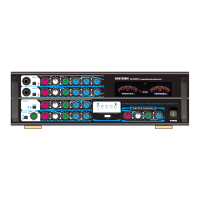
The SINGTRONIC KA-1000DSP is a professional echo mixing amplifier designed for a variety of audio applications, particularly suited for karaoke and live performances. It integrates an amplifier section with a comprehensive microphone section and digital echo effects, offering extensive control over both music and vocal audio.
Function Description:
The KA-1000DSP serves as a central hub for audio and video signals, allowing users to connect multiple external devices such as DVD players, HD sources, and auxiliary inputs. It features a powerful amplifier to drive speakers and a sophisticated mixing section for microphones, enabling individual control over vocal characteristics. The integrated digital echo processor enhances vocal performances with adjustable repeat and delay effects. The unit also includes a USB/SD card input for playing MP3 music, making it versatile for various entertainment setups.
Important Technical Specifications:
Amplifier Section:
- Power Consumption: 1700W
- Audio Output: 850W + 850W
- Input Impedance: 47kΩ
- Input Sensitivity: 200mV
- Bass Control: +/-15dB (100Hz)
- Mid Control: +/-15dB (1KHz)
- Treble Control: +/-15dB (10KHz)
- T.H.D (Total Harmonic Distortion): <0.1%
- Frequency Response: 20Hz-20KHz -1dB
- Noise Ratio: >90dB
- Power Source: 230/115V 50/60Hz (selectable)
- Dimensions (W x H x D): 430mm x 150mm x 300mm
- Weight: 8KG
Microphone Section:
- Connector: 1/4" TRS/Unbalanced
- Input Impedance: 1.5kΩ
- Input Sensitivity: 10mV
- T.H.D: <0.5%
- Frequency Response: 20Hz-15KHz -3dB
- Noise Ratio: >85dB
- Bass Control: +/-15dB (100Hz)
- Mid Control: +/-15dB (1KHz)
- Treble Control: +/-15dB (10KHz)
- Digital Echo: Up to 300ms
Usage Features:
Front Panel Controls:
- Power ON/OFF button: For turning the unit on or off.
- Music Master Volume: Controls the overall volume of the music.
- Mic Master Volume: Controls the overall volume of the microphones.
- Input Selector (AUX, DVD, HD 1-2, USB/Air-M): Allows manual selection of the audio/video input source.
- USB (MP3) Music Play Function Selector: Controls playback functions for USB/SD card media (Play, Pause, Previous, Next, Mode).
- USB and SD card input interface: For connecting USB drives and SD/MMC cards.
Microphone Controls (for MIC 1, MIC 2, MIC 3):
- Input Jacks: 1/4" TRS/Unbalanced for microphones.
- GAIN -12dB Attenuation Key: Reduces input gain by 12dB.
- MIC Vol: Individual volume control for each microphone.
- ECHO-Profundity Knob: Adjusts the depth or intensity of the echo effect.
- LO-Bass Adjustment Knob: Controls the bass frequency level for the microphone.
- MID-Mediant Adjustment Knob: Controls the mid-range frequency level for the microphone.
- HI-Treble Adjustment Knob: Controls the treble frequency level for the microphone.
Echo Effect Controls:
- SELECTOR ST MO-Stereo And Mono Diversion: Switches between stereo and mono echo.
- VOL-Volume Knob: Adjusts the overall echo volume.
- LO-Bass Control Knob: Adjusts the bass frequency level for the echo.
- HI-Treble Control Knob: Adjusts the treble frequency level for the echo.
- RPT-Repeating Knob: Controls the number of echo repeats.
- DLY-Delay Echo Knob: Controls the delay time between echo repeats.
Music Controls:
- Disco Off/On Selector: Activates or deactivates a "Disco" sound effect.
- Music Vol Controlling Knob: Adjusts the music volume.
- BAL-Left And Right Track Balance Knob: Adjusts the balance between left and right audio channels.
- LO-Bass Control Knob: Controls the bass frequency level for the music.
- MID-Mediant Control Knob: Controls the mid-range frequency level for the music.
- HI-Treble Control Knob: Controls the treble frequency level for the music.
Rear Panel Connections:
- AC 115V And 230V Input Select: Switch for selecting the appropriate input voltage.
- AC 115V/230V Input: Power input.
- FUSE: Fuse holder, requiring confirmation of rated capacity when changed.
- SPEAKER SYSTEM (8-16 Ω): Speaker outputs for left and right channels, ensuring correct polarity (+/-) for optimal sound.
- MIC OUT: Output for microphone signal to connect directly to a jukebox for scoring.
- Subwoofer OUT: Output for connecting an external subwoofer amplifier.
- EQ INPUT/OUTPUT: Connects to reverberation machines, equalizers, and other sound source interceders.
- AUDIO INPUT (AUX, DVD): Connects to auxiliary and DVD audio sources.
- Rear Mic 1 and Mic 2 Input Jack: Additional microphone inputs.
- HDMI 1-2 Input: HDMI inputs for video and audio.
- HDMI Output: HDMI output for video and audio.
Advanced Operation:
- Switching A/V Channels: Seamless switching between multiple A/V inputs (DVD, HD, AUX, USB/Air-M) using the INPUT button, ideal for continuous performances with different media sources.
- Balancing Music with Vocals: Independent MASTER, BASS, MID, and TREBLE controls for both music and microphones allow for precise sound balancing, preventing vocals from being drowned out or overpowering the music.
- Balancing Microphone Levels: A recommended procedure for adjusting microphone levels involves first cutting off echo and background music, then adjusting the MASTER MIC control, followed by fine-tuning BASS, MID, and TREBLE to avoid feedback. Background music and individual MIC channels are then adjusted.
- Using Digital Echo: The built-in digital echo processor offers adjustable profundity, volume, bass, and treble for the echo effect. DELAY and REPEAT knobs allow customization of the echo's timing and duration, enabling users to achieve a "perfect" echo effect. Each mic channel also has an individual DIGITAL ECHO VOL knob for specific echo adjustments.
Maintenance Features:
- Safety Instructions: Emphasizes reading all instructions, retaining them for future reference, heeding warnings, and following all operation and use instructions.
- Placement: Advised to install in a cool, dry, clean place away from heat sources, vibration, dust, moisture, and sources of hum. Proper ventilation is crucial to prevent overheating.
- Cleaning: Unplug the unit before cleaning. Use a damp cloth; avoid liquid or aerosol cleaners and chemical solvents.
- Power Cord Protection: Route power cords carefully to prevent walking on or pinching. Unplug the unit during long periods of non-use or during electrical storms to prevent lightning damage.
- Service: Do not attempt to service the appliance beyond what is described in the operating instructions. All other servicing should be referred to qualified service personnel.
- Troubleshooting Guide: Provides solutions for common issues such as no audio output (checking input selector, cable connections, power cord) and "squealing" noise from speakers (adjusting microphone distance, volume, and treble levels).
- Fuse Replacement: When changing the fuse, confirm the rated capacity.
- Power Disconnection: For complete power void, leave the unit disconnected from the AC outlet for at least fifteen seconds.
- Copyright Laws: Advises checking local copyright laws before recording copyrighted material.

 Need help?
 General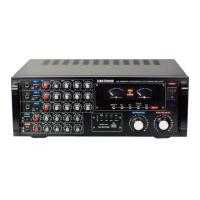

 To Next Page