Unpack
Connector Definition
Installation Notices
Connectors
Pan/Tilt/Rotate
Cabling through Junction Box
BL2005M1-EI
5MP Network Bullet Camera
Quick Start Guide
Find additional manuals, the datasheet,
the EU Declaration of Conformity, and
the latest firmware for this product at:
Siqura.com/downloads/software
Quick Start Guide
Note 1: Subject to modification. Actual product and accessories may differ in appearance.
© Siqura B.V. 2019
Vision 2.0 (01112019)
BL2005M1-EI QSG
Security Torx
NOTE:
IT IS NOT RECOMMENDED TO CONTINUOUSLY (24/7) RECORD WITH THE MICRO
SD CARD, AS THE CAMERA MAY NOT SUPPORT LONG-TERM CONTINOUS DATA
READ/WRITE. CONTACT THE MANUFACTURER OF THE MICRO SD CARD FOR
INFORMATION REGARDING THE RELIABILITY AND THE LIFE EXPECTANCY.
Screws(4x) &
Plastic Screw
Anchors (4x)
CAUTION:
INSTALLATION SHALL BE PERFORMED BY QUALIFIED PERSONNEL ONLY.
INSTALLATION SHALL BE IN ACCCORDANCE WITH LOCAL PROCEDURES.
INSTALLATION WITH POE SHALL BE IN UNEXPOSED NETWORKS.
BATTERY REPLACEMENT SHALL NOT BE APPLIED IN VIEW OF THE RISK OF
EXPLOSION.
IF YOU USE AN EXTERNAL POWER SUPPLY, CONTACT SIQURA TO MAKE SURE
THAT THE POWER SUPPLY HAS THE PROPER POWER SPECIFICATIONS.
MAKE SURE THAT THE POWER SUPPLY COMPLIES WITH LPS REQUIREMENTS.
Camera Unit
BNC Connector
1
2
3
4
5
6
Insert the SD card into the card slot to store
videos and snapshots. Do not remove the SD card
when the camera is powered on.

 Need help?
 General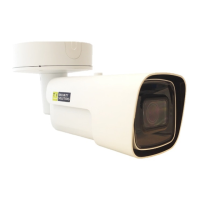

 To Next Page