Sirona Dental Systems, LLC Charlotte, NC 28273 4835 Sirona Drive Suite 100
Tel: 1 800 659 5977 ext 2 Fax: (704) 587 9394
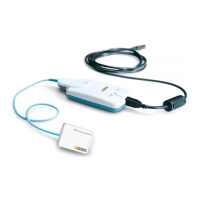
4.3 Connect XIOS USB module to computer only AFTER successful installation of the XIOS
software.
Pop-up will show up VERY shortly on the bottom right: “Hardware detected, Hardware
installed”
•
DON’T use external, un-powered USB hubs. If you have more then 2 hubs next to each other use
only one of the hubs and leave the one next (long side of connector) to the XIOS USB open.
•
DON’T use USB extension cables. If you can’t avoid it under any circumstances use ONLY the
following IO-Gear Booster cable brands: GEU216 (preferred) or G2LUB16 (less preferred - USB
1.1 only).
NEVER use the “Add Hardware wizard”
If the “Add Hardware wizard” pops up Cancel and stop “Add Hardware
wizard”
•
Unplug XIOS USB module; Reboot Computer
•
Install XIOS Software according to the instructions in this guide










 To Previous Page