3
ENEN
At a glance
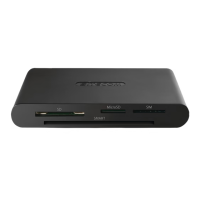
Item Specications Description
1
USB-A
connector
Male USB connector Connects to USB port of computer.
2
Cable 60 cm
3
Micro SD card
slot
Max. speed 480 Mbps.
Supports cards up to 2GB
Insert a MicroSD card to copy les to
and from the computer
4
Smartcard / ID
card slot
Cardreader specs:
ISO7816, T=0 and T=1
asynchronous card
EMV4.0 level 1 compatible
PC/SC 2.0 smartcard support
I2C interface support
Reads ID/eID cards, bank cards,
smartcards. While the product does
not require any drives and is plug
and play, additional software may be
required to use this product. Consult
your ID/eID card or bank card issuer
for information on any required
software.
5
LED indicator Status LED Active when card is inserted
Other specications
Supported OS Windows 7/8/10/11, Mac OS X
10.2 and above, Chrome OS
A free USB port is required to use
this device. Device is plug and play.
However, for ID cards and smartcards
additional software may be required to
use this product. Consult your ID/eID
card or bank card issuer for information
on the required software. Support for
future ID card standards can not be
guaranteed.
Dimensions 42 x 63 x 12 mm The dimensions are excluding cable
(60cm)
Weight 30 grams This product is lightweight for ease
of carrying
Package
contents
1x MD-1001 & 1x User manual Keep this manual for future reference
Important safety instructions
• Do not drop. Frequent dropping may lead to malfunctioning.
• Do not disassemble. Repairs should only be done by qualied service centers.
• Do not expose to liquids or re.
• Do not extend cable. Extending cable may lead to poor performance.
• Do not exceed 40° Celsius ambient temperature. Product may not function properly
above 40° Celsius
Support
Warranty 24 months warranty. Please note that your rights under national law remain
unaected by this warranty.
Support Lifetime technical support
Website www.sitecom.com
Contact support@sitecom.com



 To Next Page