Port Filter
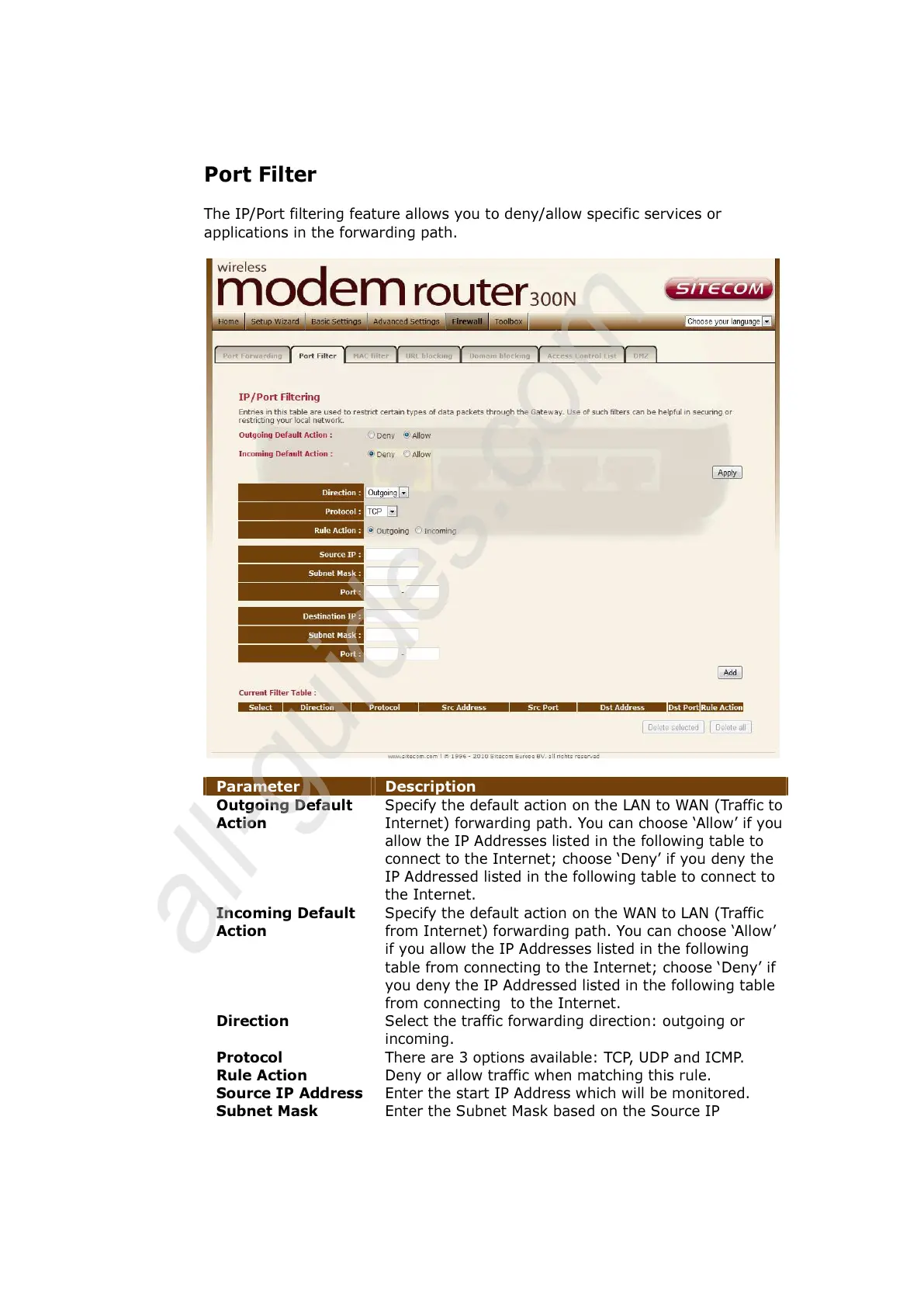
The IP/Port filtering feature allows you to deny/allow specific services or
applications in the forwarding path.
Parameter Description
Outgoing Default
Action
Specify the default action on the LAN to WAN (Traffic to
Internet) forwarding path. You can choose ‘Allow’ if you
allow the IP Addresses listed in the following table to
connect to the Internet; choose ‘Deny’ if you deny the
IP Addressed listed in the following table to connect to
the Internet.
Incoming Default
Action
Specify the default action on the WAN to LAN (Traffic
from Internet) forwarding path. You can choose ‘Allow’
if you allow the IP Addresses listed in the following
table from connecting to the Internet; choose ‘Deny’ if
you deny the IP Addressed listed in the following table
from connecting to the Internet.
Direction Select the traffic forwarding direction: outgoing or
incoming.
Protocol There are 3 options available: TCP, UDP and ICMP.
Rule Action Deny or allow traffic when matching this rule.
Source IP Address
Enter the start IP Address which will be monitored.
Subnet Mask Enter the Subnet Mask based on the Source IP



 To Next Page