When you finish, click ‘Save’ to save the settings made and restart the router so the
settings will take effect after it reboots.
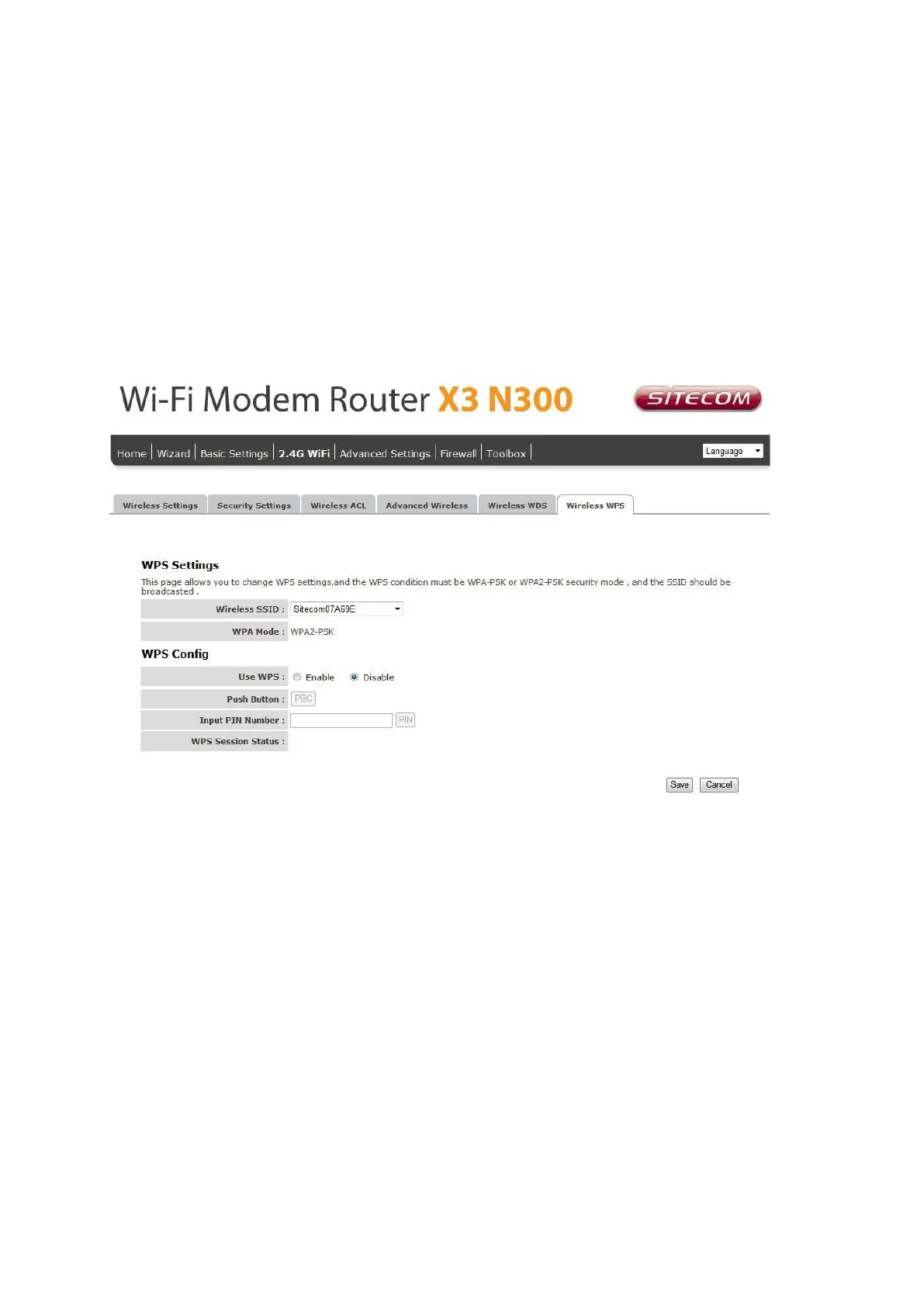
Wireless WPS
Wi-Fi Protected Setup (WPS) is the simplest way to establish a connection between the
wireless clients and the wireless router. You don’t have to select the encryption mode
and fill in a long encryption passphrase every time when you try to setup a wireless
connection. You only need to press a button on both wireless client and wireless router,
and WPS will do the rest for you.
SSID: This is the network broadcast name (SSID) of the router.
Use WPS: Check the box to enable WPS function and uncheck it to disable the WPS
function.
Push Button: Press the button to start the WPS process. The router will wait for the
WPS request from the wireless devices within 2 minutes.
Input PIN Number: You can fill-in the PIN code of the wireless device and press the
button to start the WPS process. The router will wait for the WPS request from the
wireless device within 2 minutes.



 To Next Page