EasyManua.ls Logo

SIYI ZT30 - User Manual

SIYI ZT30
139 pages
Print Icon
To Next Page IconTo Next Page
Loading...
ZT30 User Manual v1.1
1
2023 SIYI Technology Copyright
ZT30
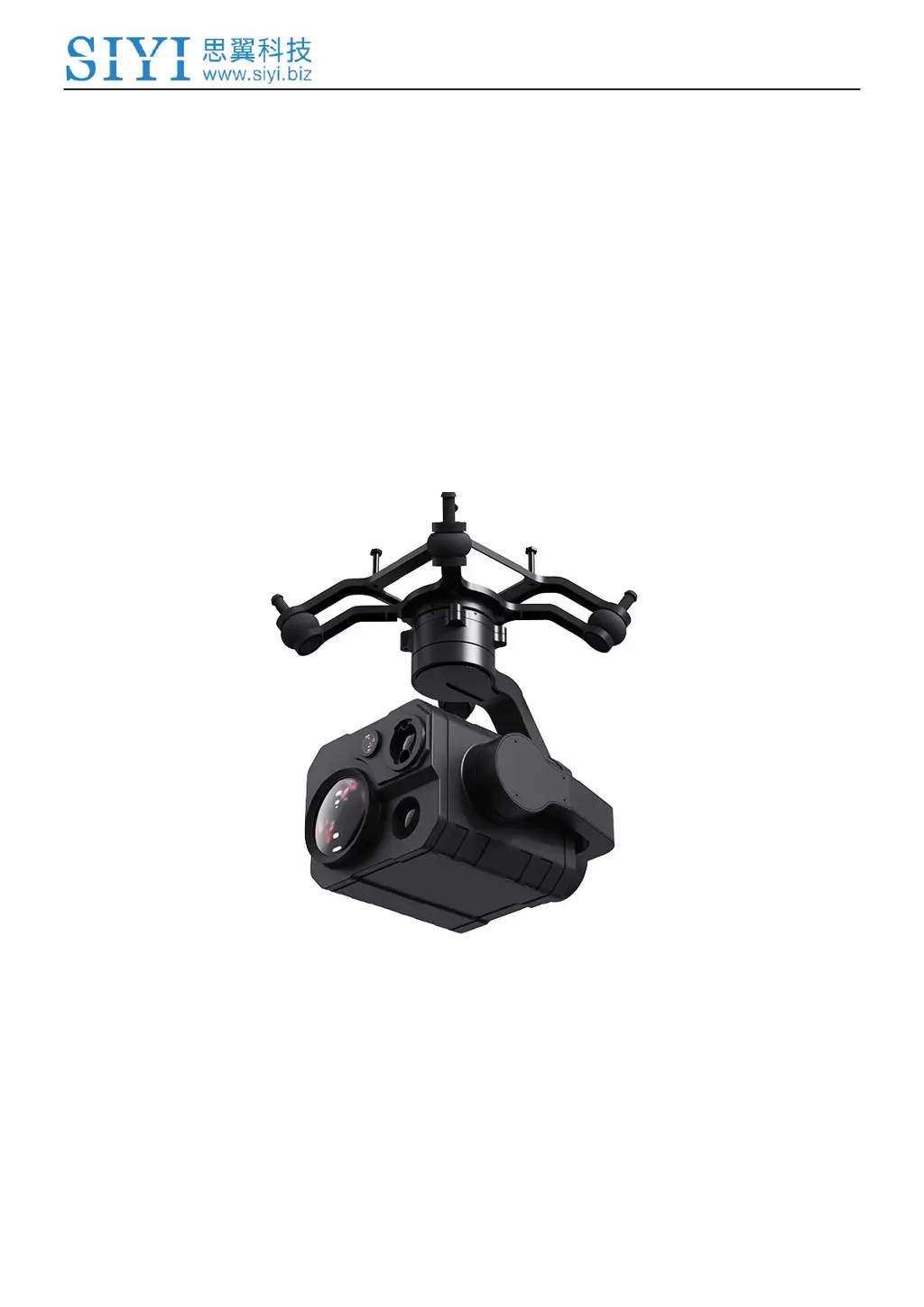
FOUR-SENSOR OPTICAL POD
4K AI THERMAL RANGEFINDER
USER MANUAL
V1.1
Sep 2023

Table of Contents

Questions and Answers

Summary

ZT30 User Manual Overview

1 Introduction to ZT30 Optical Pod

1.1 Product Features

Details the hybrid four sensors, high resolution thermal imaging, and high-accuracy laser rangefinder.

1.2 Parts

Identifies and illustrates the components and interfaces of the ZT30 optical pod.

1.3 Technical Specification

Provides comprehensive technical specifications for the ZT30, including dimensions and performance.

1.4 Packing List

Lists all items included in the ZT30 package for user reference.

1.5 Indicator Definition

Explains the meaning of various status indicators on the SIYI gimbal.

2 Getting Started with ZT30

2.1 Installation

Guides on how to physically install the ZT30, including screw hole specifications.

2.2 Connection and Power

Details how to connect and power the SIYI optical pod and gimbal camera.

2.3 Interesting Functions and Cautions

Highlights useful features and provides important cautions for product operation.

3 Gimbal Control Methods

3.1 Control via SIYI FPV;QGC App

Explains how to control the gimbal via SIYI FPV/QGC apps on the handheld ground station.

3.2 Control via S.Bus Signal (MK15)

Details controlling the gimbal using S.Bus signal with an MK15 remote controller.

3.3 UART; UDP Control (through SDK)

Provides detailed protocol and commands for SDK integration via UART/UDP.

3.4 Control via SIYI QGC (Windows) with HM30

Guides controlling the gimbal using SIYI QGC Windows software with HM30 transmission.

3.5 Control via Ardupilot Driver through UART

Details controlling the gimbal via UART using Ardupilot driver for integration.

3.6 Control via Mavlink Gimbal Protocol through UART

Explains gimbal control using Mavlink protocol via UART for flight controller integration.

3.7 Integrate Mavlink Flight Controller Attitude

Improves gimbal stability by integrating flight controller attitude data during rapid aircraft movements.

3.8 Troubleshooting Gimbal Attitude Control

Provides troubleshooting steps for abnormal gimbal attitude control issues.

4 Video Output Options

4.1 Single Camera & Single Image

Configures the SIYI FPV app to display a single camera stream in the main window.

4.2 Dual Camera & Split Image

Configures the SIYI FPV app to display split images from two cameras in the main window.

4.3 Dual Camera & Main; Sub Window Image

Configures SIYI FPV app to show two camera streams in main and sub windows.

4.4 Triple Camera & Split Image & Main; Sub Window

Configures SIYI FPV app for three camera streams across main and sub windows.

4.5 Output Video to SIYI Handheld Ground Station

Details outputting video streams to a SIYI handheld ground station.

4.6 Output Video to Android Device through HM30

Guides outputting video streams to Android devices via the HM30 transmission system.

4.7 Output Video to Windows Device through HM30

Details outputting video streams to Windows devices via the HM30 transmission system.

4.8 Output Video to Windows Device Directly through Ethernet

Explains direct video output to Windows devices via Ethernet connection.

4.9 Output Video to Third-Party Link

Guides outputting video to third-party links using Ethernet and RTSP.

4.10 Solutions to No Image

Provides troubleshooting steps for issues where no video image is displayed.

5 Laser Rangefinder Functionality

5.1 Laser Rangefinder Operation

Explains how to enable/disable the laser rangefinder and its basic function.

5.2 Laser Calibration

Details how to calibrate the target position for accurate laser rangefinder orientation.

6 Thermal Imaging Features

6.1 Palette Options

Describes assigning different color palettes for thermal imaging to acquire heat data.

6.2 Thermometric Modes

Explains the three thermometric modes: Full image, Point, and Box temperature measurement.

6.3 Thermal Synchronize Zoom

Enables simultaneous zooming of the thermal and zoom cameras in split image view.

7 SIYI FPV App Usage

7.1 Settings

Guides on configuring camera type, stream, IP addresses, and decoding in the SIYI FPV app.

7.2 Link Status

Displays the communication link status and OSD information within the SIYI FPV app.

7.3 Gimbal Camera Configuration

Details configuring gimbal camera functions like boot record, file manager, and laser calibration.

7.4 About SIYI FPV

Shows SIYI FPV app version and contact information for SIYI Technology.

7.5 SIYI FPV App Update Log

Lists recent updates and new features for the SIYI FPV application.

8 Firmware Upgrade and Configuration

8.1 Gimbal; Zoom Firmware Update

Guides on updating gimbal and zoom firmware using SIYI PC Assistant.

8.2 Camera Firmware Update

Details updating the camera firmware using an SD card.

8.3 Gimbal Camera Configuration

Explains channel settings and camera configurations via SIYI PC Assistant.

8.4 Gimbal Calibration

Guides on performing IMU, temperature, and accelerator calibration for the gimbal.

8.5 Main Firmware Update Log

Lists recent updates and changes for the main firmware.

8.6 SIYI PC Assistant Update Log

Lists recent updates and changes for the SIYI PC Assistant software.

9 After-Sale Service

9.1 Repair Service

Provides information on how to obtain repair service for SIYI products.

9.2 Warranty Policy

Outlines the conditions for Return & Refund, Replacement, and Warranty Repair services.

Summary

ZT30 User Manual Overview

1 Introduction to ZT30 Optical Pod

1.1 Product Features

Details the hybrid four sensors, high resolution thermal imaging, and high-accuracy laser rangefinder.

1.2 Parts

Identifies and illustrates the components and interfaces of the ZT30 optical pod.

1.3 Technical Specification

Provides comprehensive technical specifications for the ZT30, including dimensions and performance.

1.4 Packing List

Lists all items included in the ZT30 package for user reference.

1.5 Indicator Definition

Explains the meaning of various status indicators on the SIYI gimbal.

2 Getting Started with ZT30

2.1 Installation

Guides on how to physically install the ZT30, including screw hole specifications.

2.2 Connection and Power

Details how to connect and power the SIYI optical pod and gimbal camera.

2.3 Interesting Functions and Cautions

Highlights useful features and provides important cautions for product operation.

3 Gimbal Control Methods

3.1 Control via SIYI FPV;QGC App

Explains how to control the gimbal via SIYI FPV/QGC apps on the handheld ground station.

3.2 Control via S.Bus Signal (MK15)

Details controlling the gimbal using S.Bus signal with an MK15 remote controller.

3.3 UART; UDP Control (through SDK)

Provides detailed protocol and commands for SDK integration via UART/UDP.

3.4 Control via SIYI QGC (Windows) with HM30

Guides controlling the gimbal using SIYI QGC Windows software with HM30 transmission.

3.5 Control via Ardupilot Driver through UART

Details controlling the gimbal via UART using Ardupilot driver for integration.

3.6 Control via Mavlink Gimbal Protocol through UART

Explains gimbal control using Mavlink protocol via UART for flight controller integration.

3.7 Integrate Mavlink Flight Controller Attitude

Improves gimbal stability by integrating flight controller attitude data during rapid aircraft movements.

3.8 Troubleshooting Gimbal Attitude Control

Provides troubleshooting steps for abnormal gimbal attitude control issues.

4 Video Output Options

4.1 Single Camera & Single Image

Configures the SIYI FPV app to display a single camera stream in the main window.

4.2 Dual Camera & Split Image

Configures the SIYI FPV app to display split images from two cameras in the main window.

4.3 Dual Camera & Main; Sub Window Image

Configures SIYI FPV app to show two camera streams in main and sub windows.

4.4 Triple Camera & Split Image & Main; Sub Window

Configures SIYI FPV app for three camera streams across main and sub windows.

4.5 Output Video to SIYI Handheld Ground Station

Details outputting video streams to a SIYI handheld ground station.

4.6 Output Video to Android Device through HM30

Guides outputting video streams to Android devices via the HM30 transmission system.

4.7 Output Video to Windows Device through HM30

Details outputting video streams to Windows devices via the HM30 transmission system.

4.8 Output Video to Windows Device Directly through Ethernet

Explains direct video output to Windows devices via Ethernet connection.

4.9 Output Video to Third-Party Link

Guides outputting video to third-party links using Ethernet and RTSP.

4.10 Solutions to No Image

Provides troubleshooting steps for issues where no video image is displayed.

5 Laser Rangefinder Functionality

5.1 Laser Rangefinder Operation

Explains how to enable/disable the laser rangefinder and its basic function.

5.2 Laser Calibration

Details how to calibrate the target position for accurate laser rangefinder orientation.

6 Thermal Imaging Features

6.1 Palette Options

Describes assigning different color palettes for thermal imaging to acquire heat data.

6.2 Thermometric Modes

Explains the three thermometric modes: Full image, Point, and Box temperature measurement.

6.3 Thermal Synchronize Zoom

Enables simultaneous zooming of the thermal and zoom cameras in split image view.

7 SIYI FPV App Usage

7.1 Settings

Guides on configuring camera type, stream, IP addresses, and decoding in the SIYI FPV app.

7.2 Link Status

Displays the communication link status and OSD information within the SIYI FPV app.

7.3 Gimbal Camera Configuration

Details configuring gimbal camera functions like boot record, file manager, and laser calibration.

7.4 About SIYI FPV

Shows SIYI FPV app version and contact information for SIYI Technology.

7.5 SIYI FPV App Update Log

Lists recent updates and new features for the SIYI FPV application.

8 Firmware Upgrade and Configuration

8.1 Gimbal; Zoom Firmware Update

Guides on updating gimbal and zoom firmware using SIYI PC Assistant.

8.2 Camera Firmware Update

Details updating the camera firmware using an SD card.

8.3 Gimbal Camera Configuration

Explains channel settings and camera configurations via SIYI PC Assistant.

8.4 Gimbal Calibration

Guides on performing IMU, temperature, and accelerator calibration for the gimbal.

8.5 Main Firmware Update Log

Lists recent updates and changes for the main firmware.

8.6 SIYI PC Assistant Update Log

Lists recent updates and changes for the SIYI PC Assistant software.

9 After-Sale Service

9.1 Repair Service

Provides information on how to obtain repair service for SIYI products.

9.2 Warranty Policy

Outlines the conditions for Return & Refund, Replacement, and Warranty Repair services.

SIYI ZT30 Specifications

General IconGeneral
Gimbal3-axis
Weight380g
Dimensions120×110×110mm
Vibration Angle±0.01°
Visual Lens4.5mm
Photo StorageJPEG
Video StorageMP4
Sensor TypeCMOS
Lens Focal Length4.5mm
Image FormatJPEG
Video FormatMP4
Working Environment Temperature-20°C to 50°C
Thermal Camera Resolution640×512
Thermal Wavelength8-14μm
Visual Camera Sensor1/2.7 inch CMOS
StorageMicro SD card
Focus Range1m to ∞
Video Resolution1920×1080
ISO Range100-3200

Related product manuals