F/2.5 108° FOV
FUII HD Wi-Fi Cam
F/2.5 108° FOV
FUII HD Wi-Fi Cam
7
Low Electricity High
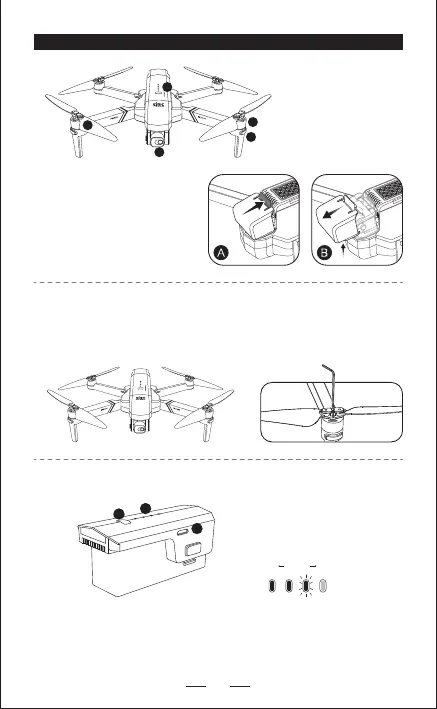
1. 2-Axis stable Gimbal
4K Wifi camera
2. Propeller
3. Motor
4. LED indicator
5. Intelligent battery
1. Battery switch
2. Battery power indicator
3. USB charging port
2. INTELLIGENT FLIGHT BATTERY
AIRCRAFT DIAGRAM
1. ASSEMBLE THE PROPELLER
Please note that the letter “A” or “B” is printed on each propeller, and m
ake
sure all the propellers are attached in the correct motor position.
— Hold the switch button for 3 sec. power on; then press the button for 3 sec.
power off.
— When the battery in low voltage,Blue indicators will be blinking, now please
charge the battery.
1
2
3
A. Open the gimble cover buckle.
B. Pull the gimble cover up then
gently take it off.
1
2
3
4
5
A
B
B
A


 To Next Page