
 Need help?
Do you have a question about the SK Pang Electronics PiCAN-M and is the answer not in the manual?
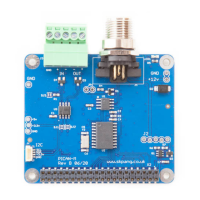
Details the key hardware features and connectivity options of the PiCAN-M board.
Connects the NMEA 2000 network using the Micro-C connector, detailing pin assignments.
Configures the NMEA 0183 (RS422) interface via a 5-way screw terminal.
Information on using the 120 Ohm terminator for CAN bus termination.
Details about the board's LED indicator and its connection to GPIO 22.
Information on the optional 5V 3A power supply module and its input range.
Explanation of the Qwiic (I2C) connector for connecting extra sensors.
Guides through installing the necessary command-line utilities for CAN bus interaction.
Procedures for bringing up and configuring the CAN interface for use.
Sets up the NMEA 0183 GPS input through the Raspberry Pi's UART port.
Integrates the BME280 sensor for environmental data via the I2C interface, including address changes.
Connects and configures NMEA 2000 devices, like sensors, to the system via CAN bus.
 General
| Brand | SK Pang Electronics |
|---|---|
| Model | PiCAN-M |
| Category | Motherboard |
| Language | English |

 To Next Page