The SKAARHOJ PTZ Pro v2B is a professional controller designed for Canon PTZ cameras, specifically the CR-N300/N500 models, utilizing the XC protocol. This user guide, updated in June 2022, provides comprehensive instructions for its setup, operation, and maintenance.
Function Description:
The PTZ Pro v2B serves as a dedicated hardware interface for controlling various functions of Canon PTZ cameras. It allows users to manage camera settings such as zoom, focus, iris, white balance, gain, shutter speed, and presets with tactile controls. The controller is designed to enhance workflow efficiency for professional users in broadcast, live events, and other production environments. Its layout is expandable, supporting multiple connected cameras through a camera select row of buttons.
Important Technical Specifications:
- Compatibility: Canon CR-N300/N500 PTZ cameras (default configuration).
- Protocol Support: XC protocol.
- Power: 5W-30W PoE (+).
- PoE Standard: IEEE 802.3af/t.
- Power Consumption: 6 Watts (when powered via DC adapter).
- Network Interface: 1 GBit network interface (SKAARHOJ Blue Pill controllers).
- Connectivity: IP Network RJ45 Port (for IP Control and PoE), Micro USB Port (for serial communication with SKAARHOJ Firmware Updater), USB-A Port (for specific connection types), 12V DC Power Supply input.
- Dimensions:
- Width: 258 mm (10.1")
- Depth: 178 mm (7") for the main unit, 186 mm (7.3") for the joystick unit.
- Height: 80 mm (3.1") for the main unit, 134 mm (5.2") for the main unit with encoders, 148 mm (5.8") for the joystick unit with joystick.
- Joystick height: 46 mm (1.8") from the base.
- Backside height: 72 mm (2.8").
- Display: Large display with 8 tiles for settings.
- Encoders: 5 rotary encoders with RGB backlight for function identification.
- Joystick: 3-point joystick for pan/tilt/zoom with a top button for home function.
- Buttons: Four-way buttons with OLED legends for dynamic labeling, menu navigation buttons, camera preset buttons, and camera select buttons with associated displays.
Usage Features:
The controller offers a rich set of features for precise camera control:
- Zoom Control: Dedicated zoom functionality and zoom mode settings.
- Focus Control: Focus, auto-focus, MF speed, and face detection.
- Iris Control: Absolute iris and auto-iris settings.
- Image Settings: White balance, black gain, gain, sharpness, shutter speed, shooting mode, joystick sensitivity, and gain mode.
- Image Stabilization: Support for image stabilization.
- Presets: Creation, recall, and management of camera presets, including preset speed, preset time, and preset store mode.
- Noise Reduction: NR mode and noise reduction settings.
- User Interface: Super crisp display tiles for settings, high-quality encoders with RGB backlight for function identification, and four-way buttons with OLED legends for dynamic labeling and functionality.
- Joystick Functionality: Classic PTZ joystick with a top button for reset, allowing for UD (Tilt), LR (Pan), Rotate (Zoom), and Top Button (Home) actions.
- Menu System: Eight distinct menus (M1-M8) for Exposure, White Balance, Black, Focus, Home, Modes, Presets, and Various settings.
- Dynamic Camera Selection: The camera select row is dynamic, adapting to the number of connected cameras.
- Configuration Layout: Option for changing the configuration layout.
- Blue Pill Access: The controller's web interface (Blue Pill) can be accessed via its IP address (DHCP or Static IP) through a web browser. It also supports Wi-Fi Access Point functionality for initial setup.
- Device Management: Auto-discovery and manual addition of devices on the network. Device details such as name, ID, active status, and IP address can be configured.
- Mapping: The controller's layout is determined by the mapping, with "PTZ Pro V1 - Generic" being the recommended mapping for Canon PTZ integration.
- Constant Sets: Customizable constant sets for camera selectors, allowing users to define camera names, device configurations, and other parameters.
Maintenance Features:
- Firmware Updates: The SKAARHOJ Firmware Updater can be used to update the controller's firmware. It can connect via Micro USB or directly over the network if the Blue Pill is on the same subnet.
- Troubleshooting: The user guide provides a troubleshooting section for common issues such as the home screen disappearing, inability to find IP address, controller not connected, and cameras not connected. It advises checking Reactor status, IP address correctness, username/password, and server type for Blue Pill Inside units.
- Cleaning: Users are advised to gently remove dust from the controller and displays using an oil-free brush or dust blowing apparatus. Organic solvents like benzene or ethanol should not be used for cleaning.
- Support: SKAARHOJ offers support via email (support@skaarhoj.com) and provides additional resources such as YouTube tutorials, manuals on their website, and a GitHub repository for manuals.
- Warnings: Users are warned against disassembling the controller, ensuring correct power supply voltage, and avoiding physical shock. Shipping should always be done in the original packaging.
The SKAARHOJ PTZ Pro v2B is a robust and versatile controller, designed to provide intuitive and comprehensive control over Canon PTZ cameras, with a strong emphasis on user-friendly configuration and reliable operation.

 Need help?
 General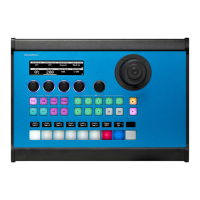

 To Next Page