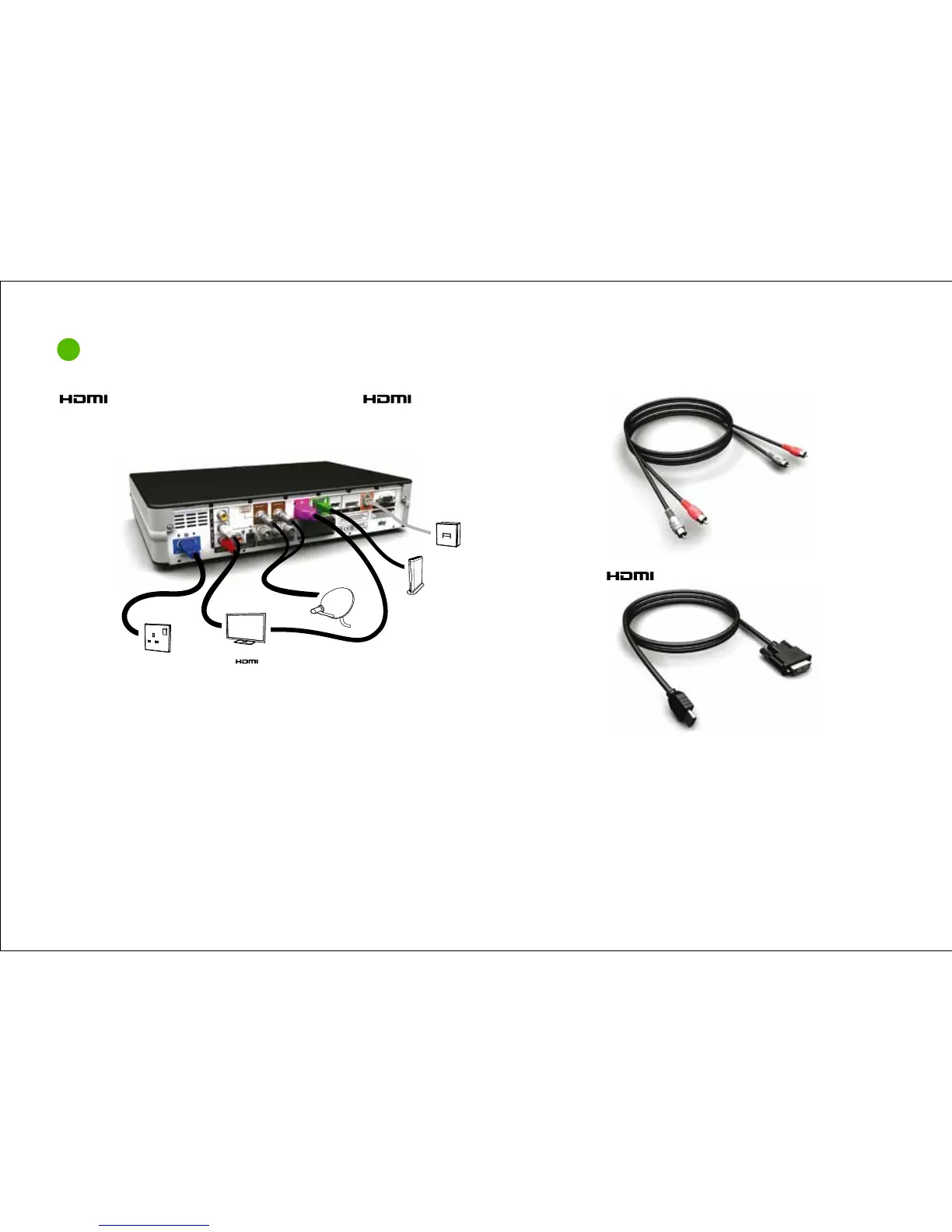
Your Sky±HD box connections
2
Basic set up 2
Audio (L/R) cableIf your TV has a DVI port you need an audio (L/R) cable and an
to DVI lead (or an adapter for the supplied lead).
Mains socket
Minidish
Telephone socket
Broadband router
HDTV
to DVI lead
WARNING!
You must disconnect your Sky±HD box from the mains supply before you connect your Sky±HD box to (or disconnect it from) any other equipment. Use only the supplied
mains lead to connect your Sky±HD box to the mains supply. With the exceptions of the mains and the telephone line, all the interconnections between the rear panel
of your Sky±HD box and your other equipment are safe, extra low voltage circuits. However, you should always disconnect the box from the mains and turn off your TV
before connecting other devices.
When connecting your Sky±HD box to your broadband router via WiFi please ensure you have enabled security on your wireless network and that a strong password
has been set. Please also ensure that you only share your wireless network password with trusted people as connecting your Sky±HD box will allow certain other
devices (with Sky software or applications installed) on your wireless network to access information on your Sky±HD box, such as a list of your Planner recordings.
87



 To Next Page