EasyManua.ls Logo

SkyBell TRIM II PRO - User Manual

SkyBell TRIM II PRO
15 pages
Print Icon
To Next Page IconTo Next Page
Loading...
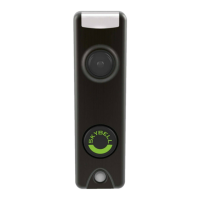
TRIM II PRO
Doorbell Camera
PRODUCT FEATURES
HD VIDEO
See your visitor up to 1080p HD and 5x zoom.
MOTION SENSOR
SkyBell alerts you even if visitor doesn’t press button providing additional
security.

Other manuals for SkyBell TRIM II PRO

Question and Answer IconNeed help?

Do you have a question about the SkyBell TRIM II PRO and is the answer not in the manual?

Summary

SkyBell Trim II Pro Product Features

HD Video

See your visitor up to 1080p HD and 5x zoom.

Motion Sensor

SkyBell alerts you even if visitor doesn't press button providing additional security.

Live Monitoring

Monitor your front door at any time by starting the video from the app.

Free Video Recording

SkyBell can record each video so you download or watch them at any time.

Multiple Users

Multiple people can receive alerts to answer the door and you can have multiple device on each account.

Hear & Speak

2 way audio means you can enjoy a full conversation with your visitor.

Color Night Vision

Feel safe knowing you can see a visitor at night - in full color HD video.

Quiet Mode

Turn off your home's doorbell chime from the app so it won't wake up a baby!

Snap Photos

Capture a photo of your visitor with the touch of a button.

Technical Specifications & Operation

Product Design

Showcases two models of the doorbell camera, TRIM2 S and TRIM2 B.

Technical Specifications

Details power requirements, compatibility, and wiring information for the doorbell.

Wi-Fi and Bandwidth Requirements

Specifies Wi-Fi standards and required upload bandwidth for the device.

Mobile Device Compatibility

States compatibility with Apple iOS and Android devices via the Alarm.com app.

Video and Night Vision Specs

Details video resolution, view angle, and night vision range.

Audio and Motion Sensor Specs

Covers built-in audio features and motion detection capabilities.

Dimensions and Weight

Provides physical measurements and weight of the doorbell camera.

Environment and Compatibility Notes

Specifies operating temperature range and Alarm.com system dependency.

Detailed Motion Sensor Explanation

Explains the Fresnel and PIR sensors for enhanced motion detection accuracy.

Cloud Recording Details

Information on cloud storage, access, fees, and recording activation triggers.

Installation and Troubleshooting

Attaching the Doorbell Mounting Bracket

Instructions for mounting the bracket to the wall using existing wiring.

Connecting Power Wires

Guidance on connecting power wires to the mounting bracket securely.

Attaching the Doorbell Camera

Steps for securing the doorbell camera to the mounted bracket.

LED Colors and Button Functions

Explanation of LED indicators and their meanings for device status.

Battery Charging Status

Details on identifying battery charging status via LED indicators.

Wi-Fi Connectivity Troubleshooting

Guidance on resolving Wi-Fi connection issues using LED indicators.

Entering AP Mode

Procedure for manually placing the doorbell into AP Mode for setup.

Power Cycle Procedure

Instructions on how to perform a power cycle on the doorbell camera.

Factory Reset Process

Steps to perform a factory reset and re-establish Wi-Fi connection.

Online Resources

Links to support resources for troubleshooting and installation.

Regulatory and Safety Information

FCC Compliance Warning

Device compliance with FCC rules and conditions for operation.

FCC Modification Warning

Caution against unauthorized modifications that could void user authority.

Class B Digital Device Limits

Details on FCC limits for residential installations to prevent harmful interference.

Interference Correction Measures

Recommendations for users to correct radio or television reception interference.

FCC Radiation Exposure Statement

Compliance with FCC radiation exposure limits for uncontrolled environments.

Industry Canada Compliance

Device compliance with Industry Canada licence-exempt RSS standards.

RF Exposure Statement

Specifies minimum distance for installation and operation for RF safety.

5.15-5.25 GHz Band Usage Restriction

Restricts operation in the 5.15-5.25GHz band to indoor use only.

Summary

SkyBell Trim II Pro Product Features

HD Video

See your visitor up to 1080p HD and 5x zoom.

Motion Sensor

SkyBell alerts you even if visitor doesn't press button providing additional security.

Live Monitoring

Monitor your front door at any time by starting the video from the app.

Free Video Recording

SkyBell can record each video so you download or watch them at any time.

Multiple Users

Multiple people can receive alerts to answer the door and you can have multiple device on each account.

Hear & Speak

2 way audio means you can enjoy a full conversation with your visitor.

Color Night Vision

Feel safe knowing you can see a visitor at night - in full color HD video.

Quiet Mode

Turn off your home's doorbell chime from the app so it won't wake up a baby!

Snap Photos

Capture a photo of your visitor with the touch of a button.

Technical Specifications & Operation

Product Design

Showcases two models of the doorbell camera, TRIM2 S and TRIM2 B.

Technical Specifications

Details power requirements, compatibility, and wiring information for the doorbell.

Wi-Fi and Bandwidth Requirements

Specifies Wi-Fi standards and required upload bandwidth for the device.

Mobile Device Compatibility

States compatibility with Apple iOS and Android devices via the Alarm.com app.

Video and Night Vision Specs

Details video resolution, view angle, and night vision range.

Audio and Motion Sensor Specs

Covers built-in audio features and motion detection capabilities.

Dimensions and Weight

Provides physical measurements and weight of the doorbell camera.

Environment and Compatibility Notes

Specifies operating temperature range and Alarm.com system dependency.

Detailed Motion Sensor Explanation

Explains the Fresnel and PIR sensors for enhanced motion detection accuracy.

Cloud Recording Details

Information on cloud storage, access, fees, and recording activation triggers.

Installation and Troubleshooting

Attaching the Doorbell Mounting Bracket

Instructions for mounting the bracket to the wall using existing wiring.

Connecting Power Wires

Guidance on connecting power wires to the mounting bracket securely.

Attaching the Doorbell Camera

Steps for securing the doorbell camera to the mounted bracket.

LED Colors and Button Functions

Explanation of LED indicators and their meanings for device status.

Battery Charging Status

Details on identifying battery charging status via LED indicators.

Wi-Fi Connectivity Troubleshooting

Guidance on resolving Wi-Fi connection issues using LED indicators.

Entering AP Mode

Procedure for manually placing the doorbell into AP Mode for setup.

Power Cycle Procedure

Instructions on how to perform a power cycle on the doorbell camera.

Factory Reset Process

Steps to perform a factory reset and re-establish Wi-Fi connection.

Online Resources

Links to support resources for troubleshooting and installation.

Regulatory and Safety Information

FCC Compliance Warning

Device compliance with FCC rules and conditions for operation.

FCC Modification Warning

Caution against unauthorized modifications that could void user authority.

Class B Digital Device Limits

Details on FCC limits for residential installations to prevent harmful interference.

Interference Correction Measures

Recommendations for users to correct radio or television reception interference.

FCC Radiation Exposure Statement

Compliance with FCC radiation exposure limits for uncontrolled environments.

Industry Canada Compliance

Device compliance with Industry Canada licence-exempt RSS standards.

RF Exposure Statement

Specifies minimum distance for installation and operation for RF safety.

5.15-5.25 GHz Band Usage Restriction

Restricts operation in the 5.15-5.25GHz band to indoor use only.

SkyBell TRIM II PRO Specifications

General IconGeneral
BrandSkyBell
ModelTRIM II PRO
CategoryDigital Camera
LanguageEnglish