34
5.7) remote control operation
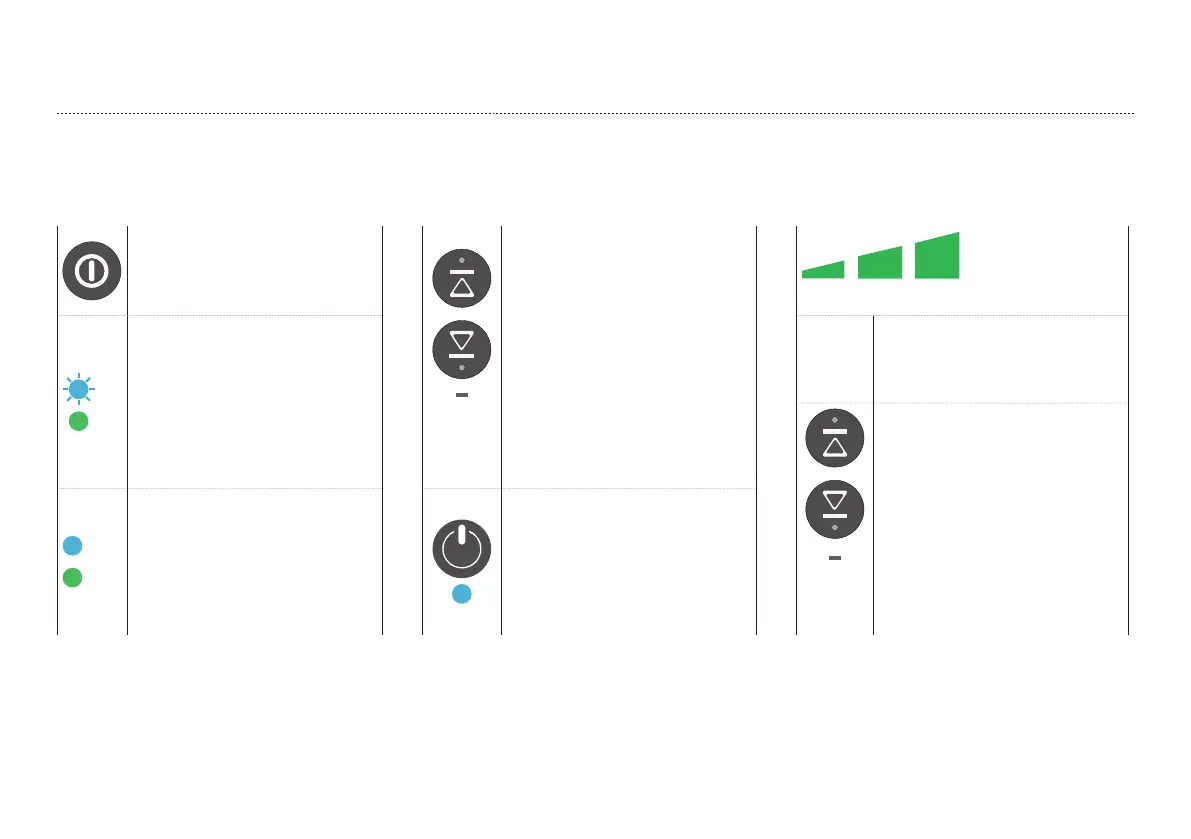
1.
Activation and connection
2. Take control of the Ascender 3. Set the Ascender speed
Activate the Remote Control by
pushing
the Power Button.
Short
press
By pushing either the ‘UP’ or
‘DOWN’ button the Remote
Control will take over the control
of the Ascender and
the Ascender will
stop immediately.
20% 50% 100%
The green ‘power‘
LED will show and the blue ‘link’
LED will
start to blink for a few seconds
whilst a connection is established
with
the Ascender.
Select between 3
speeds in both ascent and
descent: 20%,
50% and 100%.
Short
press
The speeds can be
set by a short push of the ‘UP’ or
‘DOWN’ button and the LED
bar will indicate the selected
speed.
Once connected, the
blue ’LINK’ LED on the Remote
Control will
be lit continuously.
The green LED on
the Ascender will turn blue to
indicate control has been taken
over
by the Remote Control.


 To Next Page
 Loading...