

EasyManua.ls Logo

SkyMate m Series - User Manual

SkyMate m Series
2 pages
Print Icon
To Next Page IconTo Next Page
Loading...
Install Kit #1
1.
Activate your mseries using
https://www.skymate.com/activation
2.
Install the Base Unit
(do not connect power until Step 4).
3.
Install the Keypad.
4.
Install the Smart Antenna with an
unobstructed view of the sky.
5.
Connect the Base Unit to power (within
minutes all indicators should be green).
6.
Wi-Fi connect your UI device to
the Base Unit.
7.
Login with a browser at mseries.online
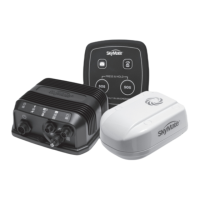
Base Unit (ISI-1600) Power Cable (2m)
+ +
Smart Antenna (IGT-2100) with 10m cable
+
Install Kit #2
+
What’s in the m1600 box?
Quick Start
Install Kit #3Keypad (KPD-110) with Keypad Cable (2m)
2
3
1
Wi-Fi is a register trademark of the Wi-Fi Alliance.
©2017 SkyMate, Inc. All rights reserved.
SkyMate, Inc.
100-11890 Sunrise Valley Drive
Reston, VA 20191, USA
Toll-free: 1-866-SkyMate
Phone: 1-703-961-5800
Email: support@skymate.com
www.skymate.com
Quick
Start
Guide
Power Smart Antenna
Keypad
Self-installation Disclaimer
This product is designed to be DIY installable. It is your responsibility to determine if you have the knowledge, skills and
physical ability required to properly perform an m1600 installation. SkyMate shall have no liability for damage or injury
resulting from the installation or use of any SkyMate products.
Warning
This is a Class A product. In a domestic environment this product may cause radio interference in which case the user may be
required to take adequate measures.
Commercial
Question and Answer IconNeed help?

Do you have a question about the SkyMate m Series and is the answer not in the manual?

Summary

Whats in the m1600 Box

Base Unit

Details the primary m1600 Base Unit component.

Smart Antenna

Describes the included smart antenna with its cable.

Keypad

Details the included keypad and its connection cable.

Quick Start Guide

Activate Your mSeries System

Guide to activating the m1600 system via the web portal.

Install the Base Unit

Instructions for physically installing the Base Unit.

Install the Keypad

Steps for mounting and connecting the Keypad.

Install the Smart Antenna

Guidance on positioning and connecting the Smart Antenna.

Connect Base Unit to Power

Procedure for connecting the Base Unit to a power source.

Wi-Fi Connect Your UI Device

Steps to connect a user interface device via Wi-Fi.

Login to mseries.online

Instructions for accessing the web interface.

Activate Your m1600 System

Get Serial Number and Connect to Internet

Obtaining the serial number and accessing the activation website.

Follow Activation Instructions

Steps to complete the system activation process.

Receive Activation Email

Information about the email received after activation.

Install Your m1600 System

Install the Base Unit

Mounting bracket, securing unit, and connecting power cable.

Install the Keypad

Selecting location, mounting, and connecting the keypad.

Install the Smart Antenna

Mounting options (flush/standard) and connecting antenna.

Power ON Your m1600 System

Connecting power and observing system indicators.

Test Your m1600 System

Wi-Fi Connect to Base Unit

Connecting a device to the m1600's Wi-Fi network.

Send;Receive Test Email

Sending and receiving a test email for verification.

Change;Upgrade Your mSeries System

Change Configuration

Logging in to change system configuration.

Upgrade mSeries System

Instructions for performing recommended system upgrades.

Overview

The SkyMate m1600 is a comprehensive satellite communication system designed for marine environments, offering reliable connectivity for various applications. It is a DIY-installable product, emphasizing ease of setup for users with basic technical knowledge and physical ability.

Function Description:

The m1600 system provides satellite-based communication, primarily for email and potentially other data services, in areas where traditional cellular or internet connectivity is unavailable. It consists of a Base Unit (ISI-1600), a Smart Antenna (IGT-2100), and a Keypad (KPD-110), all working together to facilitate communication. The system allows users to send and receive emails, and potentially access other web-based services through a dedicated web interface. It also includes an SOS function for emergency situations, indicated by dedicated buttons on the Keypad. The system's Wi-Fi capability enables users to connect their computing devices (e.g., smartphones, tablets, laptops) to the Base Unit for configuration, monitoring, and communication.

Important Technical Specifications:

While specific technical specifications like frequency bands, data rates, or power consumption are not explicitly detailed in the provided manual, the components indicate a robust design for marine use.

  • Base Unit (ISI-1600): This is the central processing unit of the system. It connects to the power source, the Smart Antenna, and the Keypad. It features LED indicators on the front panel to show operational status. The Base Unit also hosts the Wi-Fi access point for user device connectivity.
  • Smart Antenna (IGT-2100): This antenna is responsible for satellite signal acquisition and transmission. It is designed for outdoor installation with an unobstructed view of the sky. It can be either flush mounted or attached to a standard 1-inch-14 marine mount. It connects to the Base Unit via a 10m cable, which should not be cut.
  • Keypad (KPD-110): This interface provides user interaction, including SOS buttons and a message waiting light. It connects to the Base Unit via a 2m cable.
  • Power: The system operates on boat battery power, connecting via a Power Cable (2m). An in-line fuse is not required, suggesting internal protection or reliance on the boat's existing electrical system.
  • Wi-Fi: The Base Unit creates a Wi-Fi network with an SSID formatted as "SkyMate + the last six digits of the Base Unit Serial Number." The default 9-digit Wi-Fi password is "000" followed by the last six digits of the SSID.
  • Software Interface: The system utilizes a web-based interface accessible via a browser at mseries.online for configuration and operation. Activation is done online at www.skymate.com/activation.

Usage Features:

  • Easy Activation: The system requires online activation through www.skymate.com/activation using a computing device connected to the internet. Upon activation, users receive an email with their mSeries Credentials (username and password).
  • DIY Installation: The m1600 is designed for self-installation. The manual provides clear steps for mounting the Base Unit, Keypad, and Smart Antenna.
  • Flexible Antenna Mounting: The Smart Antenna offers two mounting options: flush mount or standard 1-inch-14 marine mount, catering to different vessel configurations.
  • Status Indicators: The Base Unit features LED indicators that turn green within 3-10 minutes of power-on, signifying proper operation. The Keypad also has an SOS button that remains dimly lit and a message waiting light that illuminates when new emails are received.
  • Web-based Interface: Users interact with the system through a web browser by connecting to the Base Unit's Wi-Fi network and navigating to mseries.online. This interface allows for sending/receiving emails and system configuration.
  • Email Functionality: The core communication feature is email. Users can send test emails to test@skymate.com to confirm functionality.
  • SOS Function: Dedicated SOS buttons on the Keypad provide immediate access to emergency communication.
  • Configuration Management: Users can change system configurations by logging into my.skymate.com from their computing device.
  • System Upgrade: The system supports upgrades, accessible through the mseries.online interface after connecting to the Base Unit's Wi-Fi.

Maintenance Features:

The manual does not explicitly detail maintenance features, but the design suggests minimal user-level maintenance beyond ensuring proper installation and connectivity.

  • Self-Test on Power-On: The system performs a self-test upon power-on, indicated by the LED status, which helps in initial troubleshooting.
  • Diagnostic Information: The manual mentions that Base Unit LED status descriptions can be found at mseries.online under Systems > Diagnostics > LEDS, providing a resource for diagnosing operational issues.
  • Robust Design: The components are likely designed to withstand marine environments, implying a degree of durability and resistance to elements, though specific IP ratings or material specifications are not provided.
  • Software Updates: The ability to "upgrade the mseries system" suggests that software or firmware updates can be applied, which is a common maintenance practice for improving performance, adding features, or fixing bugs.

Warning: The product is classified as a Class A product. In a domestic environment, it may cause radio interference, requiring the user to take adequate measures. This suggests that while robust, care should be taken regarding its electromagnetic compatibility with other devices, especially in residential or confined spaces.
SkyMate m Series Specifications

General IconGeneral
BrandSkyMate
Modelm Series
CategoryGPS
LanguageEnglish