Q&A
①
Whenwififailsmultipletimes,pleasecheck:
1.IstheWiFitype2.4Gwifi?(Onlysupports2.4Gwifi)
2.IsthelengthoftheWiFipasswordwithin16characters?(Thelengthcannotexceed16characters)
3.Didyouresetandheardtheresetsoundbeforeconnecting?(Theresetissuccessfulifyouhearthesound)
4.Whetherthedevicelightisalwayson(recommendedtobefullychargedtopreventshutdowninthemiddle).
5.WhenscanningtheQRcode,doyouhearsound?(Scanningisonlysuccessfulifyouhearthesound)
Q&A
②
Introduction
Introduction
App registration
App registration
Setting Operation
Operation
Q&A
Q&ASetting
※お買い上げレシートと一緒に保管してください。
製品型番
購入日
Whenwififailsmultipletimes,pleasecheck:
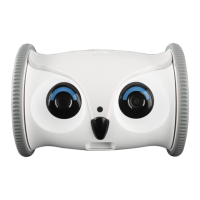
AboutOwlRobotSpeedLimit:
Aboutappvideowithoutcolor:
AboutLowbatteryalert:
1.Whenthenetworkenvironmentofthemobilephoneisthesameasthedevice(samewifi/APmode),
theappcanswitchbetween3speeds.
2.Whenthenetworkenvironmentofthemobilephoneisdifferentfromthatofthedevice,itwillbelimited
toalowspeedtopreventvideosfromfreezingtoensuretheexperience.
Weareevaluatingwhethertoremovethespeedlimit.Ifyouhavebettersuggestions,wewillbehappyto
hearthem.Pleasesendyourcommentstoamzservicea@skymee.com
1.Itmaybethatthesurroundingenvironmentistoodarkandnightvisionisturnedonautomatically.
PleaseclickGeneralSettingsintheupperrightcornerofthevideo.
FindNightVisionandturnitoff,thevideowillreturntonormalcolor.
1.Usearrowbuttons↑↓←→insteadofuniversaldirectionbutton.
2.Youmayaccidentallyhittheactionbuttonwhiledriving.
3.Itmaybethattheproductfallsandthewheelsfail.Pleaserecordavideo,pressandholdthearrow
buttons↑↓←→for5secondseach,andsendthevideotoamzservicea@skymee.com
Aboutsteeringwheelfailure:
Pleaseupdatethefirmwareaccordingtothesteps.
1.OpenOwlRobotsettings-firmwareupgrade-clickthefirmwareserialnumbertoupdate.
2.Aftertheupdate,resettheowlandconnecttoWiFiagain.
Aboutthemappingdirections:
Aboutautomaticcruise:
Aboutbatterylife:
Whentheowlrobotdetectsmovement,itmayautomaticallyactivatefromsleep.
Pleaseconsiderthispowerconsumptionfactor.
Promiseyourprivacy:
Skymeestrictlyabidesbylawsandplatformpolicies,andpromisesusersprivacyandsecurity.
Noneedtohaveanyprivacyconcerns.Owlrobotwillbeactivatedautomaticallywhenit'seyedetectsthe
movingobject.Itisrecommendedtoplacetheowlturntowardstothewallwhennotinuse.
Thecruisepathneedstobesetmanually.Thespecificusageisasfollows:
1.Placethepositioningcardonthegroundandfixit,andplaceowlrobotabovethepositioningcard.
2.Opentheapp'sautomaticcruise,checktheinitialposition,andclickStartplanning.
3.Controlthesteeringwheeltolettheowlrobotwalkapath,clickSavepath.
4.Puttheowlrobotbacktotheanchorpoint,checktheinitialpositionintheapp,andclickthecaricon.
Theowlrobotwillrestorethepathithasjustwalkedasthelowspeed.
Pleasenotethattheowlrobotcanonlyrestore90%ofthecruisepath,not100%accurate.
Opentheupperleftcorner:Controlthefurybone,whichwillswitchtothecontrolinterfaceofourotherproduct.
DrivingOwl:Switchtoappcontroldevice.
Trajectorywalking:Youcansetthewalkingpathoftheowl.Theowlwillmoveaccordingtothelineyoudraw.
Aboutautomaticcruise,theowlcannotreturntoitsoriginalpositionautomaticallyandneedstobeplaced
manually.Thespecificusageisasfollows:
1.Placethepositioningcardonthegroundandfixit,andplaceowlrobotabovethepositioningcard.
2.Opentheapp'sautomaticcruise,checktheinitialposition,andclickStartplanning.
3.Controlthesteeringwheeltolettheowlrobotwalkapath,clickSavepath.
4.Puttheowlrobotbacktotheanchorpoint,checktheinitialpositionintheapp,andclickthecaricon.
Theowlrobotwillrestorethepathithasjustwalkedasthelowspeed.
Pleasenotethattheowlrobotcanonlyrestore90%ofthecruisepath,not100%accurate.
Wewouldsuggestyoudrivetheowlmanuallyorturnonfreewalk.
Trajectorywalkingandautomaticcruiseareonlyusedasauxiliarygames.
Ifyouhaveotherissue,pleasebefreetocontactus.


 To Next Page
 Loading...