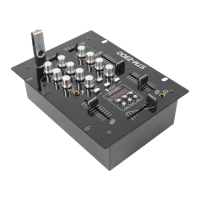
4 - 8
LAYOUT
1. CHANNEL CUE SELECTOR SWITCH
The button allows you to choose which channel you wish to monitor in your headphones by pressing
the buttons down
2. LINE / USB-PHONE INPUT SELECTOR
3. USB INPUT
4. TALKOVER SWITCH
5. MIC VOLUME:
Volume control of the microphone
6. CHANNEL VOLUME FADER
Channel fader will allow you to adjust the volume for that particular Channel selected
7. CROSS-FADER:
Slide for step less cross-fading from one to another assigned channel.
8. PHONO LEVEL
9. OUTPUT METER
VU-meter with LED as indicators for the strength of the output signal
10. MP3 PLAYER
Selects the previous track or volume decreasing. Insert your USB flash drive into this slot. The unit
will only read .mp3 file formats from the USB flash drive.
11. PHONO OUTPUT
12. -15 LINE / PHONO INPUTS
16. MICORPHONE INPUT CONNECTOR
To insert your microphone
Signal to noise ratio:Line
Signal to noise ratio:Phono
Signal to noise ratio:Mic


 To Next Page