3
18
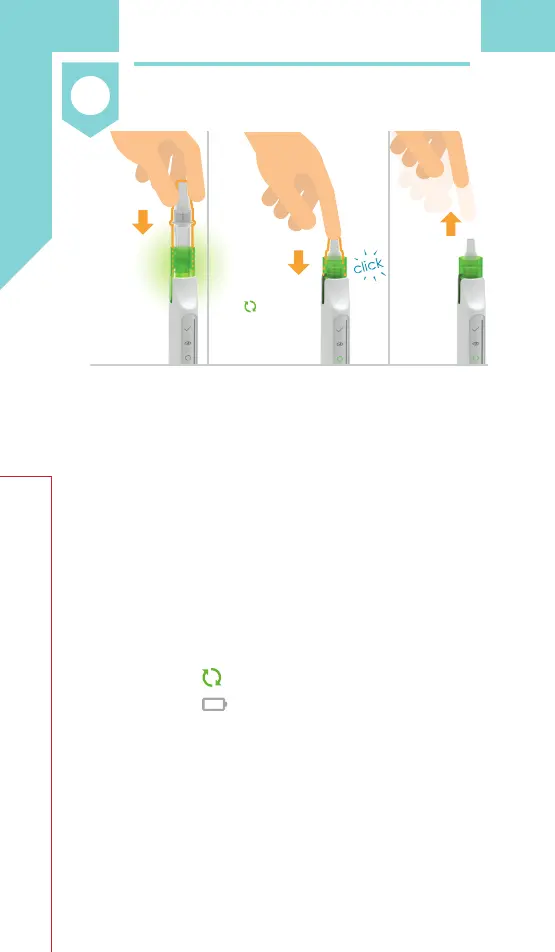
3.1 ,QVHUWWKHFDUWULGJHLQWRWKHŴDVKLQJ
green top by pushing straight down
with the needle cover still on
(see Figure I).
3.2 Click the cartridge into place. Make
sure the cartridge is pushed all the
way down (see Figure J).
• You will hear a click, the green top
ZLOOVWRSŴDVKLQJWKHJUHHQPL[LQJ
icon will light up, and the battery
icon will switch off.
• The cartridge cannot be inserted
when the auto-injector is connected
to the charger.
3.3 $IWHUWKHFOLFNUHPRYH\RXUƓQJHU
from the cartridge (see Figure K).
Prepare
Insert cartridge
Insert
cartridge
into
ŴDVKLQJ
green
top.
Click
cartridge
in place.
(Green top
will stop
ŴDVKLQJPL[LQJ
icon will
light up, and
battery icon
will switch off)
After
click,
remove
ƓQJHU
from
cartridge.
Figure I Figure J Figure K


 To Next Page