5
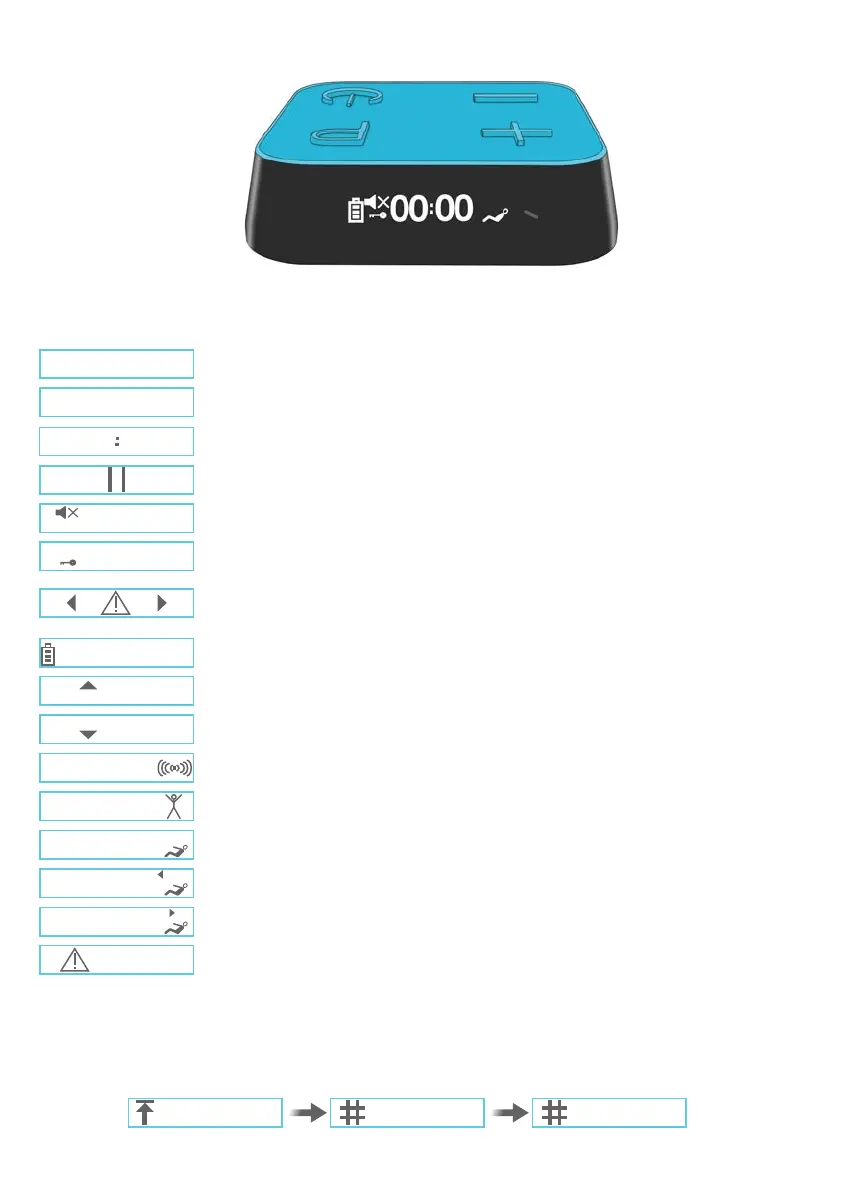
CONTROLLER DISPLAY (ICONS)
Program number
Toning intensity level
Countdown timer
Session is paused
Sound is muted
Keylock is activated. You cannot change intensity levels or program whilst enabled.
Load Sense Warning. Indicates a poor contact between the controller and belt or
between the GelPads and skin (see page 13 for more details)
Battery charging level
Intensity increasing
Intensity decreasing
This indicates each contraction/relaxation phase - Programs 1-7
Activity indicator for cardio activity - Program 8
Activity indicator for active abdominal workout - Program 9
Activity arrow for the left side abdominal crunches - Program 10
Activity arrow for the right side abdominal crunches - Program 10
Error message. Please see troubleshooting (page 13).
The following are the icons which can appear on the screen during the treatment session.
When you switch on your controller, the screen will cycle though the following start-up screens. These indicate
1. Highest intensity reached in the previous session; 2. Number of sessions completed in current
program; 3. Total number of sessions completed. You may skip these by pressing the Program button.
01
P
49
49
23
67
32
49
56
64
53
57
01 0
63
50
2503


 To Next Page