SLENDERTONE REVIVE S5
SLENDERTONE REVIVE S5
CONTROL
CONTROL
UNIT
UNIT
Your
SLENDERTONE REVIVE S5 has been designed
for ease of use. The function of each button
on the control unit is explained below. The
unit emits a high tone for a valid key press
and a low tone for an invalid key press.
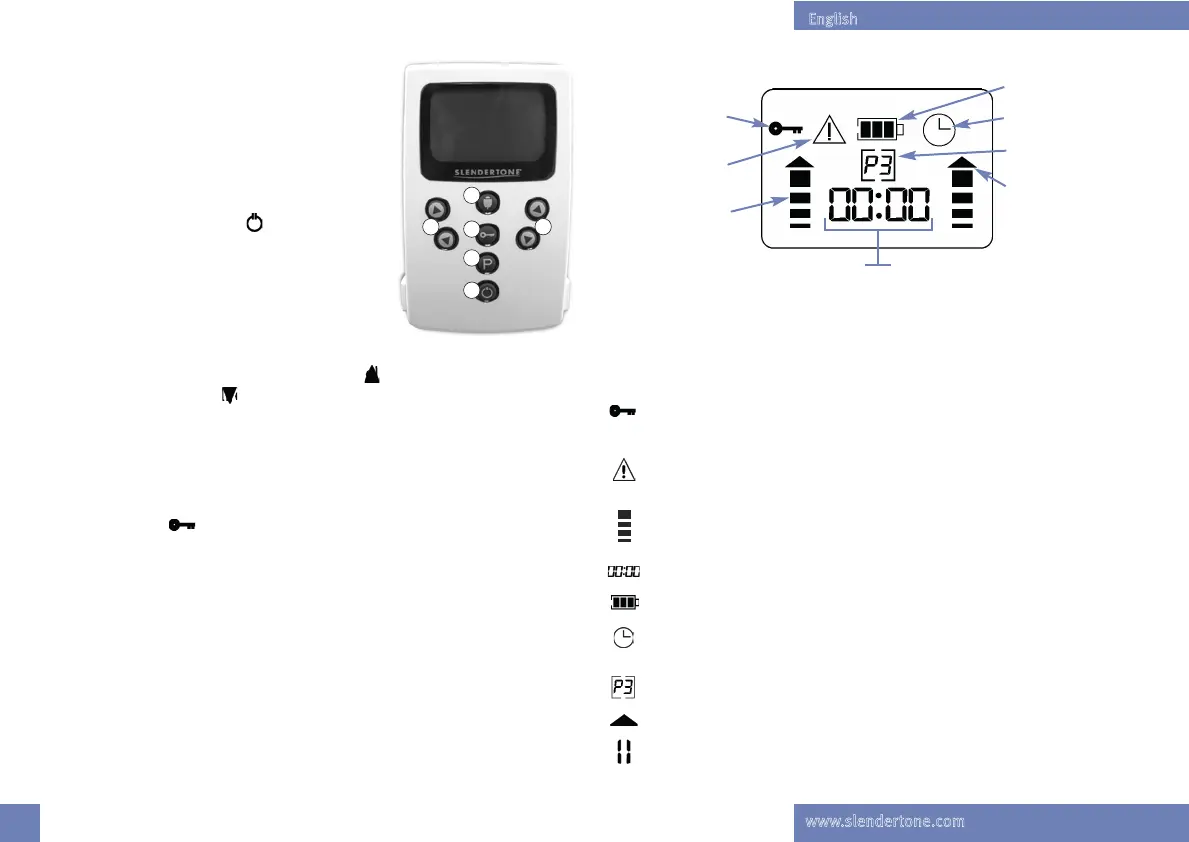
1. On/Off (Pause) Button: ( )
You must press and hold this button for 2
seconds to switch your unit on and off. Pressing
it briefly will pause/resume the session.
2. Intensity Controls:
Each intensity control corresponds to the GelPads on that side of the
unit. Press the upper half of either button ( ) to increase the intensity.
Press the lower button ( ) to decrease the intensity.
3. Program Button: ( P )
The Program button lets you select your required treatment program
(see page 7 for program details).
4. Lock Button: ( )
When you find a suitable intensity level, press the Lock button to lock
the intensity controls, preventing accidental changes in the intensity
level. Press again to unlock the controls. Pressing this button will also
lock the Trigger so that it can’t be used.
5.Trigger:
When the Trigger is pressed, the unit enters a contraction cycle which
continues for as long as the button is pressed. When the button is released
the unit enters a relaxation cycle. To revert to the normal program
parameters, press an intensity key.
SLENDERTONE REVIVE S5 DISPLAY
SLENDERTONE REVIVE S5 DISPLAY
Each
SLENDERTONE REVIVE S5 has a unique display which lets you check the
session time, contraction/ relaxation phases, program number and the
battery status.
1. Lock is active, prevents accidental changes to the intensity
levels.
2. GelPad Contact Indicator, activated when poor lead-to-GelPad
or GelPad-to-skin connection is detected.
3. During a session the intensity bars will rise and fall with the
contraction/relaxation cycle on each channel.
4. Displays the length of time left in the current session.
5. Indicates the battery power remaining.
6. Clock symbol appears when unit is switched on to indicate
your total treatment time to date.
7. Indicates which treatment program you are running.
8. Trigger mode enabled.
9. Pause indicator, appears when a session has been paused.
8
1
3
2
5
2
4
1
2
3
5
6
7
8
4
9
unit. Press the upper half of either button ( ) to increase the intensity.
Each intensity control corresponds to the GelPads on that side of the
English
www.slendertone.com
Slendertone ReVive IM_Layout 1 05/03/2015 14:24 Page 9



 To Next Page