
 Need help?
Do you have a question about the SLIDE SF-206 and is the answer not in the manual?
Instructions on how to remove and detach the wristband from the main device.
Procedure to turn the fitness tracker on or off using the touch sensor.
Guide on how to charge the fitness tracker using the provided USB clamp.
Explanation of how to navigate device functions via the touch sensor.
Instructions for downloading the necessary 'Lefun Health' mobile application.
Steps to activate all device features within the app's health section.
Details on features like Smart Alarm and Message Notification configurable via the app.
How to locate a lost fitness tracker by making it vibrate.
Using the tracker to remotely trigger the phone's camera for photos.
Configuration of sedentary reminders, drinking reminders, and screen gestures.
Option to enable or disable the smart anti-lost security feature.
Information regarding the fitness tracker's resistance to water and sweat.
How to switch between different home screen displays by holding the touch sensor.
Detailed explanation of the step tracking feature and its 24-hour data.
How the device records the duration of physical exercise sessions.
Measures and displays the wearer's resting heart rate in BPM.
Measures the oxygen saturation level in the user's blood.
Measures and displays the user's current blood pressure readings.
Information on extra functionalities like Find Phone, Messages, QR Code, and Power Off.
Steps to enable app-specific features for notifications and reminders.
Instructions to grant necessary permissions for 'Lefun Health' on the phone.
Specifies the acceptable operating temperature range for the device.
Information about the adjustable wristband circumference and fit.
Guidelines for responsible electronic waste disposal and recycling.
Instructions on how to navigate and use the health monitoring section within the app.
Information on travel distance, speed, calories burned, and elevation change.
Explanation of History, Settings, Begin Tracking, and map access for sports.
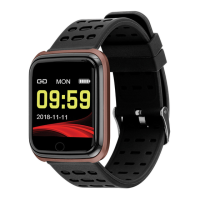
The SLIDE SF-206 is a fitness tracker designed to help users monitor various aspects of their health and activity. This device comes with a detachable wristband and is intended for daily use to track fitness goals and provide health insights.
The primary function of the SF-206 is to track and record a range of fitness and health data. It acts as a pedometer, counting the number of steps taken throughout a 24-hour period. This step count is reset to zero at midnight, providing a daily overview of activity. Beyond steps, the device also records the amount of time the user has exercised, with this data also resetting at midnight.
A key health monitoring feature is the heart rate monitor, which measures the wearer's current resting heart rate and displays it in beats per minute (BPM). This data is saved within the accompanying app for historical tracking. The SF-206 also includes a SPO2 test, which measures the amount of oxygen in the blood. However, it's important to note that SPO2 data is not recorded in the app. Additionally, the device can measure blood pressure, displaying the wearer's current readings. Normal blood pressure is indicated as 120/80 mmHg.
The fitness tracker also incorporates a sleep monitor, which functions when the user is wearing the device while asleep. This feature provides insights into sleep patterns, including awake time, light sleep, and deep sleep durations.
For active tracking, the SF-206, in conjunction with its app, can track various exercise options, including running, badminton, climbing, and bicycling. When tracking is initiated through the app, it records travel distance, speed (in min/km), calories burned, and elevation changes. The app also allows users to set calorie targets and adjust countdown settings for their workouts.
Beyond core tracking, the device offers several additional features to enhance user experience. These include a "Find Phone" function, which can make the connected phone vibrate to help locate it, and a "Message Notification" feature, causing the tracker to vibrate when the user's phone receives a message or call. An "Smart Alarm" feature allows the watch to vibrate at a set time.
The SF-206 is designed for ease of use with a touch sensor for navigation. To power the device on or off, the user simply touches and holds the touch sensor. Available functions are displayed on the screen and can be navigated by touching or touching and holding the sensor.
To fully utilize the SF-206, users must download the "Lefun Health" app using the provided QR code. The app is crucial for enabling all features and accessing detailed data. Before first use, it's essential to enable all features within the app by navigating to the "Health" section, then to the menu in the top left, and selecting both "Band Function Settings" and "Message Reminder." Furthermore, users must ensure that "Lefun Health" has the necessary permissions enabled on their phone, typically found under "Notifications and Accessibility" in the phone's settings, to allow the app to access phone features like messages and calls.
Pairing the fitness tracker with a smartphone is done through the "Lefun Health" app. Users open the app, navigate to the "Health" section, then to the menu, and select "Device Name/Connection Status." The app will request permissions to access phone features, which must be granted for the tracker to function as intended. If the tracker is not immediately visible for pairing, users should ensure it's powered on and then use the "search" button in the app to scan for a signal. Once found, the tracker can be selected from the available list to pair.
The device offers several "Band Function Settings" accessible through the app. These include a "Sedentary Reminder" that warns the user if they remain inactive for too long, and a "Reminder for drinking" that prompts the user to drink water at regular intervals. The "Screen Up Upon Raising" feature allows users to quickly view the time or messages by simply turning their wrist towards them, illuminating the screen for a few seconds without needing to tap or press buttons. A "Smart Anti-lost" setting can also be toggled on or off to help prevent losing the device.
For exercise tracking within the app, users can press a blue icon to immediately begin tracking their route and distance. While tracking, additional icons will appear, and pressing a blue icon again will stop the tracking. The app also provides options to access route tracking via a map. When a workout is initiated, the phone screen will automatically lock. To unlock it, users press an icon and are prompted to "Slide To Unlock." After a workout, users can choose to continue tracking or end the workout, which will record the data in the sports history section of the app.
The app's "Health" section displays "Today's Data," including steps taken, calories burned, distance traveled, hours slept, blood pressure, and heart rate. The "Pedometer" screen shows daily steps, calories burned, and distance traveled, with a graph illustrating activity over time. The "Sleep Monitor" screen provides an overview of sleep duration and quality (awake, light, deep sleep). The "Heart Rate" and "Blood Pressure" screens allow users to initiate measurements directly from the app by pressing "Start To Measure," which activates the tracker's respective monitors.
The "Trend" section of the app provides a summary of steps, mileage, calories, and sleep monitor data over day, week, month, or year views, allowing users to track their progress over time. The "My Data" section allows users to edit personal information, view device information, set fitness targets, access frequently asked questions, and check for updates.
The SF-206 is designed to be water-resistant, rain-proof, and splash-proof, capable of withstanding even sweaty workouts. However, it is explicitly stated that users should not swim or shower with the wristband. While water will not damage the device, it should be thoroughly dried after any contact with water.
Charging the device is straightforward using the provided USB charging clamp. Users should plug the clamp into a USB slot and then clamp the fitness tracker into the charger, ensuring that the charging contacts on both the clamp and the tracker are aligned. It is recommended to charge the device for at least two hours prior to its first use.
To restore the fitness tracker to factory settings, users can navigate to the "About" page on the device, then touch and hold the touch button. A prompt "Long Press Restore Factory Settings" will appear, and holding the touch sensor again will confirm the reset, automatically restoring the device to its original settings.
The wristbands are detachable, and to remove them, users locate the metallic pin on the edge of the wristband where it meets the watch, pull the pin sideways, and the wristband will detach.
The device is designed with an adjustable wristband circumference, fitting wrists between 5.5 and 0.5 inches.
Regarding disposal and recycling, users are responsible for properly disposing of and recycling the SmartWatch and its components. It should not be disposed of with common household waste but rather at a local electronic equipment collection facility, as it is considered electronic waste.
 General
| Category | Fitness Trackers |
|---|---|
| Water Resistance | IP67 |
| Connectivity | Bluetooth 4.0 |
| Model | SF-206 |
| Battery Life | 7 days |
| Compatibility | Android, iOS |
| Activity Tracking | Steps, Calories, Distance, Sleep |

 To Next Page