
 Need help?
Do you have a question about the SLV CONTROL and is the answer not in the manual?
Safety instructions must be read before installation to avoid danger.
Turn off the main power supply before proceeding with the installation.
Detach the current wall switch and disconnect wires before replacement.
Connect the live and neutral wires to the designated terminals.
Connect the neutral and live wires for a 230V motor.
Connect the 24V+ wire and switch wires for 12-24V motors.
Connect the two wires for motors with a momentary switch.
Turn on the main power supply to continue the installation process.
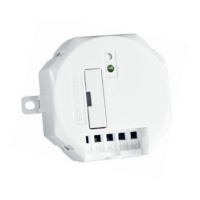
Press the learn-button on the receiver to activate the learning mode.
Send an ON-signal with an SLV transmitter to assign its code.
The LED indicator blinks fast to confirm code reception.
Install the receiver in a standard junction box or housing.
Operate the screen up/down/stop using the SLV transmitter.
Procedure to delete a specific SLV transmitter code from memory.
Procedure to delete all stored transmitter codes from receiver memory.
 General
| Brand | SLV |
|---|---|
| Model | CONTROL |
| Category | Controller |
| Language | English |

 To Next Page