Need help?
Do you have a question about the SM Pro Audio M-Patch and is the answer not in the manual?
Philosophy behind SM ProAudio products guarantees a no-compromise circuit design and employs the best choice of components.
All inputs and outputs are secured firmly to the exterior chassis housing, ensuring robust quality.
Details how to place the M-Patch on a desktop or rackmount it in a standard 19” professional rack.
Explains analog input (Stereo, Aux) and analog output connections on the rear panel.
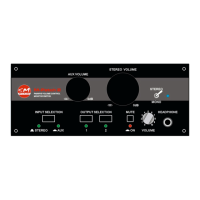
Selects the physical input source (Stereo or Aux) for listening and control.
Provides an on/off mute function to immediately mute all audio from the M-Patch.
Adjusts the monitored output signal level for devices connected to the Aux inputs.
Allows summing a stereo signal to a mono signal for testing purposes.
Enables selection of desired outputs for sending audio to monitors or other devices.
Adjusts the monitored output signal level for devices connected to the stereo inputs.
Guides on using the M-Patch for gain trimming, monitoring, and balancing input sources in a home workstation.
Instructions for buyers to complete and return the warranty card for protection.
Details the mechanical and electronic warranty coverage period and conditions.
Outlines the procedure to obtain warranty service, including contacting SM ProAudio and returning the product.
 General
| Brand | SM Pro Audio |
|---|---|
| Model | M-Patch |
| Category | Recording Equipment |
| Language | English |


 To Next Page