EasyManua.ls Logo

Smart Caregiver 433-MS - User Manual

Smart Caregiver 433-MS
2 pages
Print Icon
To Next Page IconTo Next Page
Loading...
1. Install Batteries into Motion Sensor
Insert 3 new AA batteries into the back of the motion sensor.
Optional AC Adapter is available for purchase.
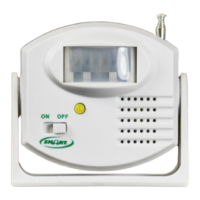
Yellow light = Operational. Red light = Low Battery.
3. Mounting Options: Use provided mounting tape or screws
2. Programming your Motion Sensor
Need Set-up Help?
Call one of our friendly Customer Service
Representatives at (800) 650-3637
1229 North McDowell Blvd, Petaluma, CA 94954
csr@smartcaregiver.com | www.smartcaregiver.com
Toll Free: (800) 650-3637
IMPORTANT INFORMATION: This Smart product uses wireless technology which is subject to physical and environmental
considerations. This product does not have an out of range function and as such should be tested periodically in the setting in which
it is used to verify its area of effective operation. Please be aware that the pager
will not be 100% accurate if it is out of range at anytime.
Wireless systems and monitors are intended as an adjunct to good caregiving practices and are not a substitute for proper staffing
and patient management practices. We recommend that all personnel receive periodic training in the operation of these systems and
that the systems are tested before each use.
WARNING: Failure to comply with warning may result in injury or death. This device is not suitable for all individuals. Other devices
may be required. This device is not a substitute for visual monitoring by caregiver. The manufacturer does not claim that this device
will stop elopement and/or stop falls. This device is designed to augment caregivers’ comprehensive resident mobility management
program. TEST THIS DEVICE BEFORE EACH USE. READ THE INSTRUCTIONS AND LEGAL DISCLAIMER.
The Smart Caregiver Corporation 433-MS Pager is designed to be installed by the end-user. As such, it is the entire responsibility of
the buyer to insure that the system is properly installed and tested. Further, the system is not designed to replace good caregiving
practices including, but not limited to:
A) Direct patient supervision
B) Adequate training for staff personnel for fall prevention and elopement
C) Testing of the system before each use
WHERE PERMISSIBLE, IT IS THE SELLER’S INTENT TO LIMIT ANY LIABILITY FOR SPECIAL, CONSEQUENTIAL OR INCIDENTAL
ECONOMIC DAMAGES TO REFUND OF THE PURCHASE PRICE OR REPLACEMENT OF THE GOODS. SELLER DISCLAIMS ANY LIABILITY
FOR COMPENSATORY OR OTHER DAMAGES ARISING OUT OF THE USE OF THE GOODS.
WARNING: The manufacturer does not claim that this device will stop elopement and/or stop falls. This device is designed to
augment caregivers’ comprehensive resident mobility management program. This product is to be used
by a licensed caregiver only.
LIMITED WARRANTY: Seller warrants that the goods sold will be free from defects of workmanship and manufacturing, for a period
of one year from the date of sale. Other than this limited warranty, seller makes no express or implied warranties. Except for this
limited warranty, NO EXPRESS OR IMPLIED WARRANTIES ARE GIVEN AND NO AFFIRMATION OF SELLER, BY WORDS OR ACTION, WILL
CONSTITUTE A WARRANTY. THE GOODS BEING PURCHASED ARE BEING SOLD ON A “WITH ALL FAULTS” BASIS. THE ENTIRE RISK
AS TO THE QUALITY AND PERFORMANCE OF THE GOODS IS WITH THE BUYER. SHOULD THE GOODS PROVE DEFECTIVE FOLLOWING
THEIR PURCHASE, THE BUYER, AND NOT THE MANUFACTURER, DISTRIBUTOR OR RETAILER, ASSUMES THE ENTIRE COST OF ALL
NECESSARY INSTALLATION, SERVICING OR REPAIRS.
Motion Sensor
433-MS
433-MS 11-10-20
Wall mount use
Test system before each use.
IMPORTANT:
The end user is responsible for testing system at its furthest range of use.
Motion Sensor
Works with 433-EC Fall Alarm or 433-CMU
Central Monitoring Unit
433-MS
ON OFF
Wall mount use
*Must be mounted 6-8
inches from the edge
of the bed to avoid false
detection.
Bed Mounting: Mounting the motion sensor next to the bed you are able to monitor when someone is exiting the bed.
Above Door Mounting: Rotate the motion sensor down so its facing the oor. By mounting the motion sensor above the door
you are able to monitor when someone leaves the room.
To add to your 433-CMU
Turn motion sensor o.
Put the CMU into the “UNLOCK position.
Press and hold the “REPLACE ADD COMPONENTS” button
until you hear 2 dings and a melodic tone; then release.
Quickly press & release “PROGRAM COMPONENTS” and
wait for melodic tone (may take 5-10 seconds.
Turn the motion sensor on.
Wave your hand in front of the motion sensor until the
CMU is activated. This may take 10-15 seconds.
The CMU will speak a number.
Turn motion sensor o.
Wait until you hear the melodic conrmation tone.
Put CMU into the “LOCK position and push reset.
Test.
Programming for use with the 433-EC
Turn motion sensor on.
Use a paperclip or a pointed tool to press and hold the
“Program button within the hole on the back of the
monitor, located under “Program”. When the outer two
LED Lights on the front of the monitor are solid, release
pressure on the button. The lights will remain on to
indicate that the monitor is in programming mode.
Wave your hand in front of the motion sensor until the
lights on the motion sensor blink.
Quickly, press and release the program button on the
back of the monitor. The outer two LED lights will blink to
conrm programming and turn o.
Test.
ON OFF
Red Light indicates
Low Battery

Question and Answer IconNeed help?

Do you have a question about the Smart Caregiver 433-MS and is the answer not in the manual?

Summary

Important Information and Warnings

General Usage Information

Product uses wireless technology, requires periodic testing, and is an adjunct to caregiving practices.

Safety and Liability Disclaimers

Device is not a substitute for visual monitoring and does not stop falls/elopement; seller limits liability.

Limited Warranty Terms

One-year warranty against defects; buyer assumes risk for quality and performance.

Motion Sensor Setup and Operation

Install Batteries

Insert 3 AA batteries; yellow light indicates operational, red light indicates low battery.

Program for 433-CMU

Steps to program the motion sensor to communicate with the 433-CMU Central Monitoring Unit.

Program for 433-EC

Steps to program the motion sensor to communicate with the 433-EC Fall Alarm.

Mounting Options

Bed mounting next to bed or above door mounting to monitor room exit.

FCC Compliance

FCC Warning Statement

Device complies with Part 15, may not cause interference, and must accept received interference.

Radiation Exposure Statement

Equipment complies with FCC radiation exposure limits set forth for an uncontrolled environment.

Overview

The Smart Motion Sensor (Model 433-MS) is a wireless device designed to enhance fall prevention and anti-wandering solutions, primarily for use in caregiving environments. It operates wirelessly and is compatible with the 433-EC Fall Alarm and the 433-CMU Central Monitoring Unit.

Function Description:

The motion sensor detects movement within its range and transmits a signal to a connected alarm or monitoring unit. This allows caregivers to be alerted when a resident exits a bed, leaves a room, or moves in a way that might indicate a fall risk or wandering behavior. The device is intended as an adjunct to good caregiving practices and not a substitute for direct patient supervision or adequate staffing.

Important Technical Specifications:

  • Wireless Technology: Operates using wireless technology, which is subject to physical and environmental considerations.
  • Power Source: Requires 3 new AA batteries for operation. An optional AC adapter is available for purchase.
  • Indicators:
    • Yellow light: Indicates operational status.
    • Red light: Indicates a low battery condition.
  • Compatibility: Works with 433-EC Fall Alarm and 433-CMU Central Monitoring Unit.

Usage Features:

Installation:

  1. Battery Installation: Insert 3 new AA batteries into the back of the motion sensor.
  2. Mounting Options:
    • Bed Mounting: Mount the motion sensor next to the bed to monitor when someone is exiting the bed. It must be mounted 6-8 inches from the edge of the bed to avoid false detection.
    • Above Door Mounting: Rotate the motion sensor downwards, facing the floor. This allows monitoring when someone leaves the room.
    • The device can be mounted using provided mounting tape or screws.

Programming:

To add to your 433-CMU (Central Monitoring Unit):

  1. Turn the motion sensor off.
  2. Put the CMU into the "UNLOCK" position.
  3. Press and hold the "REPLACE ADD COMPONENTS" button on the CMU until two dings and a melodic tone are heard; then release.
  4. Quickly press and release "PROGRAM COMPONENTS" on the CMU and wait for a melodic tone (this may take 5-10 seconds).
  5. Turn the motion sensor on.
  6. Wave your hand in front of the motion sensor until the CMU is activated (this may take 10-15 seconds).
  7. The CMU will speak a number.
  8. Turn the motion sensor off.
  9. Wait until a melodic confirmation tone is heard.
  10. Put the CMU into the "LOCK" position and push reset.
  11. Test the system.

Programming for use with the 433-EC (Fall Alarm):

  1. Turn the motion sensor on.
  2. Use a paperclip or a pointed tool to press and hold the "Program" button located within the hole on the back of the monitor.
  3. When the outer two LED lights on the front of the monitor are solid, release pressure on the button. The lights will remain on to indicate that the monitor is in programming mode.
  4. Wave your hand in front of the motion sensor until the lights on the motion sensor blink.
  5. Quickly, press and release the program button on the back of the monitor.
  6. The outer two LED lights will blink to confirm programming and then turn off.
  7. Test the system.

Important Usage Notes:

  • The device does not have an out-of-range function and should be tested periodically in its intended setting to verify effective operation. The pager may not be 100% accurate if out of range.
  • Wireless systems and monitors are intended as an adjunct to good caregiving practices and are not a substitute for proper staffing and patient management practices.
  • All personnel should receive periodic training in the operation of these systems, and the systems should be tested before each use.
  • This device is not suitable for all individuals, and other devices may be required.
  • It is not a substitute for visual monitoring by a caregiver.
  • The manufacturer does not claim that this device will stop elopement and/or falls. It is designed to augment caregivers' comprehensive resident mobility management programs.
  • This product is to be used by a licensed caregiver only.
  • The end user is responsible for testing the system at its furthest range of use. Test the system before each use.

Maintenance Features:

  • Testing: Regular testing of the system is crucial to ensure proper functionality, especially before each use and periodically to verify its effective operating range.
  • Battery Replacement: The red light indicator signals a low battery, prompting replacement of the AA batteries.

Safety and Compliance:

  • FCC Warning: Any changes or modifications not expressly approved by the party responsible for compliance could void the user's authority to operate the equipment. The device complies with part 15 of the FCC Rules, meaning it will not cause harmful interference and must accept any interference received.
  • FCC Radiation Exposure Statement: This equipment complies with FCC radiation exposure limits set forth for an uncontrolled environment.

Limited Warranty:

The seller warrants that the goods sold will be free from defects of workmanship and manufacturing for a period of one year from the date of sale. Beyond this, no other express or implied warranties are given. The goods are sold "with all faults," and the buyer assumes the entire risk regarding quality and performance. If the goods prove defective, the buyer, not the manufacturer, distributor, or retailer, assumes the entire cost of necessary installation, servicing, or repairs. The seller's liability for special, consequential, or incidental economic damages is limited to a refund of the purchase price or replacement of the goods. The seller disclaims any liability for compensatory or other damages arising from the use of the goods.

Smart Caregiver 433-MS Specifications

General IconGeneral
BrandSmart Caregiver
Model433-MS
CategoryAccessories
LanguageEnglish