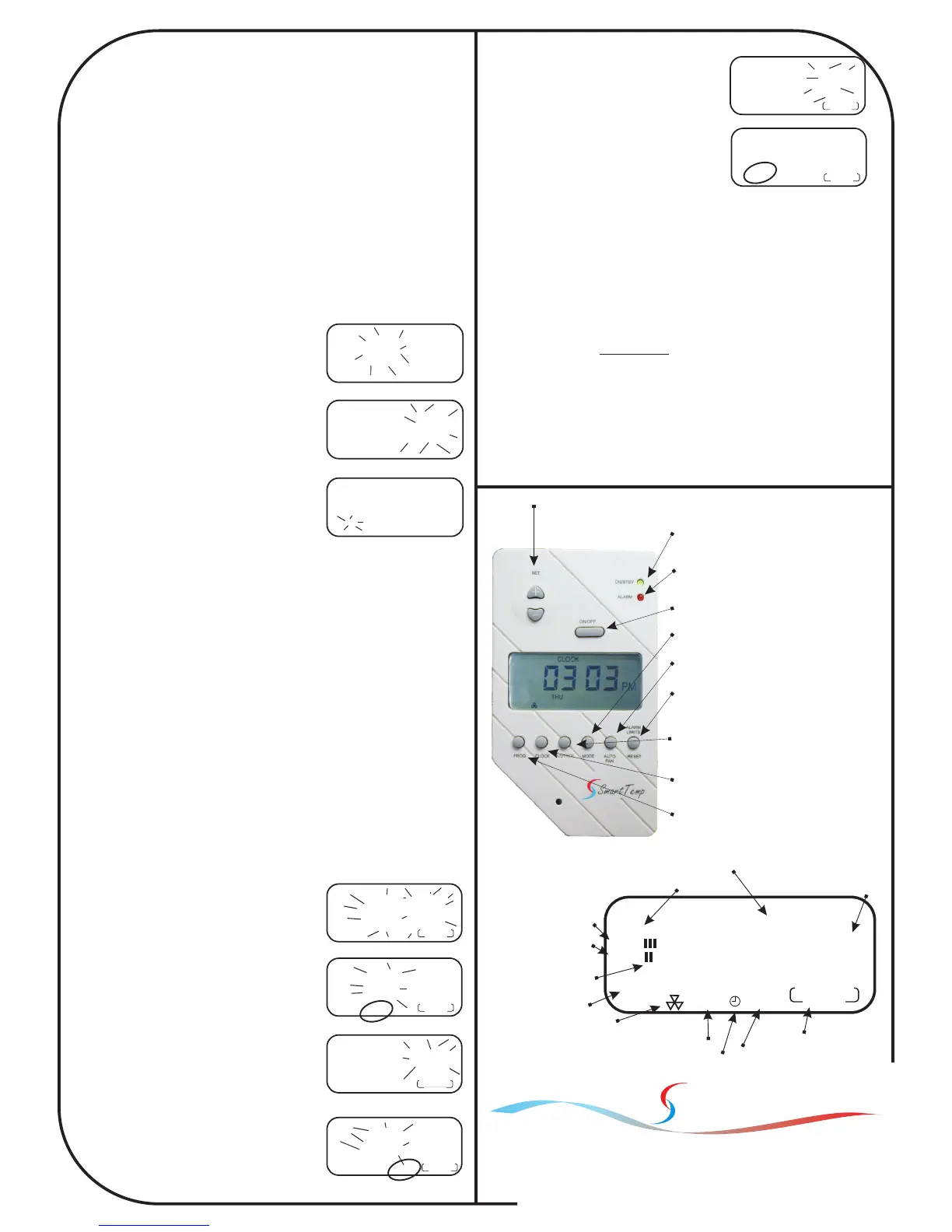
ALARM
Indicates Over / Under Temperature alarm active.
Indicates Equipment Fault.
ON/STB
Indicates System Status
Indicates Comp Protection delay active.
ALARM LIMITS / RESET
Used to Reset Over/Under Temp alarms.
Used to enter Lock / Unlock mode.
Used to acknowledge equipment fault
AUTO FAN
Used to Select Auto or Manual Fan mode.
MODE
Used to select Heat, Cool, Auto or Fan Only Mode.
CLOCK
Used to set the ISIS Real Time clock.
PROG
Used to program the ISIS start and Stop times.
Used to Toggle between Program & Manual Modes.
OVERRIDE
Used to toggle the Two Hour System Run Override
SET
Used to adjust the desired or “set” temperature.
ON / OFF
Toggles the ISIS between on and off modes.
Programming your ISIS
Setting the Desired Temperature
Use the SET + button to increase the desired room temperature. Use the
SET - button to decrease the desired room temperature. While pressing
these buttons the ISIS will display both the SET temperature and the
current room temperature on the LCD. Normally the ISIS display will
alternate between Temperature Display & Time display.
Setting the Clock
Please note. During programming and set up, the ISIS will resume normal
mode if no buttons are pressed for 15 seconds. This is an important
consideration during set up of the ISIS as if there is to long a period
between pressing buttons the thermostat will return to normal mode forcing
you to commence the programming procedure from the start.
As the ISIS can operate as a programmable thermostat it is essential that
the clock is set correctly otherwise the ISIS will not operate the AC system
at the desired times.
1 Press the CLOCK button once. The
Hours will flash in the LCD. Using the Set
+ or SET - button adjust the hours to the
correct time making sure that the AM or
PM (if in 12 hour mode) indicator is
correct. (Pict 2)
2 Press the CLOCK button again. Now the
minutes flash in the LCD. Using the Set +
or SET - button adjust the minutes to the
correct time. (Pict 3)
3 Press the CLOCK button again. Now the
day of the week flash in the LCD. Using
the Set + or SET- button adjust the day
indication to the correct day. (Pict 4)
4 Press the Clock button once again. The
ISIS clock is now set.
Programming the ISIS to turn on and off at your required times.
Please note. During programming and set up, the ISIS will resume normal
mode if no buttons are pressed for 15 seconds. This is an important
consideration during set up of the ISIS as if there is to long a period
between pressing buttons the thermostat will return to normal mode forcing
you to commence the programming procedure from the start.
The ISIS is a 7 day programmable thermostat. Each day of the week can
have a different start and stop time for each of the program “starts” and
program “stops”. For example, the ISIS can turn the AC system on at 9:30
am Sunday and off again at noon Sunday.
For simplicity, your ISIS has a default factory installed program of 7:30 AM
Start ~ 5:00 PM Stop Monday to Friday. This default program may be
modified if required
To program the ISIS
1 Press the PROG button and the time will flash in the LCD. Monday
is displayed and the program indicator on the lower right of the LCD
is on. (Pict 5)
2 Press the PROG button again, The Hour flashes, START and
Program 1 is displayed. Note that
Monday is displayed indicating that this
days program is being set. Press the
Set + or SET - button to adjust the hours
to the time you want the ISIS to turn the
AC system on during Monday. (Pict 6)
3 Press the PROG button again, Now the
Minutes flash, Press the Set + or SET -
button to adjust the minutes to the time
you want the ISIS to turn the AC system
on. (Pict 7)
4 Press the PROG button; the Hour
flashes again but this time the word
STOP is displayed in the LCD. Using the
Set + or SET - button adjust the hours to
the time you wish the ISIS to turn the AC
system OFF. (Pict 8)
5 Press the PROG button again and the
minutes flash. Using the Set + or SET -
button adjust the minutes to the time you
wish the ISIS to turn the AC system OFF.
(Pict 9)
6 Press the PROG button again; the
Hour flashes again with the
word START shown in the
07
00
CLOCK
AM
Pict 2
07
26
CLOCK
AM
Pict 3
07
26
CLOCK
TUE
AM
Pict 4
09
26
SET
MON
TUE WED
THU FRI
SAT SUN
PM
1 2 3 4
PROGRAM
06
00
SET
MON
AM
START
06
42
SET
MON
AM
START
08
00
SET
MON
AM
STOP
Pict 5
Pict 6
Pict 7
Pict 8
1 2 3 4
PROGRAM
88
88
SET
CLOCK TEMP
MON
TUE WED
THU FRI
SAT SUN
HEAT
COOL
AUTO FAN
AM
PM
START
STOP
Time & Temperature Display
AM/PM Indicator
(Not used in 24 Hour clock mode)
Fan only mode indicator
Day indicator
Heat mode indicator
Auto Fan on indicator
Cool mode indicator
Stage indicators
Program Indicator
(Flashes when in override mode)
Program Start Indicator
Program Stop Indicator
Current Program running
Note: Both HEAT and
COOL on together
indicates Auto Change-
over mode on.
Unit 20, 1488 Ferntree Gully Road
Knoxfield 3180 Victoria Australia
Phone:(03) 9763 0094 Fax (03) 9763 0098
www.thermostat.com.au
1
PROGRAM
1
PROGRAM
1
PROGRAM
LCD but this time we are adjusting the
Start time for the Tuesday program.
7 Repeat steps 2 through 6 to adjust the
hours and minutes of the remaining
Monday to Sunday start and stop
times. (Pict 10)
Should you wish the ISIS to remain in the
OFF mode completely for one day
(I.E. Sunday) set the Start & Stop times to
the same value.
TIP: Press the clock button to advance rapidly through the days while in
program mode.
Please note. The ISIS is able to operate as a manual (non
programmable thermostat) or as a 7 day programmable thermostat as
previously described.
To operate the ISIS in Non Program or manual mode (Not under any
automatic time clock control) press and hold the PROG button for 5
seconds. When the ISIS is running in non program mode the program
indicator in the lower right of the ISIS LCD will be missing. This ISIS can
then be manually turned off and on when required with the ON/Off button.
To reactivate program mode simply press and hold the “prog” button for 5
seconds until the Program indicator is active.
08
32
SET
MON
AM
STOP
1 2
03
SET
TUE
PM
START
Pict 9
Pict 10
1
PROGRAM
1
PROGRAM
Smart Temp
Australia
Making Life Comfortable
Ver 06-07



 To Previous Page
 Loading...







