Quick Start Instructions
TL-2100G
Need Set-up Help? (800) 650-3637
To Set Fall Monitor, position switches as desired using
chart shown below. Use a pen point to adjust settings.
VolumeProgram
Button
Decrease
Increase
Tones
Tone 3
Tone 2
Tone 1
Test the system. (A) Put pressure on the sensor pad to activate the pad and
fall monitor. The fall monitor will beep two times to indicate that the sensor
pad and fall monitor are in use. The “Status/In Use” light will blink while
pressure remains on the pad. (B) When pressure is removed, the fall monitor
will sound the alert tone. Press the Reset button to silence the alert .
Important Information:
Smart CordLess® products utilize wireless technology which is subject to
physical and environmental considerations. These products must be tested
by the end user before each use in the setting in which they are to
be used. Please be aware that the transmitter will not be 100% accurate if
it is out of range at any time. Wireless systems and monitors are intended as
an adjunct to good caregiving practices and are not a substitute for proper
stang and patient management practices. We recommend that all personnel
receive periodic training in the operation of these systems and that the
systems are tested before each use.
Install Battery, Adjust Settings
1
Test the System - Floor Mats
3
Test the System - Pressure Pads
2
The TL-2100G CordLess® Monitor may be placed up to apporoximately
100 feet from the CordLess sensor pad.
Mounting hardware is included for bed or wall mounting.
Note: Other mounting options are available.
Call 800-650-3637 for more information.
Mounting the TL-2100G
4
A.
B.
Reset
Button
Reset
Button
CordLess® Floor Mat
FMT-07C
Reset
Low Battery
Status/
In Use
Check
Pad
Reset
Low Battery
Status/
In Use
Check
Pad
Reset
Low Battery
Status/
In Use
Check
Pad
Insert battery as shown.
The black ribbon should be under
the battery for easy removal.
TL-2100G settings: Volume, Tone
Close the battery door and secure
it with the small Phillips-head
screw.
Place the TL-2100G in its
protective plastic boot.
Step on the oor mat.
The alert will sound. Press the Reset button to silence and reset the monitor.
Resetting the Monitor/ Tamper Proof
™
Mode with Caregiver Key
™
(Optional)
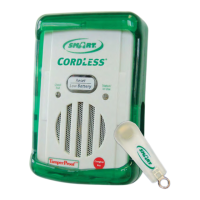
Caregivers can choose to reset the
TL-2100G in either of two ways:
1. Pressing the Reset/Low Battery
button on the front of the monitor
(“Reset Button ON” mode).
2. Placing the optional Caregiver Key™
over the red dot on the front of the
monitor. (“Caregiver Key™ ON” mode).
This mode allows only the caregiver to
reset the monitor.
Select either “Reset Button ON” or
“Caregiver Key™ ON” with the switch
on the side of the Fall Monitor.
For more information about the
Caregiver Key™ and how it can be
used in your facility’s Fall Assessment
Program call 800-650-3637
When using “Reset Button ON” Mode
Press the Reset/Low Battery button to
reset the monitor.
When using “Caregiver Key™ ON” Mode
Place the Caregiver Key™ over the red dot to reset
the monitor.
Alert Tone/Melody Adjustment
Default Setting: Tone 1
Alert Volume Dial
Default Setting: Full Volume
Program Button
To program monitor to
a new sensor pad
S M A RT C A R E G I V E R C O R P O R AT I O N
Tel: 800-650-3637 | www.smartcaregivercorp.com


 To Previous Page
 Loading...