
 Need help?
Do you have a question about the SMART Cordless TL-2100G and is the answer not in the manual?
How to test the bed sensor pad system for activation and alerts.
Instructions on where to place the bed sensor pad for optimal detection.
How to test the chair sensor pad system for activation and alerts.
Instructions on where to place the chair sensor pad for optimal detection.
How to test the floor mat system for activation and alerts.
Instructions on where to place the floor mat for optimal detection.
How to attach and position the seat belt for monitoring.
How to test the seat belt system for activation and alerts.
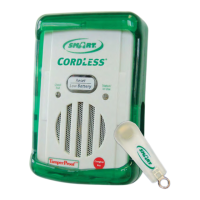
The TL-2100G CordLess® Fall Monitor is a wireless fall monitoring system designed to enhance patient safety and provide caregivers with timely alerts. This device utilizes wireless technology to connect with various sensor pads, eliminating the need for cords and reducing trip hazards. The system is designed to be tested by the end user before each use to ensure optimal performance in its specific environment.
The primary function of the TL-2100G CordLess® Fall Monitor is to detect when a patient attempts to exit a bed, chair, or other designated area and to alert caregivers. This is achieved through the use of various sensor pads, including bed sensor pads, chair sensor pads, and floor mats, which wirelessly communicate with the main monitor unit. When pressure is applied to or removed from a sensor pad, the monitor triggers an alert, notifying caregivers of potential patient movement or falls.
The monitor features a "Status/In Use" light that blinks when a sensor pad is active, indicating that the system is engaged and monitoring. If a patient attempts to exit a bed or chair, or steps on a floor mat, the monitor will sound an alert tone. The system also includes a "Check Pad" light that illuminates if the sensor pad is not properly connected or is out of range, ensuring that caregivers are aware of any potential communication issues. A "Low Battery" light indicates when the monitor's battery needs to be replaced, ensuring continuous operation.
The TL-2100G CordLess® Fall Monitor can be integrated into a facility's nurse call system, allowing alerts to be transmitted directly to the nurse station or other designated caregiver devices. This integration enhances response times and ensures that caregivers are promptly notified, even when not in the immediate vicinity of the patient. The monitor also features an adjustable alert tone and volume, allowing caregivers to customize the alert settings to suit their preferences and the patient's environment.
The TL-2100G CordLess® Fall Monitor is designed for ease of use and versatility in various care settings. To begin, a 9V battery is installed into the monitor, ensuring the black ribbon is under the battery for easy removal. The monitor is then placed in its protective plastic boot.
Testing the system is a crucial step before each use. For pressure pads, caregivers apply pressure to the sensor pad, which activates the pad and the fall monitor. The monitor will beep twice, and the "Status/In Use" light will blink. When pressure is removed, the monitor will sound an alert tone, which can be silenced by pressing the "Reset" button. For floor mats, stepping on the mat will trigger an alert, which can also be silenced by pressing the "Reset" button. This testing ensures that the wireless connection between the sensor pad and the monitor is functioning correctly.
The monitor offers flexible mounting options. It can be placed up to approximately 100 feet from the CordLess sensor pad, providing caregivers with freedom in monitor placement. Mounting hardware is included for bed or wall mounting, and other mounting options are available.
The TL-2100G CordLess® Fall Monitor also features a "Tamper Proof™ Mode with Caregiver Key™" (optional), which allows caregivers to reset the monitor in two ways. The first method involves pressing the "Reset/Low Battery" button on the front of the monitor ("Reset Button ON" mode). The second method involves placing the optional Caregiver Key™ over the red dot on the front of the monitor ("Caregiver Key™ ON" mode). This mode ensures that only authorized caregivers can reset the monitor, preventing unauthorized tampering. Caregivers can select either "Reset Button ON" or "Caregiver Key™ ON" using a switch on the side of the fall monitor.
The system is designed to be an adjunct to good caregiving practices and not a substitute for proper staffing and patient management. It is important to note that wireless technology is subject to physical and environmental considerations, and the transmitter may not be 100% accurate if it is out of range.
Regular maintenance of the TL-2100G CordLess® Fall Monitor primarily involves battery replacement and periodic testing. The "Low Battery" light on the monitor indicates when the 9V battery needs to be replaced. To replace the battery, the battery door is opened, the old battery is removed, and a new 9V battery is inserted, ensuring proper polarity. The battery door is then closed and secured with a small Phillips-head screw.
The sensor pads and floor mats should be regularly inspected for any signs of wear or damage. If a "Check Pad" light illuminates on the monitor, it indicates that the sensor pad is not properly connected or is out of range. Caregivers should check the connection of the sensor pad to the transmitter and ensure that the pad is within the effective range of the monitor. If the issue persists, the sensor pad may need to be replaced.
The monitor and sensor pads should be kept clean. Regular cleaning with a mild disinfectant can help maintain hygiene and ensure the longevity of the device. It is important to avoid using harsh chemicals or abrasive cleaners that could damage the device's components.
Periodic training for all personnel on the operation of the system is recommended to ensure proper usage and to maximize the effectiveness of the fall monitoring system. This includes understanding how to install the battery, test the system with various sensor pads, and reset the monitor.
The manufacturer provides a limited warranty against defects in workmanship and manufacturing for a period of one year from the date of sale. This warranty covers repairs or replacement of defective units but does not cover damage resulting from misuse, abuse, or unauthorized modifications. It is important to retain proof of purchase for warranty claims.
For any issues or questions regarding the device, technical support is available via phone. This ensures that caregivers can receive prompt assistance and troubleshooting guidance, helping to maintain the system's functionality and reliability.
 General
| Display | LCD |
|---|---|
| Product Type | Thermometer |
| Measurement Method | Infrared |
| Measurement Range | 32.0°C - 42.9°C (89.6°F - 109.2°F) |
| Accuracy | ±0.2°C (±0.4°F) |
| Measurement Distance | 1-5 cm |
| Battery Type | 2 x AAA batteries |
| Auto Power Off | Yes |
| Memory Function | Yes |

 To Next Page
