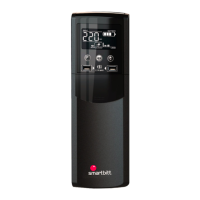
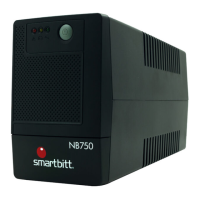
This document describes the Smartbitt Gamer UPS (Uninterruptible Power Supply), a line-interactive sinewave UPS designed to protect personal computers and sensitive electronic equipment from power interference and failures.
Function Description
The Smartbitt Gamer UPS provides battery backup, EMI filtering, line conditioning, and surge protection. It automatically supplies power in case of a power failure and offers surge protection for connected devices. It also includes features for monitoring and controlling the UPS via a USB communication port and optional HID functionality for safe shutdown during power failures without dedicated monitoring software.
Important Technical Specifications
The manual provides specifications for the Model 1800:
- Capacity: 1800 VA / 900 W
- Input Voltage: 110/120 VAC
- Input Voltage Range: 81~145 VAC
- Output Voltage Regulation: +/-10% (Battery Mode)
- Transfer Time: Typical 6 ms, 10 ms max.
- Waveform: Pure Sine Wave
- Battery Type & Number: 12 V/9 AH x 2
- Charging Time: 6-8 hours to recover to 90% capacity
- Dimension (DxWxH): 430 x 99 x 280 mm
- Net Weight: 13.8 kgs
- Humidity: 0-90 % RH @ 0-40°C (non-condensing)
- Noise Level: Less than 45 dB @ 1 meter
Usage Features
Installation:
The UPS should be placed on a flat, clean surface, away from vibration, dust, humidity, high temperatures, flammable liquids and gases, and corrosive/conductive contaminants. It requires a well-ventilated indoor environment, away from windows and doors. A minimum clearance of 100mm in front and 300mm in the back and sides is recommended for heat dissipation and maintenance.
Altitude Derating:
For normal operation at full load, the UPS requires a maximum altitude of 1000m. In high-altitude areas, the connected load must be reduced according to the following derating factors:
- 1 000 m: 1.0
- 1 500 m: 0.95
- 2 000 m: 0.91
- 2 500 m: 0.86
- 3 000 m: 0.82
- 3 500 m: 0.78
- 4 000 m: 0.74
- 4 500 m: 0.7
- 5 000 m: 0.67
This derating is based on the density of dry air (1.225 kg/m3 at sea-level, +15°C) and accounts for reduced fan efficiency at higher altitudes.
Connections:
- UPS Input: Plug the UPS into a two-pole, three-wire, grounded receptacle. Avoid extension cords. Charge the battery for at least 5 hours before initial use.
- Battery Backup Outlets (5): Connect computers and monitors to these outlets for battery backup, EMI filtering, line conditioning, and surge protection.
- Surge-Protected Outlets (5): Connect printers, fax machines, or scanners to these outlets for surge protection only (no power during power failure). CAUTION: Never connect laser printers or scanners to battery backup sockets due to high power draw.
- Modem/Phone Line/Network Surge Protection: Connect a modem/phone line to the "IN" outlet and then from the "OUT" outlet to the computer.
- Communication Port & Software: Connect a USB cable from the UPS to a PC. Download ViewPower software from http://www.power-software-download.com for monitoring and control.
- Optional HID Function: If equipped, connecting the UPS via USB to a Windows PC allows for safe shutdown during power failure without additional software.
Operation (Buttons):
- ON/OFF: Press and hold for 2 seconds to turn on/off. Hold for 10 seconds to reset the unit (communication failure between remote panel and UPS). Quick press 5 times to reset pairing (wireless transmission failure).
- MUTE: Press and hold for 2 seconds to enable/disable mute function.
- UP/DOWN: Press and hold for 0.5 seconds to switch display information. Press and hold for 2 seconds to enter the setting menu.
Remote Panel Operation:
The LCD panel can be removed from the base and placed nearby (up to 6m) when playing PC games. The remote panel has a NiMH battery that charges when docked. When the battery capacity is low, an icon will flash to remind users to charge the panel.
LCD Display Information:
The LCD displays various information, including:
- Configuration and fault information: Indicates fault or warning codes (e.g., E14).
- Mute operation: Indicates if the UPS alarm is disabled.
- Input, Battery, Backup time, Output & Load information: Input voltage, input frequency, battery voltage, battery capacity, backup time, output voltage, output frequency, load capacity, load percentage, NiMH battery level, PC CPU speed, PC CPU temperature, and PC CPU load percentage.
- Load information: Load level (0-24%, 25-49%, 50-74%, 75-100%) or overload alarm.
- Mode operation information: UPS operating mode (Line, AVR, Battery), LED bar setting, PC CPU temperature/alarm level, PC CPU speed/load, wireless connection status, remote panel docking status.
- Battery information: UPS battery level (0-24%, 25-49%, 50-74%, 75-100%), "LOW BATT" icon when low, NiMH battery level of remote panel.
- LCD backlight: Automatically shuts off after 1 minute of inactivity (30 seconds when panel is removed from docking base), except during UPS fault.
Audible Alarms:
- Overload: Sounding every 0.5 seconds
- Low battery: Sounding every second
- Overcharge: Sounding every 1.5 seconds
- Battery replacement: Sounding every 2 seconds
- Battery mode: Sounding every 10 seconds
- Fault: Continuously sounding
LCD Setting Programs:
The UPS offers various settings accessible via the UP/DOWN and ON/OFF buttons:
- P0 (On/Off energy star function):
ESd (Off): LED bars and LCD function per defined settings.ESE (On): LED bars and LCD backlight turn off automatically when UPS is in bypass mode and battery is fully charged.
- P1 (PC's CPU Temp. Alarm Level): Sets temperature alarm thresholds (50°C, 60°C (default), 70°C, 80°C, 90°C).
- P2 (On-Off RGB LED):
ELDS (LED Off)ELEN (LED On, default)ELES (Energy Saving)
- P3 (Brightness of RGB LED):
b LO (Low)b nOH (Normal, default)b HI (High)
- P4 (Scrolling speed of RGB LED):
S LO (Low)S nOH (Normal, default)S HI (High)
- P5 (Effects of RGB LED):
nbFE (Breath, default)nSrr (Scrolling)nSOL (Solid)
- P6 (Color selection of RGB LED in Line mode, AVR mode, and Battery mode): Offers various color options (White, Yellow (default), Blue, Orange, Green, Purple, Others) for each mode.
- P7 (Backlight control):
- When remote panel is connected:
1 1 (1 min, default) or 1bdE (Permanent on). Setting range: permanent on, then 1 to 60 minutes (1 min increment).
- When remote panel is not connected:
2 0.5 (0.5 min, default) or 2bdE (Permanent on). Setting range: permanent on, then 0.5 to 30 minutes (0.5 min increment).
Maintenance Features
Storage:
Before storing, charge the UPS for 5 hours. Store it covered and upright in a cool, dry location. Recharge the battery during storage according to the following schedule:
- Storage Temperature: 0 - 40°C
- Recharge Frequency: Every 3 months
- Charging Duration: 1-2 hours
Battery Replacement:
- Typical battery life is 3-5 years. Environmental factors like high temperatures, poor utility power, and frequent short discharges can negatively impact battery life.
- Battery replacement must be performed by qualified service personnel only.
- Safety Precautions:
- Do not dispose of batteries in fire (they may explode).
- Do not open or mutilate batteries (released electrolyte is harmful and toxic).
- Batteries present a risk of electrical shock and high short-circuit current.
- Remove watches, rings, and metal objects.
- Use insulated tools, wear rubber gloves and boots.
- Do not place tools or metal parts on batteries.
- Disconnect charging source and load before maintenance.
- Remove battery grounds during installation/maintenance to reduce shock risk.
- Verify no voltage is present between battery terminals and ground before touching.
- Replace fuses/circuit breakers with the same type and amperage.
- Only adequately familiar personnel should replace batteries.
- Replace batteries with the same number and type as originally installed (sealed non-spillable maintenance-free lead-acid batteries with pressure-operated vents).
- Replacement Procedure:
- Turn off equipment plugged into UPS.
- Turn off UPS.
- Remove AC input plug from wall outlet.
- Remove all equipment from UPS output sockets.
- Remove battery cover by loosening two screws, sliding it downward and outward.
- Disconnect battery wires (BAT+ and BAT-). Slide out the existing battery pack by grasping the battery tab. CAUTION: Do not short positive and negative wires. Do not pull the battery pack out by pulling the wires.
- Slide the new battery pack into the UPS.
- Verify proper polarity. Reconnect battery connectors (some sparking is normal).
- Re-install the battery cover.
- Disposal: Properly dispose of old batteries at a recycling facility or return them to the dealer in the new battery packing material.
Troubleshooting:
The manual provides a detailed troubleshooting table with common problems, possible causes, and solutions, including:
- UPS not turning on: Short ON/OFF press, loose power cable, tripped circuit breaker.
- UPS in battery mode with normal mains: Internal fault.
- AC normal icon illuminated, no output: Internal fault.
- Short battery backup time: Batteries not fully charged, battery defect.
- Fault codes (E12, E13, E14, E15, E20, E21, E28, E43): Indicate output voltage issues (high/low), short circuit, overcurrent, fan fault, overcharge, low battery, overload. Solutions typically involve contacting the dealer, checking connected devices, or replacing the battery.
- Warning code E32 (flashing): Communication lost between UPS and docking base, remote panel out of wireless range, pairing password error. Solutions include contacting the dealer, moving the remote panel closer, or resetting pairing.

 Need help?

 To Next Page
 General